Chat With a PDF Using AI Free: Study, Contracts, Reports
To chat with a PDF using AI for free, drop the file into GrabCast's Chat with PDF, wait for the confirmation showing its page and character count, then type a question such as What is the cancellation policy? The answer cites page numbers like (p. 3), so you can check every claim against the original. The PDF stays in your browser; only your question and the best-matching passages go to the AI. This guide covers how the tool finds its answers, then two of the most useful ways to use it: studying a textbook actively instead of rereading it, and reviewing a long contract for the terms that matter before you sign.
💬 Try the Chat with PDF tool now — freeOpen →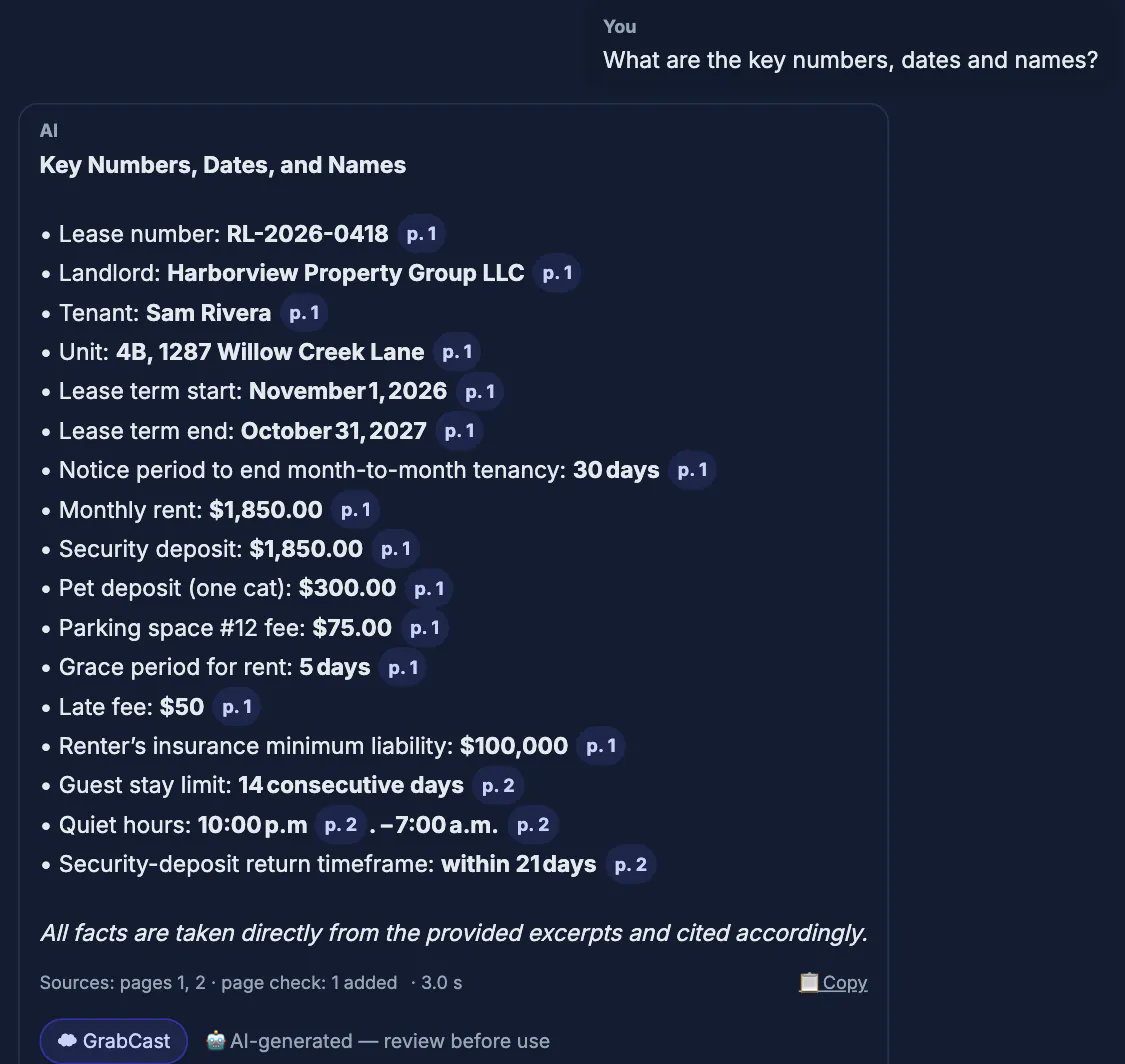
A 60-page PDF hides its most important sentences. Students reread chapters that feel familiar and retain little, and people sign leases and service agreements after skimming past the auto-renewal clause. Asking questions flips both situations. Retrieval, explaining an idea in plain words and testing yourself are what make material stick, and a conversation with a textbook provides all three on demand. With a contract, targeted questions pull out deadlines, fees and obligations scattered across many pages and put them in one place. The page citations keep you honest: the AI points you to the source, and you read the actual wording before you rely on it.
How to chat with a PDF using AI in the browser
The text is extracted page by page on your device, then searched locally each time you ask something.
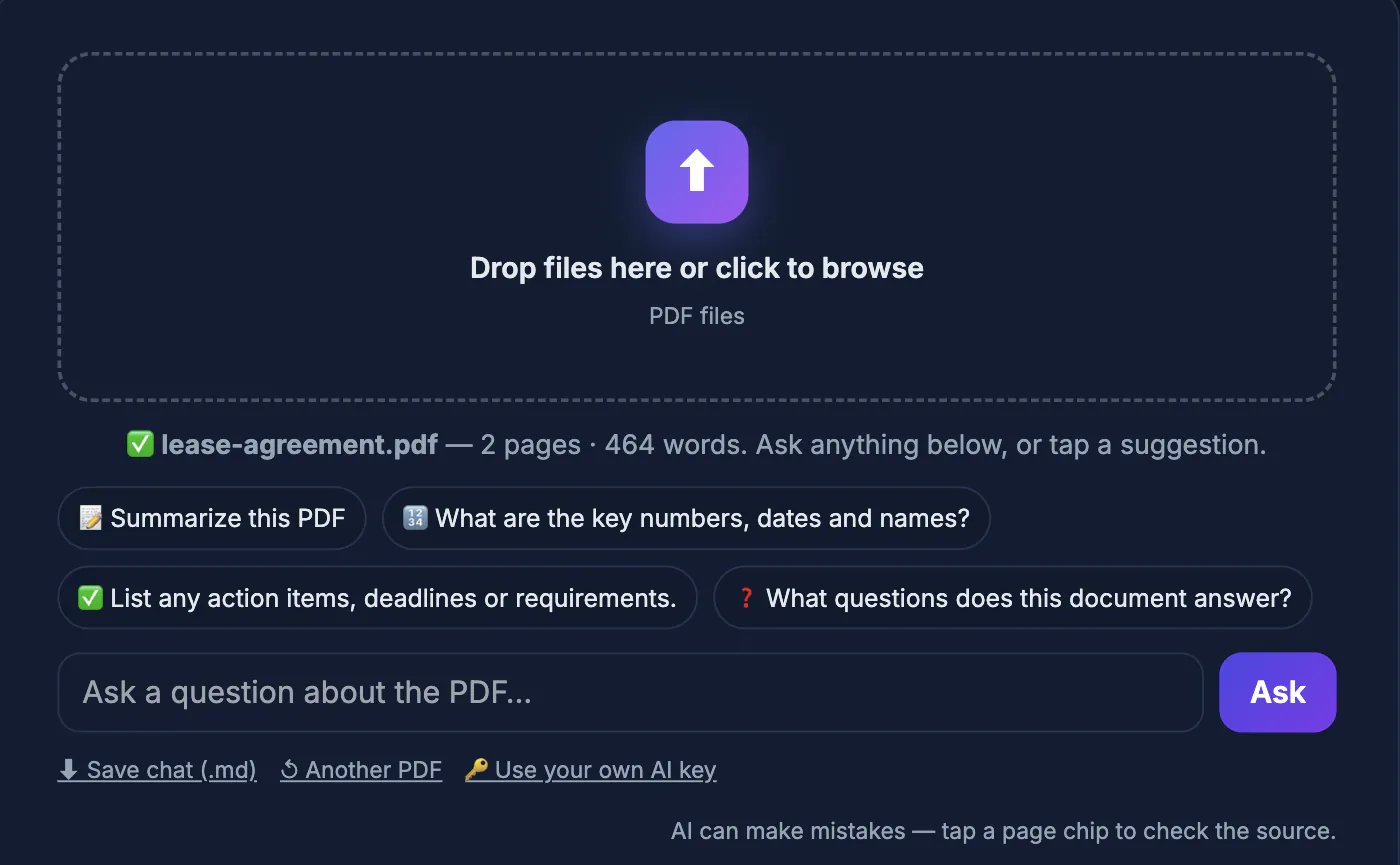
- Drop a PDF in and wait for the confirmation with the file name, page count and character count
- Ask in plain English and press Enter; follow-up questions keep the recent conversation in mind
- Each question sends only that question, a few recent Q&As and up to about 7,000 characters of the best-matching passages to GrabCast's AI server, which passes them to an AI provider
- Answers use only those excerpts and cite pages; if the answer is not in them, the tool says so instead of guessing
- For broad requests like Give me an overview, it samples passages from across the whole document
There is no fixed page count, but very long files stop being read after about two million characters. Questions go through a shared free AI service with fair-use limits of roughly 12 requests a minute and 300 a day per connection. It answers in the language of your question, and passage matching works across languages.
Study a textbook chapter actively
Load one chapter at a time rather than a 900-page textbook; smaller files give tighter, more relevant excerpts.
- Orient: ask What are the five main ideas of this chapter? before you read, so you know what to look for
- Unstick: ask Explain the difference between mitosis and meiosis in plain language, with an example, and follow up until it clicks
- Test: ask Give me 8 practice questions on section 4.2 without the answers, answer from memory, then ask it to check you
- Repair: ask why a wrong answer is wrong and which page covers it, then reread that page
- Condense: before an exam, ask for key definitions and the concepts the chapter treats as most important
Verify every definition and formula you plan to memorize against the book itself. Use the AI to guide and test you, and the textbook as the final word. Check your course's policy on AI tools, too; using it to quiz yourself is different from submitting its words as your own.
Review a contract or lease by asking the PDF
The risk in a long agreement is rarely the clause you read carefully; it is the one you skimmed. Ask about consequences directly.
- What are the key dates, deadlines and notice periods?
- How and when can this agreement be cancelled, and does it renew automatically?
- What fees, penalties, deposits or late charges apply, and when?
- What am I responsible for, and what is the other party responsible for?
- Summarize what I must do, what I must not do, and every date I need to remember, with page numbers
Then open each cited page and read the exact wording. AI can misread a clause and knows nothing about your state's law or your situation. This is a way to understand a document faster and ask better questions, not legal advice; for a high-value or high-risk agreement, have a qualified professional review it.
Limits and fixes when the chat cannot help
- Scanned PDFs: images of pages have little or no selectable text, so the tool warns you; make the file searchable with OCR PDF first, then chat with the result
- Password-protected, encrypted or damaged PDFs cannot be opened; remove a password you know with Unlock PDF
- Confidential material: the passages matched to your question leave your device, so avoid highly confidential files or remove sensitive pages first
- Tables and charts: extracted text loses layout, so numbers from complex tables deserve a check against the page
- Busy AI service: wait a moment and ask again, or ask fewer, more specific questions
Answers are only as accurate as the extracted text and the excerpts chosen, which is why the page citations matter. Specific questions about a named section usually beat vague ones about the whole file.
▶ Watch: How to chat with a PDF (0:38)
Video transcript
- Add your PDF. Drop a PDF. Its text is read in your browser and split into pages.
- Ask a question. Ask in plain English, just like you would ask a colleague.
- Read the answer. Only the matching passages are sent to the AI. The answer names its page.
- Check the source page. Tap the page chip to see the exact passage the answer is based on.
- Save the chat. Download the questions and answers as a Markdown file for your notes.
Step-by-step
Common mistakes to avoid
Pro tips
Frequently asked questions
Is Chat with PDF free, and are there limits?
It is free with no sign-up. There is no fixed page count, but very long files stop being read after about two million characters, and the shared AI service allows roughly 12 requests a minute and 300 a day per connection.
Is my PDF uploaded?
The file stays in your browser, where the text is extracted and searched. Each question sends only the question, a few recent Q&As and up to about 7,000 characters of matching passages to the AI.
Can AI quiz me on a textbook PDF?
Yes. Ask for practice questions on a chapter or section, answer from memory, then ask it to check your answers and cite the pages to reread.
Is chatting with a contract PDF legal advice?
No. It helps you find and understand terms faster, but it can misread a clause and does not know local law. Verify the cited wording and use a professional for important agreements.
Can it read a scanned PDF?
Yes. When pages have no selectable text, Chat with PDF reads them with OCR right in your browser (up to 40 scanned pages; the scan is not uploaded) and answers from that text. Faint or blurry scans read less accurately, so check key numbers against the cited page.
Chatting with a PDF turns a long document into answers with page citations. Use it to study actively, quizzing yourself instead of rereading, and to pull the deadlines, fees and duties out of a contract. Keep questions specific, OCR scans first, and always read the cited page before you rely on an answer.
Related guides
Browse more: all PDF guides · the Chat with PDF tool