How to Get a Free AI API Key (Groq or Google Gemini)
A free AI API key lets tools call a large language model on your own account instead of a shared one. Two providers offer keys with a free tier that works well for everyday writing, summarising and translating: Groq and Google Gemini through Google AI Studio. Getting either key takes a few minutes and, at the time of writing, no credit card. This guide shows how to get a free AI API key from each, what the free tiers allow, what to know about how your prompts are handled, and how to add the key to GrabCast's AI tools so requests go from your browser straight to the provider.
✍️ Try the AI Writer now — freeOpen →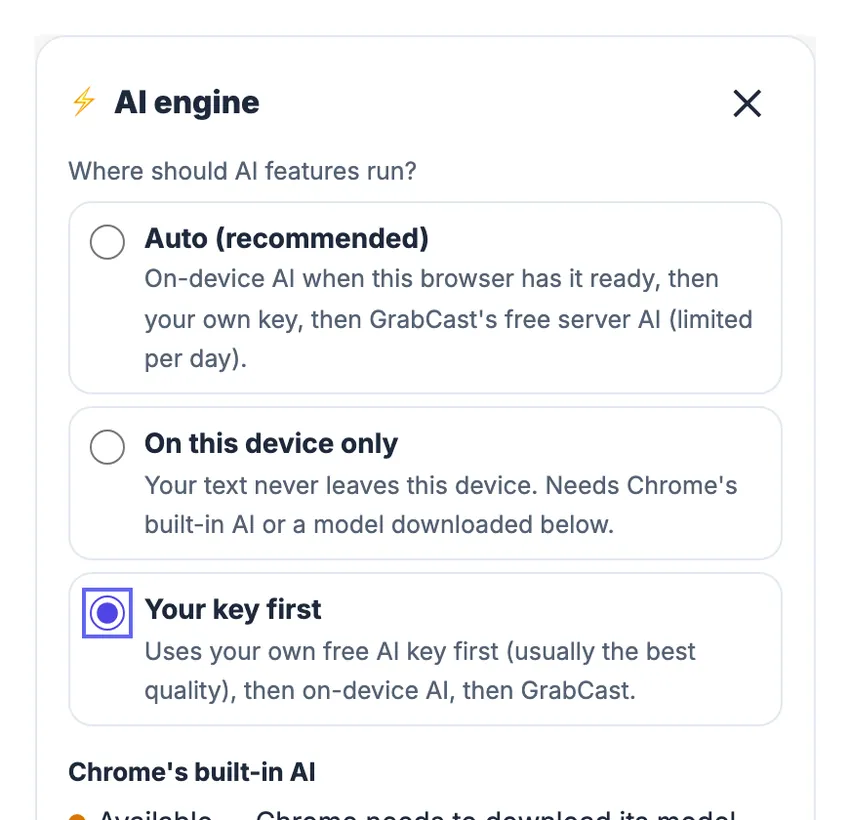
Free AI features on websites share one pool of capacity across every visitor, so they come with daily limits. With your own key, the requests count against your personal free quota instead, which is usually far larger for one person. A key also lets you choose the provider whose terms you prefer, and some tools send key requests directly from your browser, so the tool's own server never sees the text. The trade-off is responsibility: the key is tied to your account, so treat it like a password, and read the provider's terms, especially about whether free-tier prompts may be used to improve their models.
Get a free Groq API key
Groq runs open models very fast and has a free plan with rate limits per model.
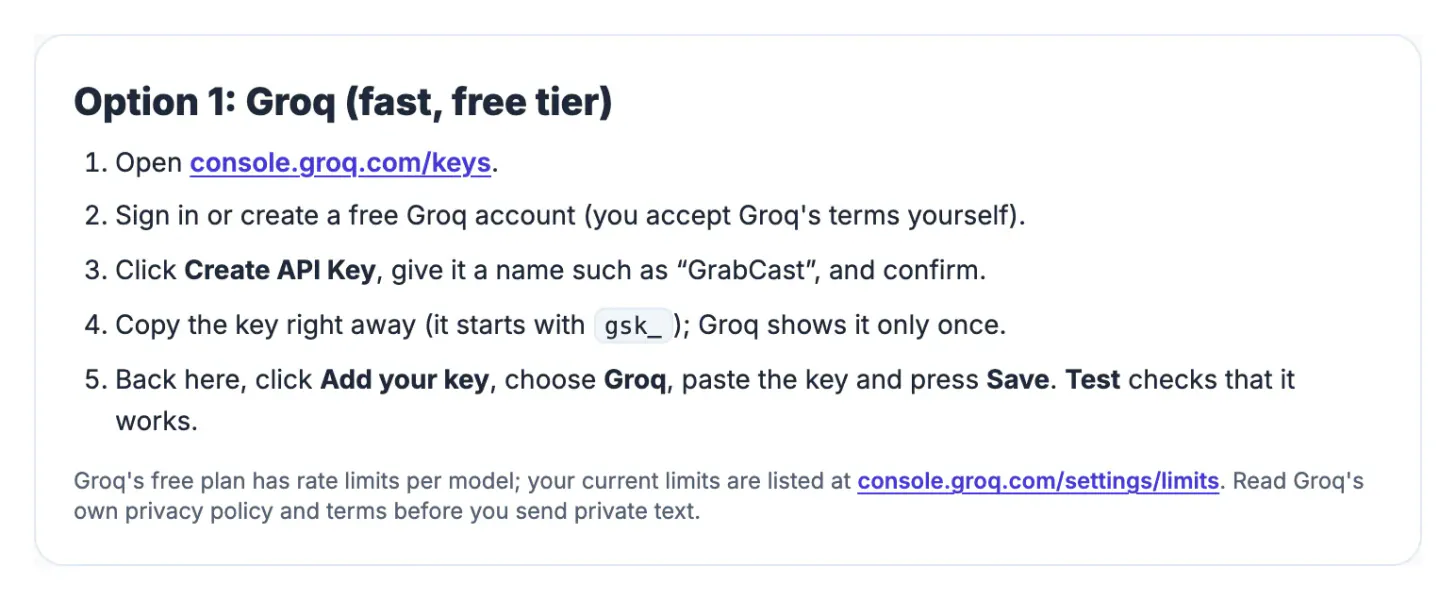
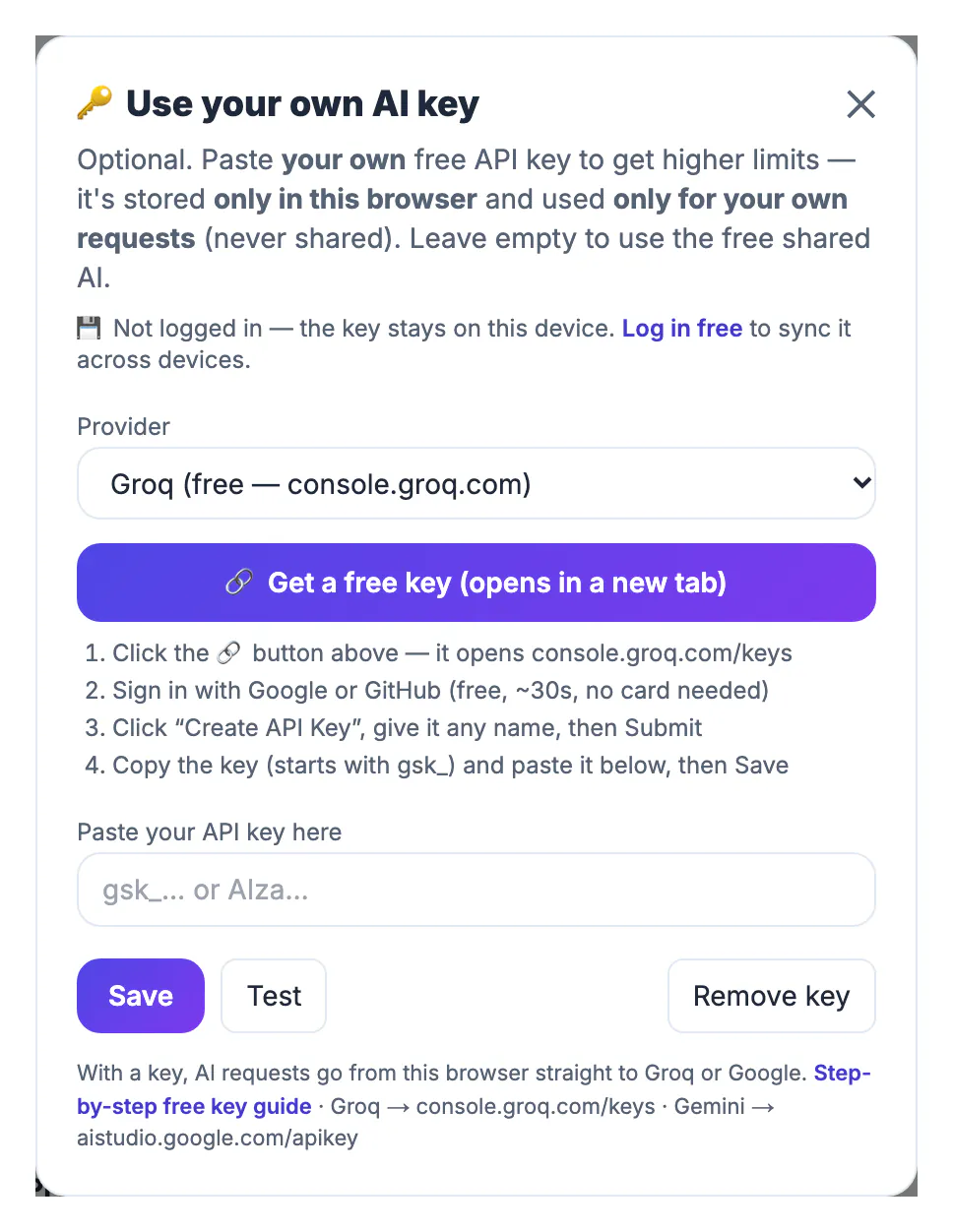
- Open console.groq.com/keys and sign in or create a free account; you accept Groq's terms yourself.
- Click Create API Key, give it a name such as GrabCast, and confirm.
- Copy the key straight away; it starts with gsk_ and Groq shows it only once.
- If you lose it, delete it in the console and create a new one.
Your current limits are listed in the console under Settings, Limits, per model, as requests and tokens per minute and per day. At the time of writing the free plan needs no card, and the limits are generous for one person's writing tasks.
Get a free Google Gemini API key in Google AI Studio
Gemini keys come from Google AI Studio.
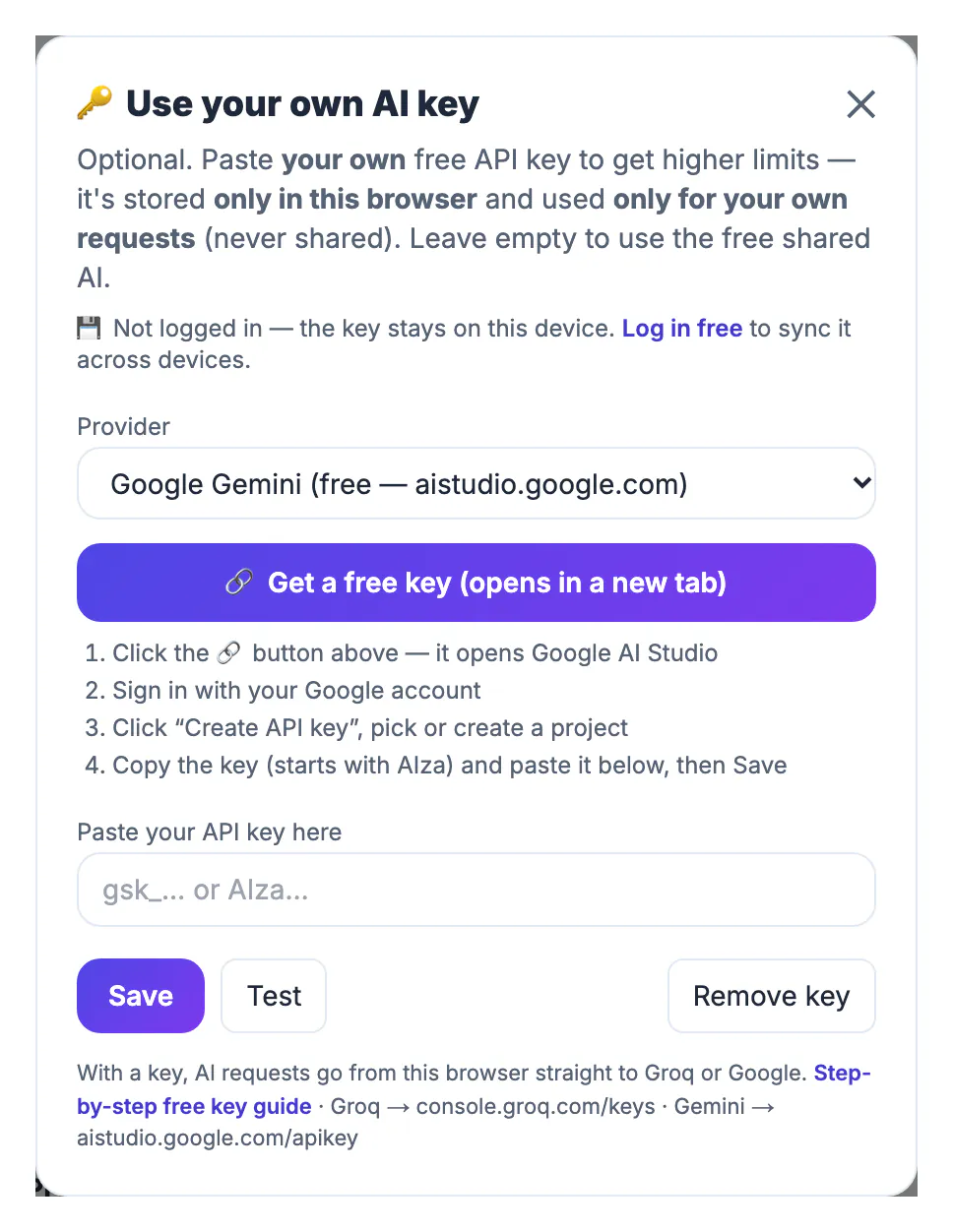
- Open aistudio.google.com/apikey and sign in with your Google account.
- Click Create API key and choose an existing Google Cloud project or let it create one.
- Copy the key; it starts with AIza.
Two things to know before you use it. First, on the free (unpaid) tier, Google's terms allow it to use your prompts and responses to improve its products, and human reviewers may read them, so do not send confidential text with a free Gemini key. Second, the Gemini API is only offered in the countries Google lists as supported. Both points are in Google's Gemini API Additional Terms, which are worth reading once.
Paid tiers of both providers exist, but you do not need them for personal use; stay on the free tier until you actually hit its limits. If you later add billing to the same account, check that the key you use in browser tools is not the one tied to a spending limit you care about.
Keep your free AI API key safe
An API key is a password for your AI account.
- Never paste it into a public place: a forum post, a shared document, a screenshot or a code repository.
- Give each key a name for where it is used, so you can delete just that one if it leaks.
- Delete and recreate a key you think someone else has seen.
- Only paste it into tools you trust and that say where they store it.
Browser tools deserve one extra check: whether the key goes straight from your browser to the provider, or passes through the tool's own server first. Both can be fine, but you should know which one you are dealing with. A tool that states this plainly, and lets you remove the key again, is a better sign than one that says nothing.
In GrabCast, the key is stored in your browser. If you are signed in, it is also saved to your account encrypted so your other devices can use it, and you can remove it at any time with Remove key. More detail is in the free AI key guide.
Add the key and choose when it is used
On any GrabCast AI tool, for example the AI Writer, open the key dialog with Add your key:
- Choose the provider, Groq or Google Gemini.
- Paste the key and press Save; Test checks that it works.
- Open the ⚡ AI engine button and pick an order: Auto uses on-device AI first, then your key, then GrabCast's free server AI; Your key first puts your key at the front.
With a key, AI requests go from your browser directly to Groq or Google, under your own free quota. If you would rather not use any key, the AI can also run entirely on your device; see the AI guides for the on-device options.
The key is used for the AI text features: writing and rewriting, summaries, translations, chat with a document and similar tools. Speech-to-text runs its own Whisper model in the browser and does not use the key. If a request fails with a limit message, the provider's quota for that model has run out for now; switching the order in ⚡ AI engine lets on-device AI or GrabCast's free server AI take over.
Step-by-step
Common mistakes to avoid
Pro tips
Frequently asked questions
Is there a free AI API key?
Yes. Groq and Google AI Studio (Gemini) both offer API keys with a free tier. At the time of writing, neither needs a credit card for the free tier.
Which is better, Groq or Gemini?
Groq is very fast and has clear per-model limits; Gemini is Google's model family. For private text, note that Gemini's free tier allows Google to use prompts to improve its products.
Where does GrabCast store my key?
In your browser, and, if you are signed in, encrypted in your account so your other devices can use it. Remove it any time.
Does GrabCast see my prompts when I use my key?
With a key, requests go from your browser directly to Groq or Google. The Scheduler's AI Studio may build the prompt on GrabCast's server first, then send it with your key.
What happens when I hit the free limit?
The provider refuses requests until the limit resets. You can switch to on-device AI or GrabCast's free server AI in ⚡ AI engine.
A free AI API key from Groq or Google AI Studio takes a few minutes and gives you your own quota. Copy it once, keep it private, read the free-tier data terms, then add it to the tools you use and choose when it should be used.
Related guides
Browse more: all AI guides · the AI Writer