Compare PDF Without the Noise: Ignore Case and Punctuation
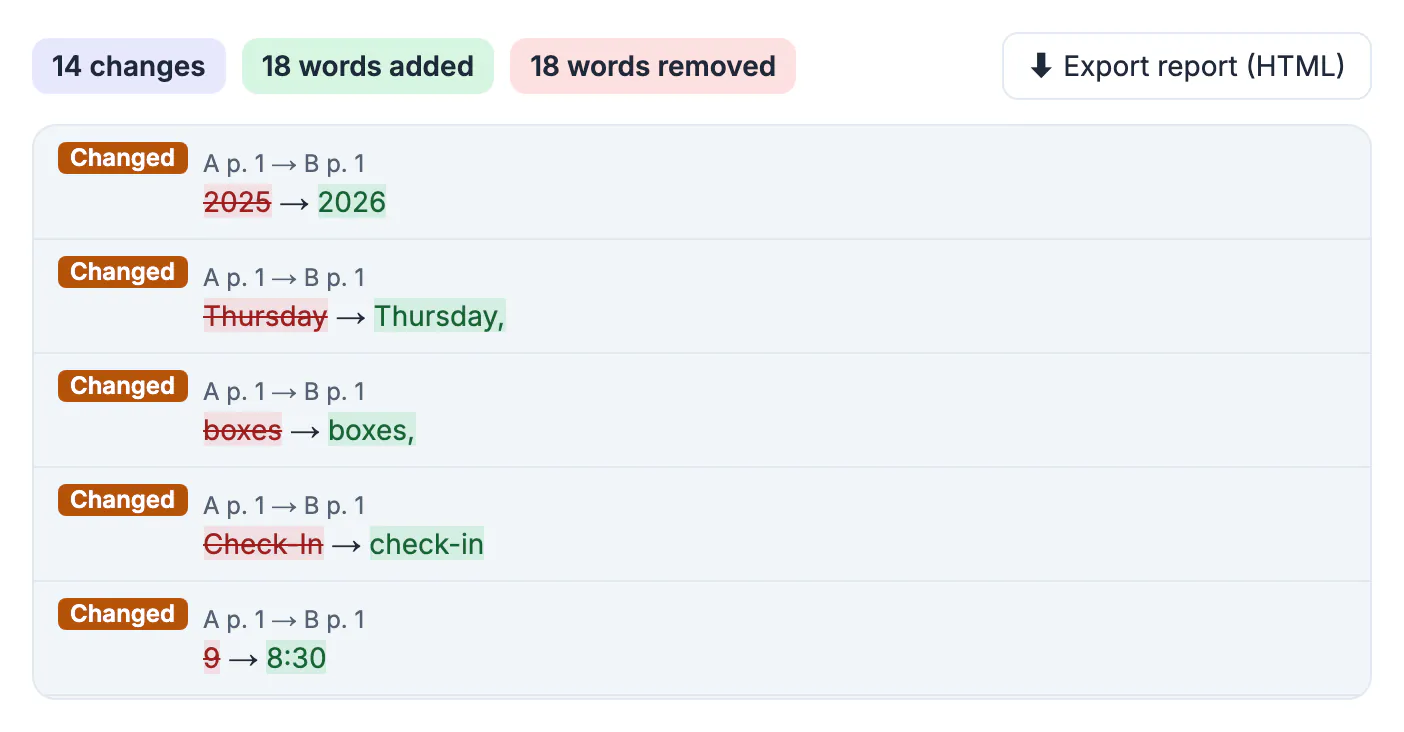
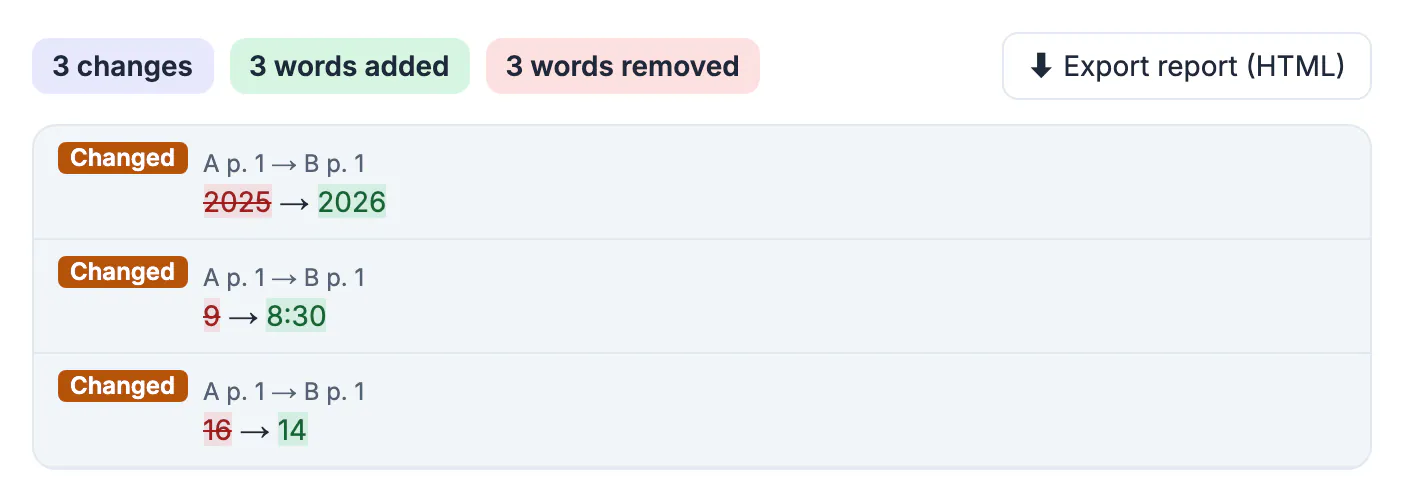
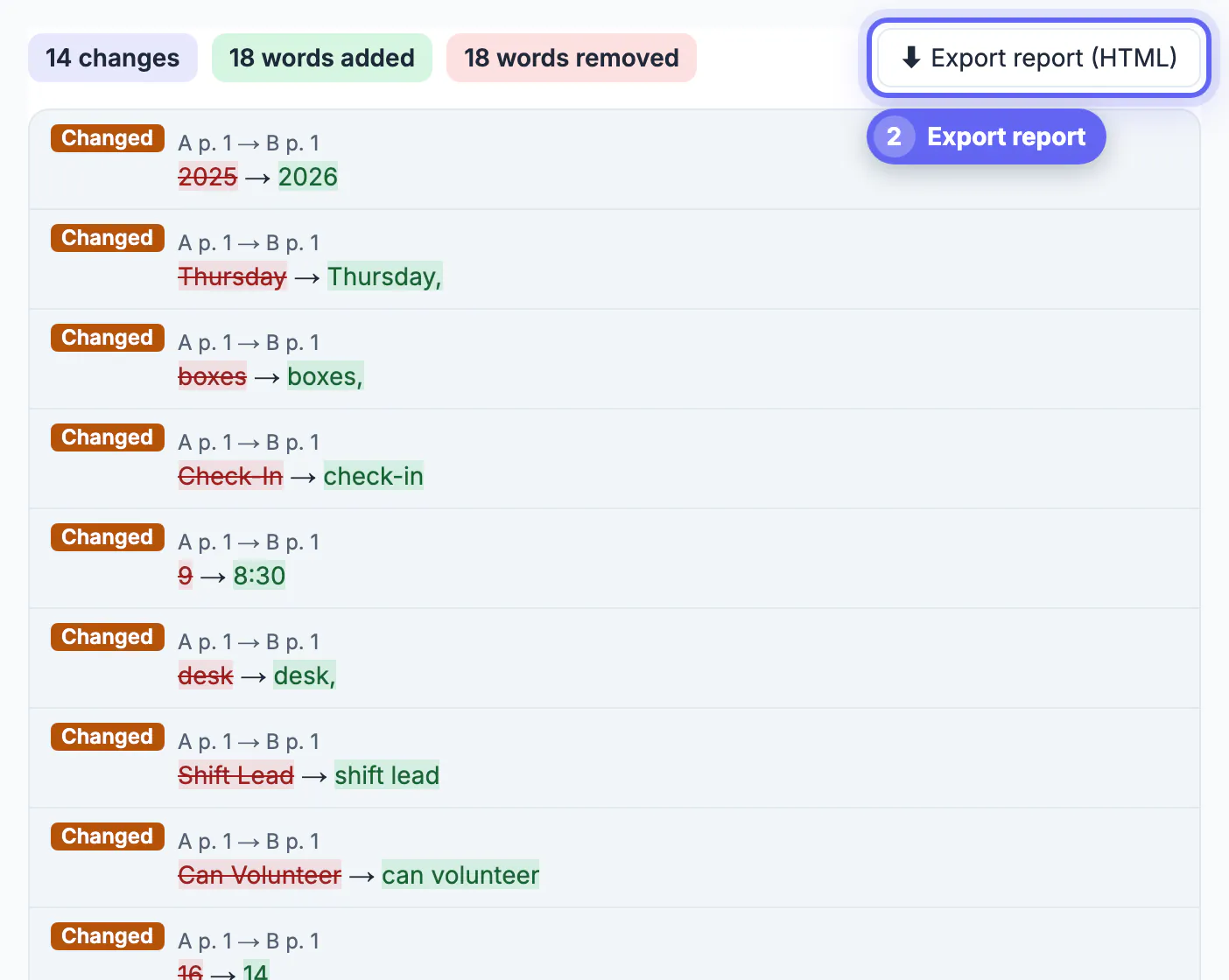
If a PDF comparison lists dozens of changes that do not matter, turn on Ignore case and Ignore punctuation in GrabCast's Compare PDF and keep Ignore spacing and line breaks switched on. In the example used here, two editions of a fictional food pantry volunteer handbook, the default comparison reported 14 changes, mostly headings that went from Title Case to sentence case and commas added before and. With the two extra options ticked, the list dropped to 3 real edits: the edition year, a start time moved from 9 to 8:30 a.m., and a minimum volunteer age lowered from 16 to 14. This guide explains where comparison noise comes from and which filter removes each kind.
🆚 Try the Compare PDF tool now — freeOpen →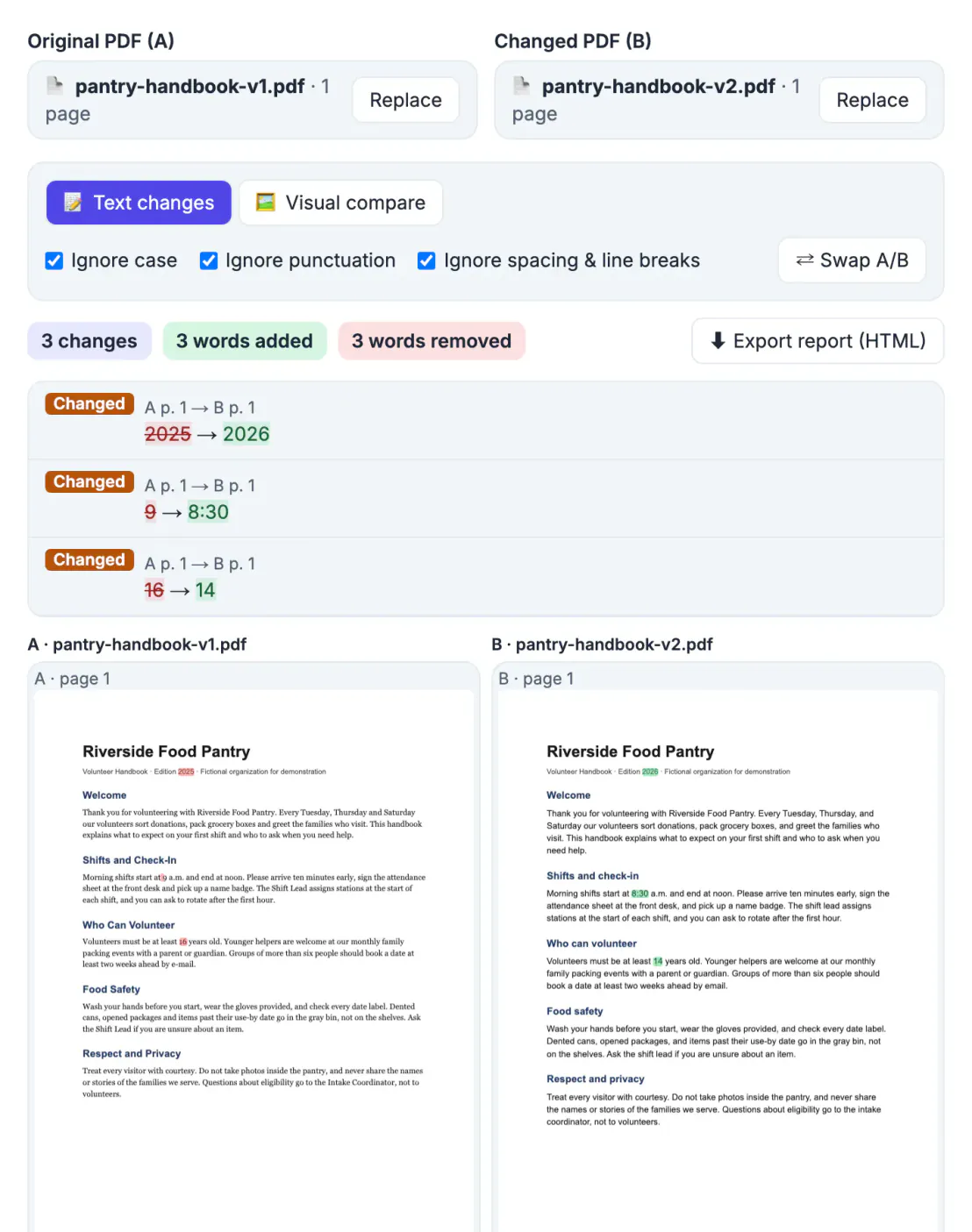
Documents get restyled all the time: a new template, a house style guide that prefers sentence-case headings, an editor who adds serial commas, a switch from e-mail to email. A strict word-by-word comparison correctly reports every one of those, and a list of 40 trivial edits is exactly where a changed age limit or deadline gets overlooked. Filtering the noise is not about hiding changes; it is about reviewing them in the right order. You can always untick the filters and look at the full list afterward. The comparison runs in your browser, so both editions stay on your device.
Where comparison noise comes from
- Reflowed text. A new font, font size or page margin moves words to different lines. The sample's second edition switched from a serif font at 11 points to a sans-serif font at 12 points, so almost every line broke differently.
- Capitalization. Headings like Shifts and Check-In became Shifts and check-in, and role names like Shift Lead became shift lead.
- Punctuation. Serial commas were added in lists such as Tuesday, Thursday, and Saturday, and e-mail became email.
- Line-end hyphens. A word split across two lines with a hyphen looks like two different words to a naive comparison.
None of these change what the handbook asks volunteers to do, yet together they made up 11 of the 14 reported changes.
If both versions start in Word, exporting them the same way with the Word to PDF tool helps keep layout noise down.
What each ignore option filters
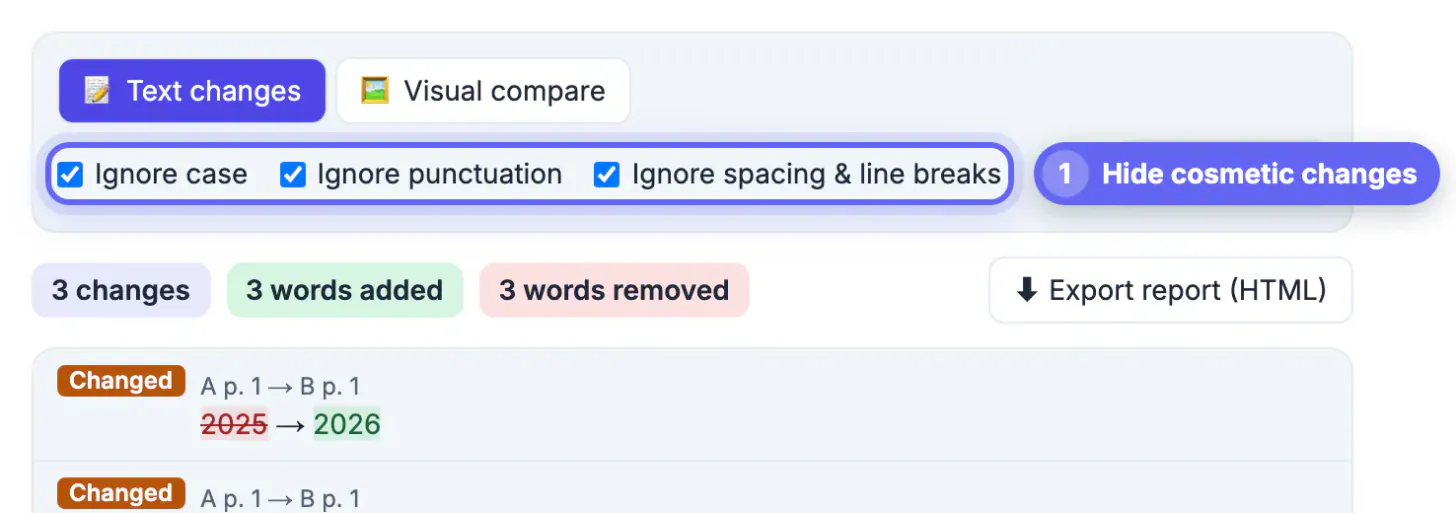
- Ignore spacing and line breaks is on by default. Text that only moved to another line is not reported, and a word hyphenated at the end of a line is joined back together before comparing. Keep it on unless spacing itself is what you are checking.
- Ignore case treats Check-In and check-in, or SHALL and shall, as the same word.
- Ignore punctuation removes commas, periods, hyphens, quotes and other punctuation before comparing, so boxes and boxes, count as equal and e-mail matches email.
The options apply instantly; the list, the counts and the page highlights update as soon as you tick a box, without loading the files again. The summary says when no differences remain with the options you chose.
Review in two passes
A reliable routine is to read the filtered list first, then the full one, because each pass answers a different question: what changed in substance, and did any small edit sneak in that still matters. In the first pass, with all three options on, the handbook shows 3 changes, and two of them matter to every volunteer: shifts now start at 8:30 a.m. instead of 9, and 14-year-olds can now volunteer. Those are the edits to announce.
In the second pass, untick Ignore case and Ignore punctuation and skim the rest. Occasionally punctuation does carry meaning. A comma can change a list of three items into two, a hyphen can turn a re-sign into a resign, and a capitalized Client can be a defined term in a contract that differs from an ordinary client. Thirty seconds on the full list catches those exceptions.
When you are done, Export report (HTML) records the file names and the options you used, so anyone reading it knows whether cosmetic changes were filtered.
When the list is still too long
- If the tool says the files are very different and were compared page by page, the documents may not be two versions of the same text, or one has a large inserted section. Check that you picked the right files.
- If whole blocks appear as replaced rather than word-level edits, a section was rewritten from scratch. Read those blocks in the side-by-side pages instead of the list.
- Font, color and bold changes never appear in the text list. Use Visual compare if the style itself is what you are reviewing, for example when checking that a rebranded template kept every heading in the right place.
- If one file is a scan, it has no text to compare; convert it with OCR PDF first, or use Visual compare.
Step-by-step
Common mistakes to avoid
Pro tips
Frequently asked questions
Why does Compare PDF show so many changes?
Usually because of capitalization, punctuation or reflowed text after a new font or layout. Keep Ignore spacing and line breaks on, and tick Ignore case and Ignore punctuation to hide those cosmetic edits.
Does ignoring punctuation hide real changes?
It can hide the rare change where punctuation carries meaning, such as a comma in a list or a hyphen in a word. Review the filtered list first, then untick the option and skim the full list once.
Are hyphenated words at the end of a line handled?
Yes. With Ignore spacing and line breaks on, a word split across two lines with a hyphen is joined before comparing, so it does not show up as a change.
Can I see font or color changes?
Not in the text list. Switch to Visual compare, which renders both pages and marks pixels that exist in only one version, so styling changes appear as red and green areas.
Do the filters change the exported report?
The report reflects the options you had on when you exported it and lists those options at the top, so the reader knows whether cosmetic changes were included.
A long comparison list is usually noise from restyling, not a flood of real edits. Keep Ignore spacing and line breaks on, add Ignore case and Ignore punctuation, and the list shrinks to the changes that alter meaning, like the handbook's new start time and age limit. Then take one quick look at the unfiltered list for the rare comma that matters, and export the report with the options recorded.
Related guides
Browse more: all PDF guides · the Compare PDF tool