Convert PDF to Markdown for Docs, Notes and AI Prompts
To convert a PDF to Markdown, open it in a converter that reads the text layer, turns large bold lines into # headings, bullets into - lists and aligned columns into tables, and strips the headers and page numbers repeated on every page. You then check the result, fix anything the layout confused, and copy it or save a .md file. This guide uses a two-page staff handbook as the example and shows which options to pick for a wiki, a notes app or a prompt for an AI assistant.
Ⓜ️ Try PDF to Markdown now — freeOpen →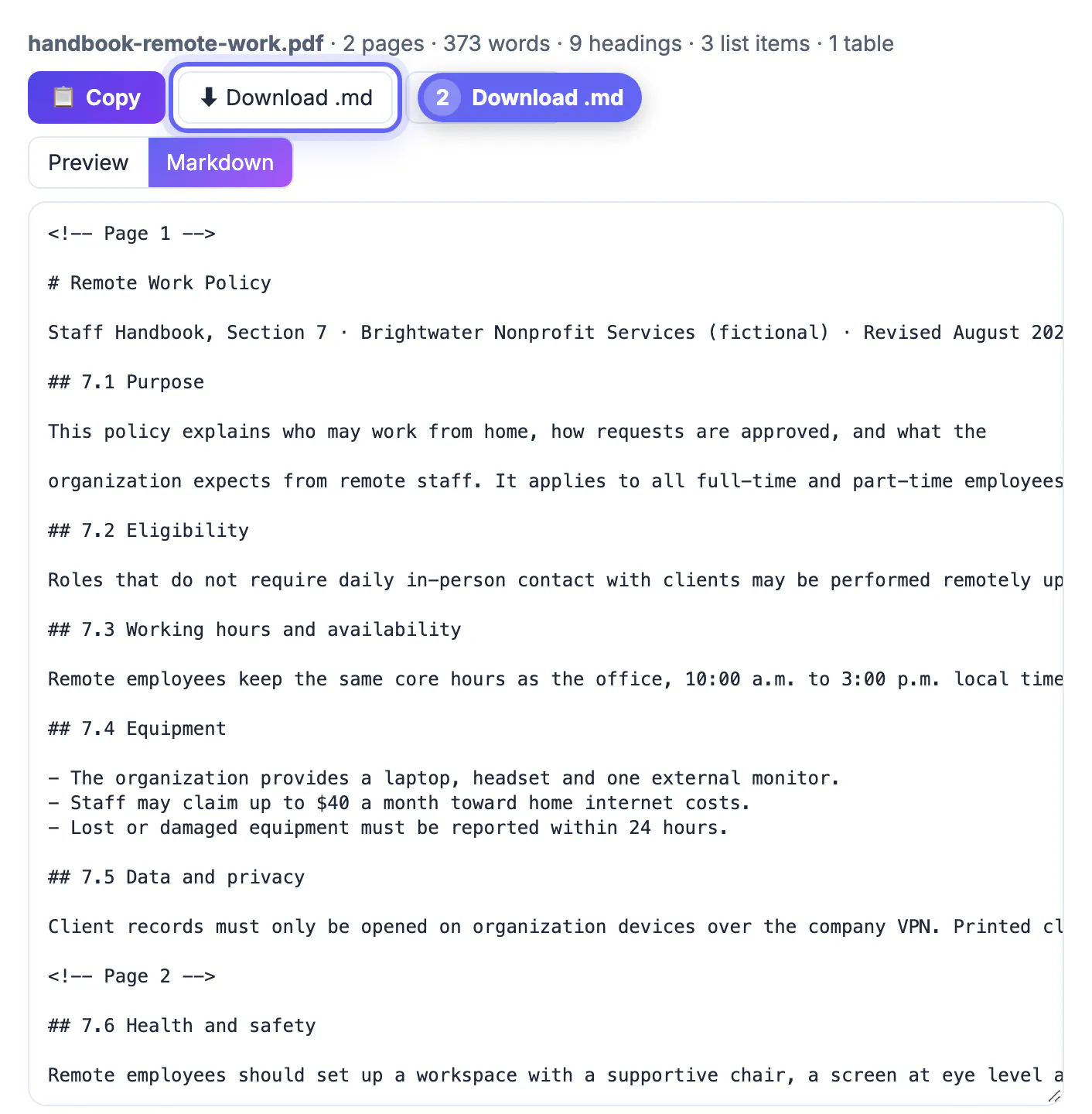
Copying from a PDF viewer gives you a wall of text with broken lines, page numbers in the middle of sentences and tables flattened into a single column. Markdown keeps what matters, headings, lists, bold, links and tables, in a lightweight plain text format that GitHub, Notion, Obsidian, static site generators and AI chat tools all understand. Structured input also helps an AI model: it can tell section 7.4 from section 7.5 and quote the right one.
What a PDF to Markdown converter keeps
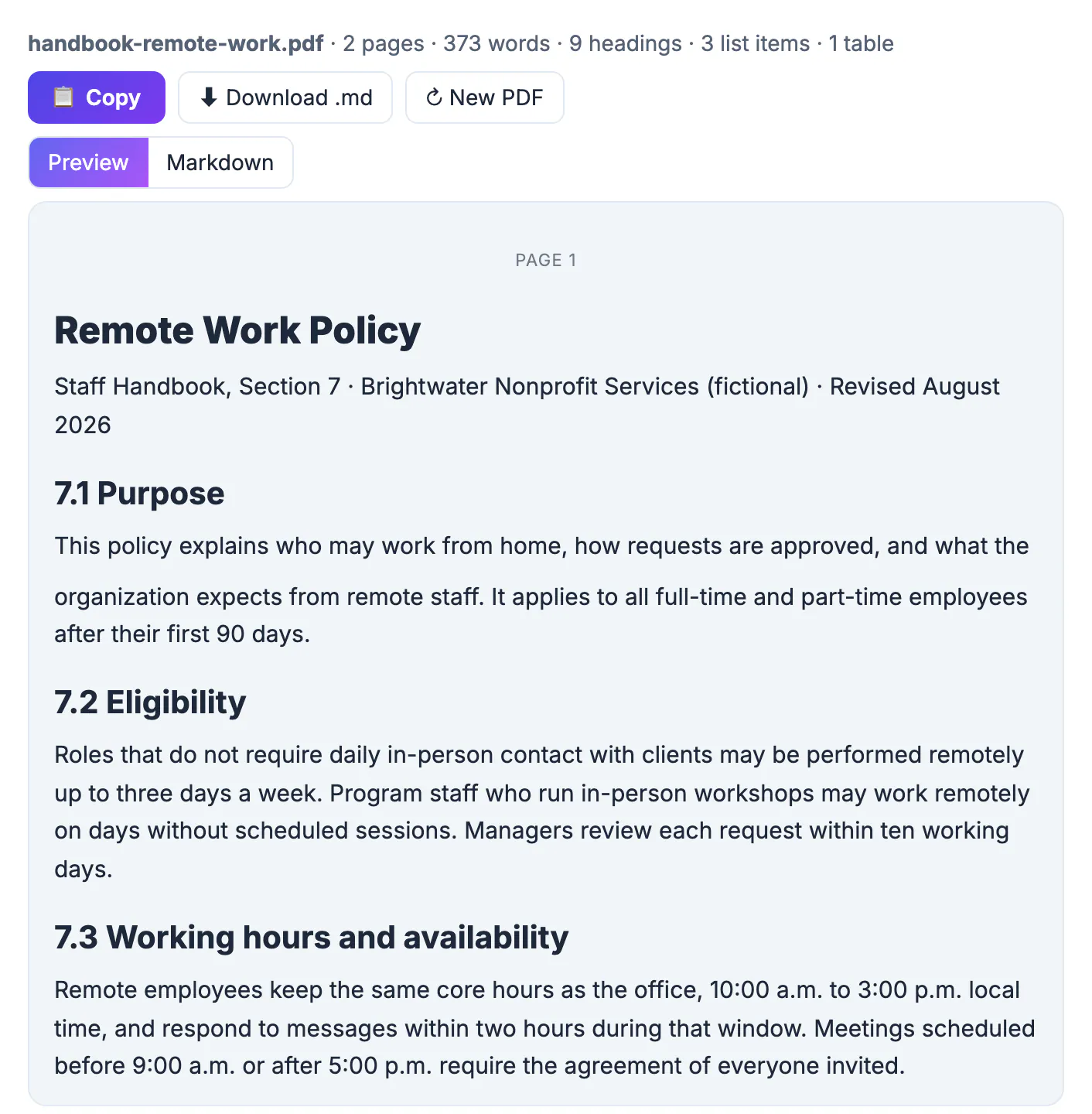
A PDF stores positioned characters, not paragraphs, so the converter has to rebuild the structure from font size, weight and position. The GrabCast PDF to Markdown tool reports what it found: the example handbook came out as 2 pages, 373 words, 9 headings, 3 list items and 1 table.
- Headings: lines in a larger or bolder font become # and ## headings, such as # Remote Work Policy and ## 7.1 Purpose.
- Lists: bullets and numbered items become - and 1. lists.
- Emphasis and links: bold, italic, code and links are kept when that option is on.
- Tables: aligned columns are detected as GitHub-style tables, best-effort.
The four options and when to change them
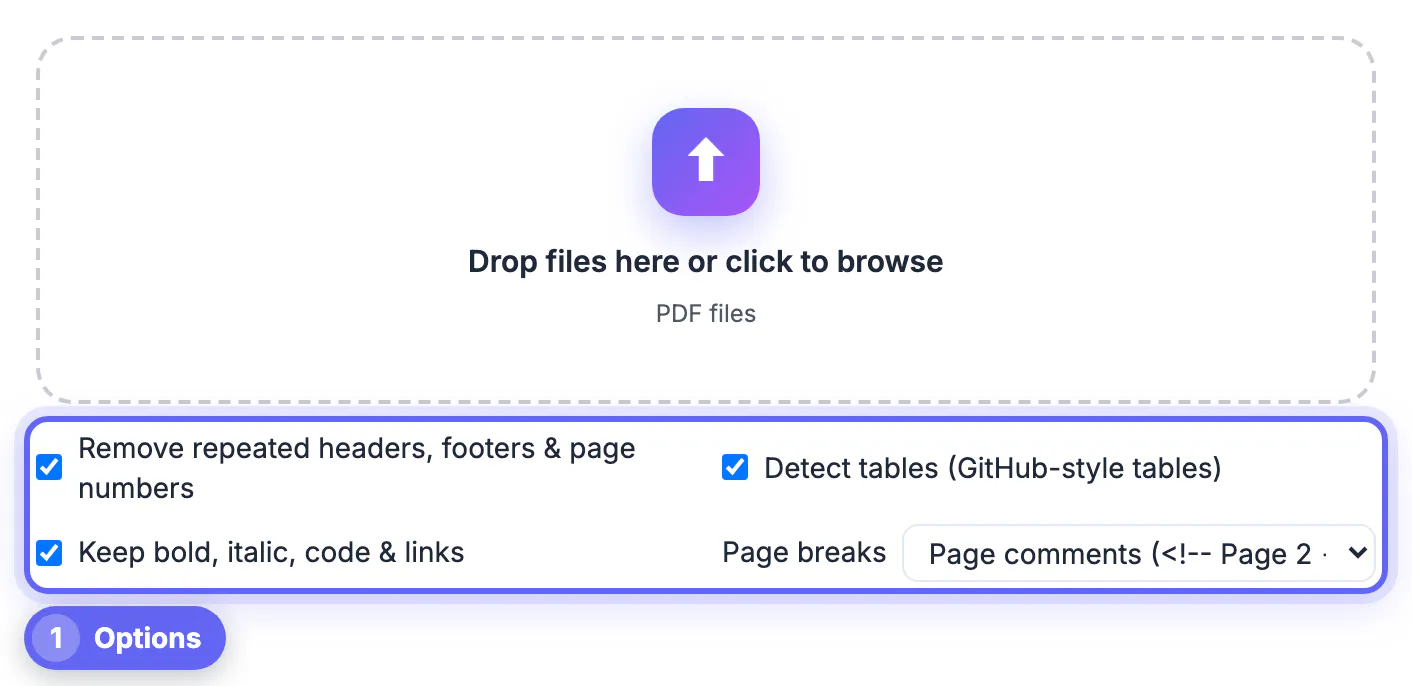
The options sit under the drop zone, and it is easier to set them before you add the file. Changing one afterwards rebuilds the Markdown and replaces any edits you made in the Markdown tab.
- Remove repeated headers, footers & page numbers: on by default. Leave it on unless the header carries information you need.
- Detect tables (GitHub-style tables): on by default. Turn it off if a two-column layout is being misread as a table.
- Keep bold, italic, code & links: on by default. Turn it off for the plainest possible text, for example before pasting into a form.
- Page breaks: None (continuous text) by default, or a horizontal rule (---), or page comments such as <!-- Page 2 -->. Page comments are invisible when the Markdown is rendered but let you cite the original page later.
Converting PDF to Markdown for AI prompts and knowledge bases
Chat assistants and retrieval tools work better with Markdown than with raw PDF text. Headings mark where topics start, so a question about equipment can be answered from ## 7.4 Equipment rather than a guess from the whole file. Page comments are useful here too: ask the assistant to cite the page number from the nearest comment.
For a wiki or docs site, choose None or the horizontal rule for page breaks, then download the .md file and drop it into your repository or notes vault. Obsidian and most static site generators read it directly; in Notion you can paste the copied Markdown and it becomes formatted blocks.
Check the result before you use it
The Preview tab shows headings, lists and tables the way Markdown will render them. The Markdown tab shows the raw text, and you can edit it there before copying.
- Look for headings that came out as plain paragraphs, which happens when a PDF uses the body font in bold for titles.
- Check tables row by row; merged cells and multi-column layouts are the usual problems.
- Watch for a paragraph split in two where the original line wrapped, and join it by hand.
- Search for stray numbers that were part of a footer the tool did not recognize as repeated.
When it looks right, press Copy or Download .md. New PDF clears the page for the next file.
Scanned and protected PDFs
The converter needs selectable text. If the PDF is a scan, the page says there is no selectable text and points you to OCR PDF, which adds a text layer first; mixed files show a warning for the pages that are only images. Password-protected files must be unlocked before conversion. Everything runs in your browser, so a confidential handbook or contract is never uploaded.
If a file opens but part of it cannot be read, the tool suggests re-saving it through Print, then Save as PDF, and converting the new copy. That rebuilds a damaged or unusual file into a standard one. For password-protected documents, remove the password with Unlock PDF, which you can only do when you know it, and keep the unlocked copy somewhere private once you have the Markdown.
Step-by-step
Common mistakes to avoid
Pro tips
Frequently asked questions
How do I convert a PDF to Markdown for free?
Drop it into the GrabCast PDF to Markdown page, check the Preview and Markdown tabs, and press Copy or Download .md. There is no sign-up and the file stays on your device.
Does it keep tables?
Tables with clearly aligned columns are converted to GitHub-style Markdown tables. Complex layouts are best-effort, so check them in the Markdown tab.
Why does my PDF have no text?
It is probably a scan, which contains pictures of pages. Run OCR PDF to add a text layer, then convert it again.
What does the Page breaks option do?
It decides what goes between pages: nothing, a horizontal rule, or an HTML comment with the page number that stays invisible when rendered.
Can I use the Markdown with ChatGPT or Claude?
Yes. Copy it straight into the chat or attach the .md file. Headings and lists help the assistant find and quote the right section.
Set the options first, drop the PDF, review the Preview tab, tidy anything odd in the Markdown tab, then copy it or download the .md file. You get structured text that works in a wiki, a notes app or an AI prompt, without retyping and without uploading the document.
Related guides
Browse more: all PDF guides · PDF to Markdown