Password Protect a PDF Free With AES-256 Encryption
To password protect a PDF for free, drop it into GrabCast's Protect PDF tool, type or generate a strong code, and download a copy that nobody can open without it. The encryption is AES-256, it runs inside your browser tab, and neither the document nor the secret is sent to a server. This guide walks through the settings that matter, the order to do things in, and the built-in apps on Mac, Windows and Linux that can do the same job.
🔒 Try Protect PDF now — freeOpen →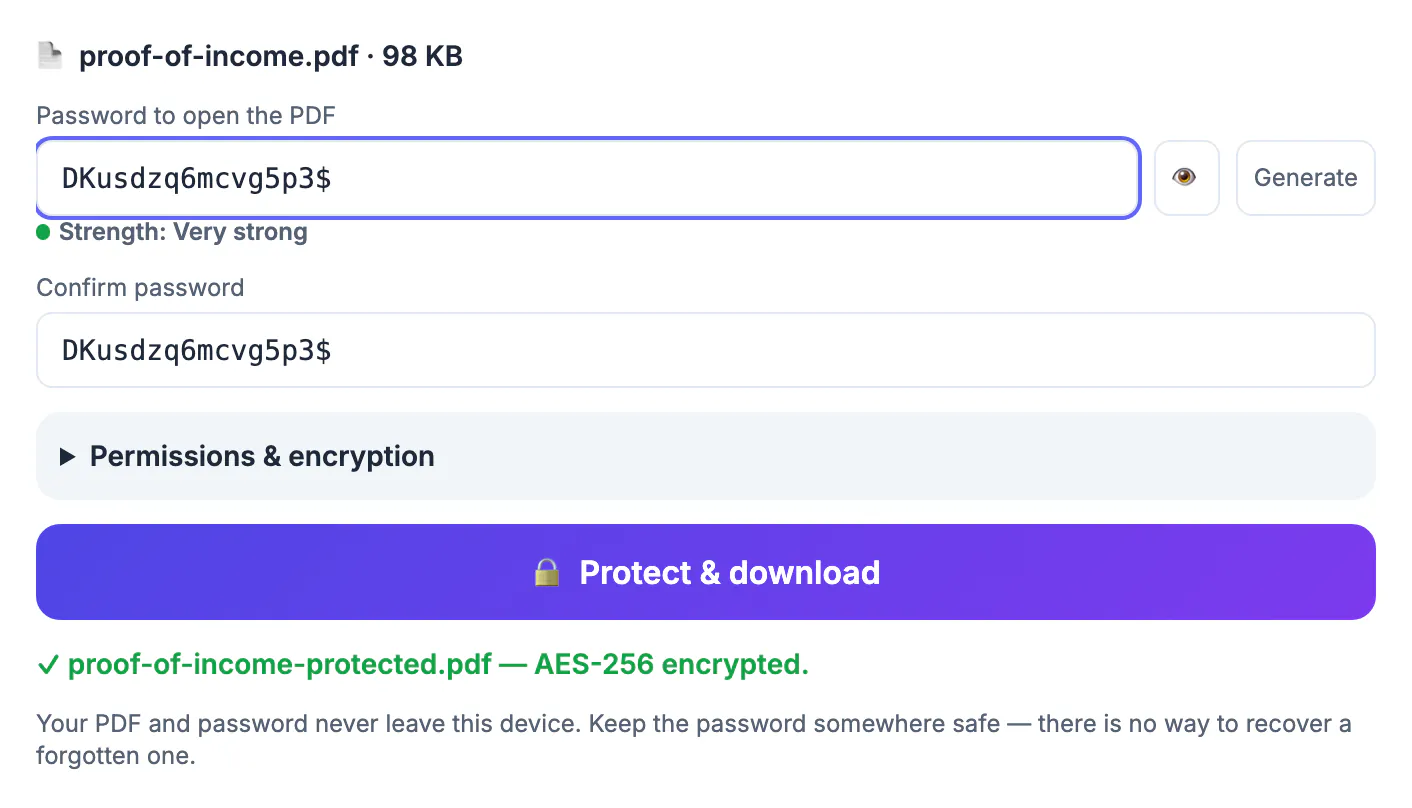
An attachment does not stay where you send it. It sits in the sender's outbox, the recipient's inbox, their phone's download folder, a shared drive sync and often a backup nobody remembers. A tax return, a lease with a Social Security number on page two, or a payroll export for an accountant can outlive the conversation by years. Encrypting the file means that every one of those copies is just scrambled bytes to anyone who does not know the code, and it keeps working even if the email account is later compromised. It is not a substitute for a secure portal when your employer requires one, but for the everyday case of sending one sensitive document to one person, a locked copy is the simplest real protection most people can add in under a minute.
What Protect PDF actually does to your file
The tool runs qpdf, a long-established open-source engine, compiled to WebAssembly so it works inside the browser. When you click Protect and download, it rewrites the document with an open code (sometimes called the user code) and saves it as yourfile-protected.pdf.
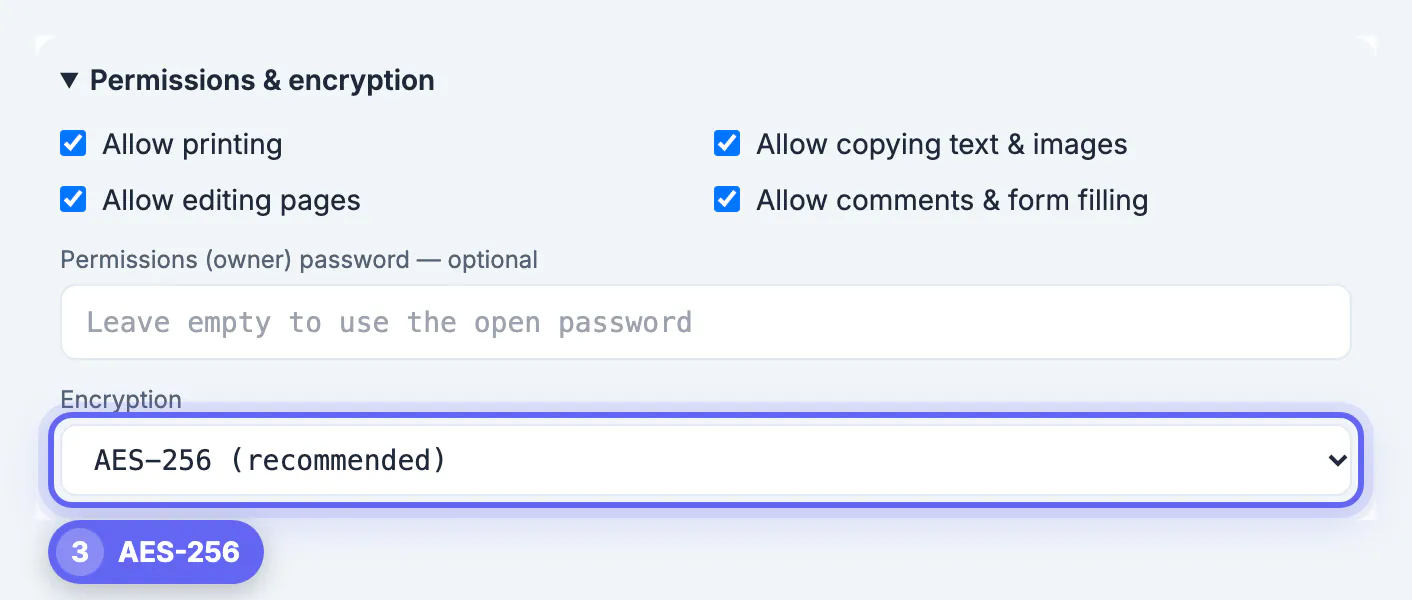
- Encryption strength: AES-256 by default, with AES-128 available only for very old readers that cannot handle the newer standard.
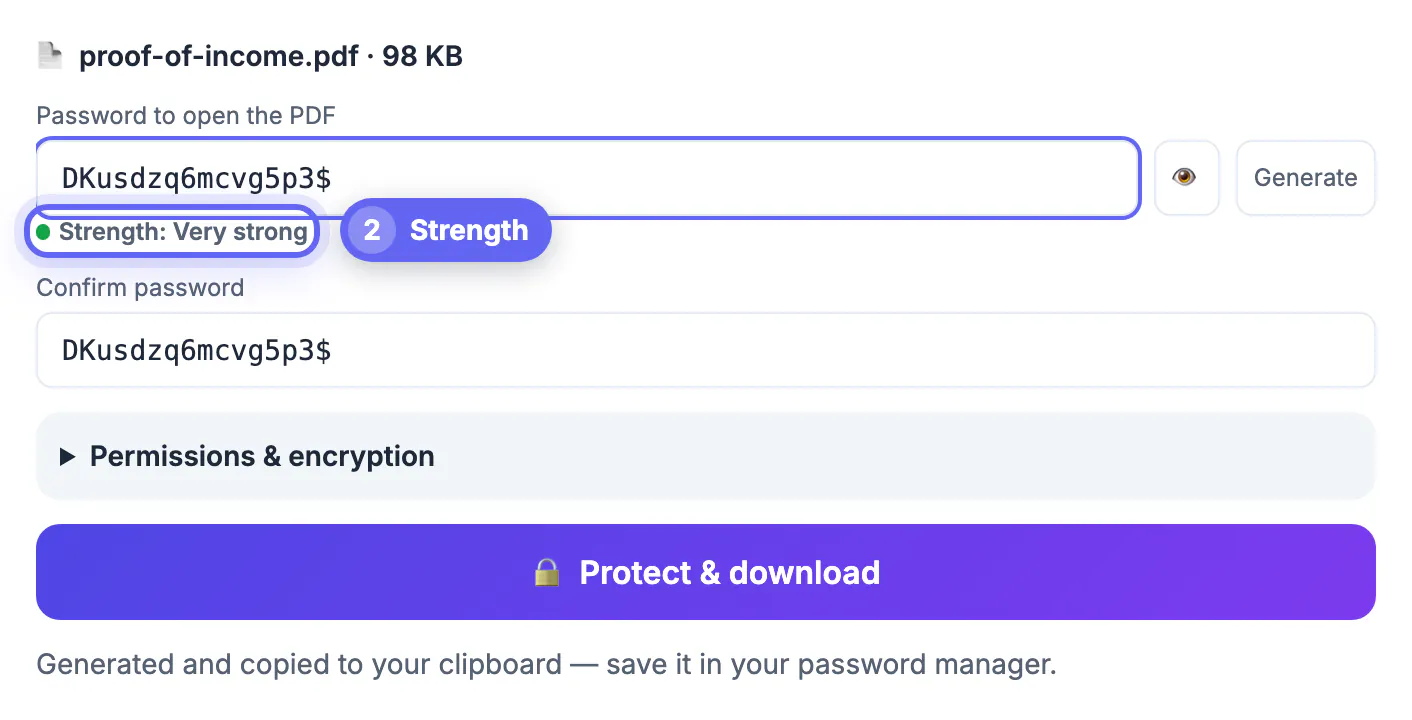
- Strength meter: labels your code from Too short through Weak, Fair, Good and Strong to Very strong as you type, and a show button reveals what you typed so typos do not lock you out.
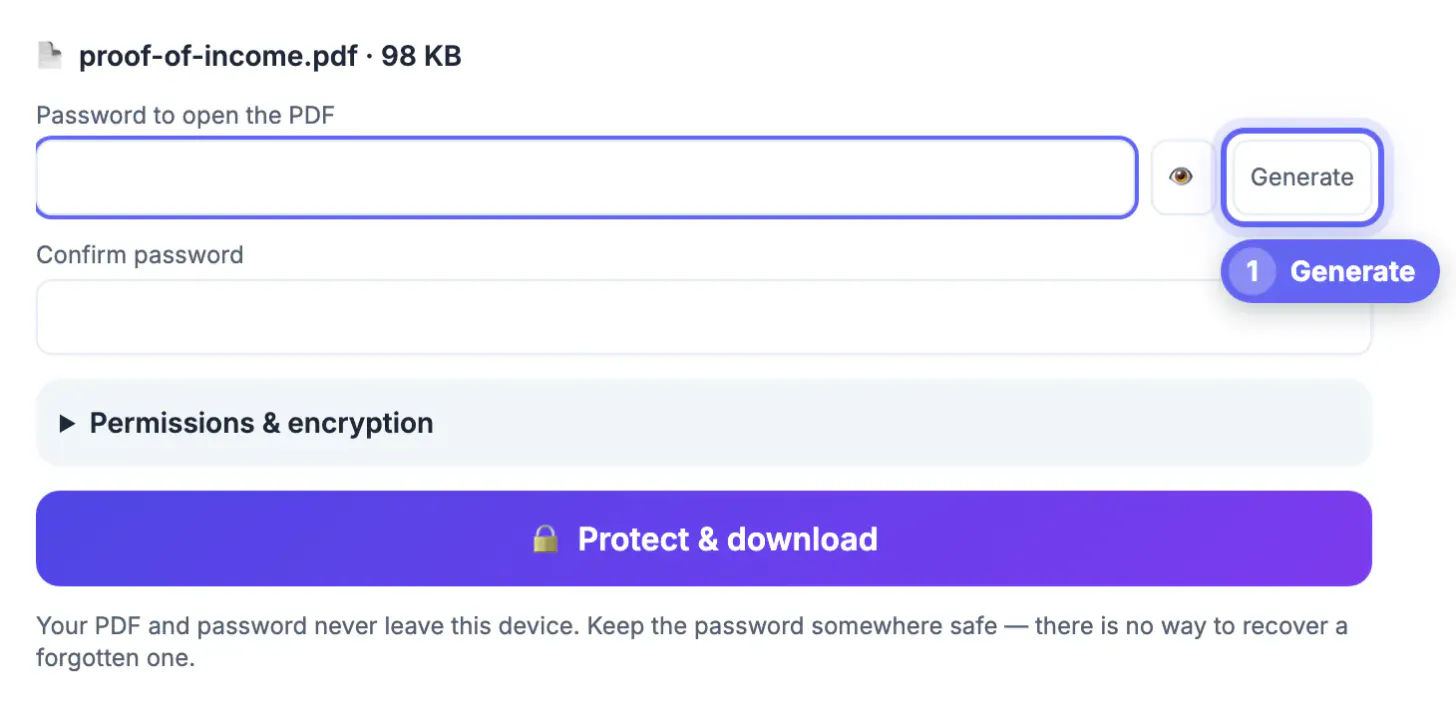
- Generate button: creates a random 16-character code that skips look-alike characters such as O and 0, fills both boxes and copies it to your clipboard.
- Permissions panel: four checkboxes allow or block printing, copying text and images, editing pages, and comments or form filling, plus an optional separate owner code.
- Safety check: if the file is already encrypted or restricted, the tool says so and points you to Unlock PDF first, instead of double-wrapping it.
There is a minimum of 4 characters, but treat 12 as the real floor. The tool also cannot recover a forgotten code, by design: nothing is stored anywhere, so write it into your password manager before you close the tab.
Choosing a code that survives an offline attack
Once a locked file leaves your hands, an attacker can make unlimited guesses on their own hardware with no lockout. The cipher is not the weak point; the code is. A six-character lowercase word falls quickly, while a random 16-character string or a passphrase of five unrelated words is out of practical reach.
- For a file you send once, let Generate create the code and paste it into your password manager entry for that recipient.
- For a file someone must type the code for on a phone, a passphrase such as four or five random words is easier to enter than symbols.
- Never reuse your email, bank or Apple ID secret; if the document leaks together with that code, the damage spreads.
- Avoid anything printed in the document itself, such as a birth date, account number or ZIP code, which are the first guesses.
A useful rule for families and small offices: one code per recipient, not one code for everything. If an accountant's laptop is stolen, you only need to rotate the secret shared with that accountant.
To generate a long, random code worth using, try the Password Generator and save it in a password manager.
Finish the document before you protect the PDF
Encryption should be the final step, because most browser tools, GrabCast's included, refuse encrypted input. Do the work in this order:
- The Merge and Organize tools put statements, receipts and cover pages in the right sequence.
- The Sign and Fill Form tools add your signature, initials, dates and typed answers.
- Compression if the result is heavy; GrabCast's compressor re-compresses images only, so the text stays selectable and a 14 MB scan often drops under a 10 MB email limit.
- A watermark pass to stamp diagonal text such as Confidential or a recipient name, which survives even if the file is later unlocked.
Open the finished copy once, check every page, then lock it. Keep the unencrypted original in a private folder so you can rebuild the protected version when something changes. If a recipient sends back a locked form for you to complete, Unlock PDF can remove a code you have been given so you can fill it, and you can lock it again afterward.
Sharing the secret and other free options
A lock is only as good as the channel the key travels in. Send the code a different way from the file: the attachment by email, the code by text message, a phone call or a password manager share. Never put it in the same email thread, the subject line or the file name.
- Mac Preview: File, Export, then use the Encrypt or Permissions option to set a code. Good for one-off files, but it offers fewer permission controls.
- Microsoft Word: File, Save As, choose PDF, Options, Encrypt the document with a password. Only works when you still have the original .docx.
- LibreOffice on any system: File, Export as PDF, Security tab, Set Passwords, with both open and permissions codes in one dialog.
- qpdf on the command line: qpdf --encrypt userpw ownerpw 256 -- in.pdf out.pdf, handy for scripting a folder of statements.
Adobe Acrobat Pro adds certificate encryption and enterprise features for a subscription. Many websites also encrypt files, but they require uploading the unprotected document first, which is exactly the exposure you are trying to avoid.
Step-by-step
Common mistakes to avoid
Pro tips
Frequently asked questions
Is my file uploaded when I use Protect PDF?
No. The qpdf engine is downloaded to your browser once, and the document and code stay on your device while it encrypts.
Can GrabCast recover a code I forgot?
No. Nothing is stored, and the tool does not guess or crack codes. Keep the unencrypted original or store the code in a password manager.
Will the recipient need special software?
No. Any modern reader, including Adobe Acrobat Reader, Mac Preview, iPhone Files and the viewers built into Chrome, Edge and Firefox, opens AES-256 files after the code is entered.
What is the difference between the open code and the owner code?
The open code is needed to view the file at all. The owner code only controls the print, copy and edit permissions, If you block anything and leave the owner field blank, the tool creates a random hidden owner code so the limits hold; with nothing blocked, it simply reuses the open code.
Does protecting a PDF make it bigger?
Barely. Encryption adds a few kilobytes of overhead, so compress the file first if it is near an email size limit.
Finish the document, then lock it last: Protect PDF adds an AES-256 open code in your browser, lets you block printing, copying or editing if you need to, and never sees your file or secret on a server. Use a long generated code, send it by a different channel than the attachment, and keep the unencrypted original somewhere private so a forgotten code is never a dead end.
Related guides
Browse more: all PDF guides · Protect PDF