Unlock a PDF When You Know the Password: Free, Private
To unlock a PDF you know the password to, drop it into GrabCast's Unlock PDF tool, type the code you were given, and download a copy that opens without asking. The same tool can also lift print and copy restrictions on a document you own, after you confirm you have the right to do so. It works in your browser, sends nothing to a server, and it will not guess or crack a code you have forgotten.
🔓 Try Unlock PDF now — freeOpen →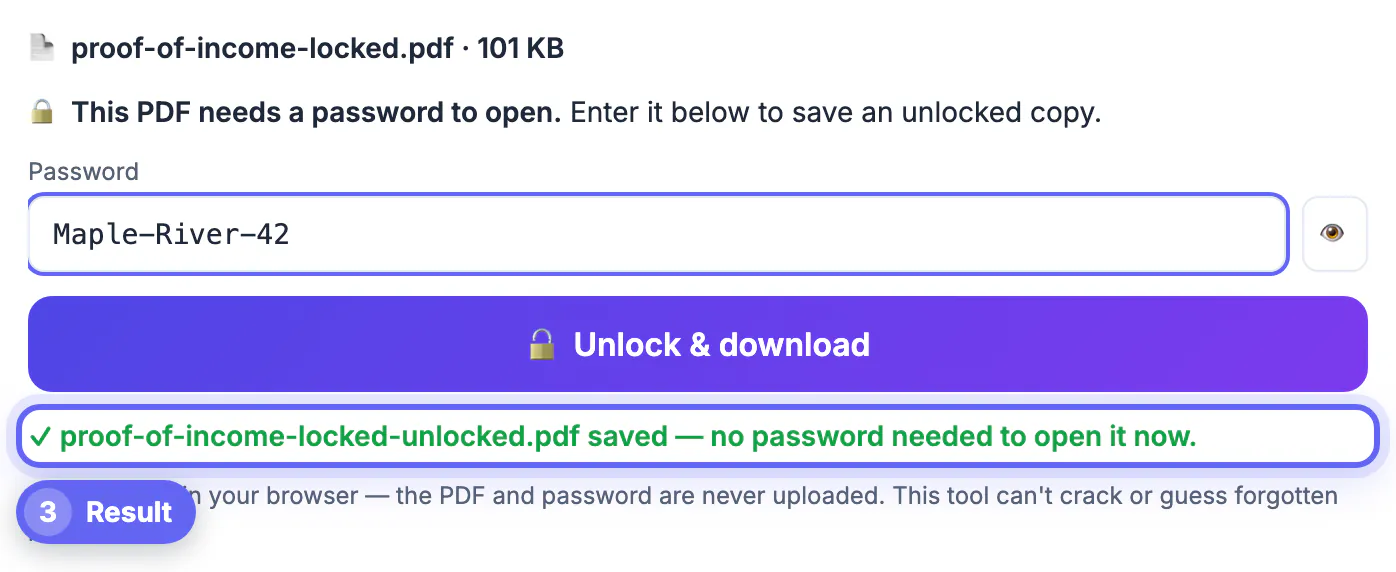
Encrypted statements are safe in transit, but they are awkward to live with. Every time you open one you type the code again, and most tools that do real work on a document refuse encrypted input: merging, compressing, signing, filling and converting to text all stop with an error. That matters when a mortgage lender wants twelve months of bank statements as one file, when your accountant needs a payroll summary under an upload limit, or when an insurance form arrives locked and still needs your signature. An unlocked working copy lets you finish the job, and you can always put a fresh lock on the final version before sending it anywhere. The key is doing it only with documents you are entitled to open, and treating the unlocked copy with the same care as the original.
What the tool checks before it unlocks anything
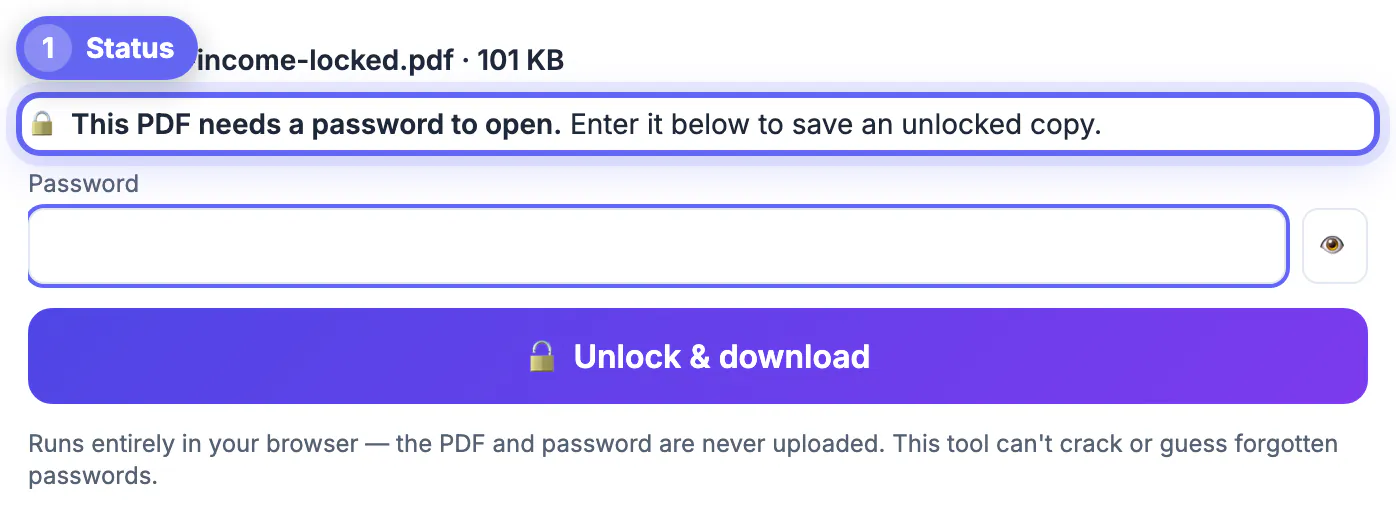
As soon as you drop a file in, the tool inspects its encryption and tells you which of three situations you are in, so you are never guessing.
- Not protected: the file opens and has no restrictions, so there is nothing to remove, and the button stays disabled.
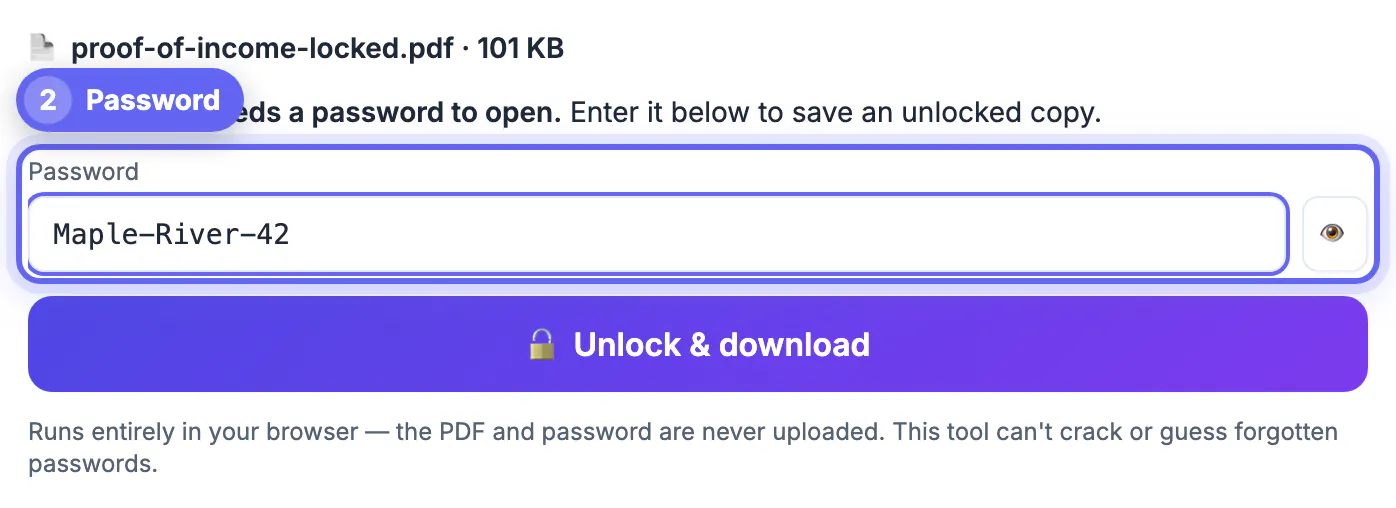
- Needs a code to open: a box appears for the open code. Type it, use the eye button to check for typos, and press Enter. A wrong entry returns a clear incorrect message with a caps lock reminder, and you can try again.
- Opens but restricted: the file views freely but blocks printing, copying or editing. A checkbox asks you to confirm you own the document or have permission, and only then does it save an unrestricted copy.
- Output: a new file ending in -unlocked.pdf, with pages, text, links and form fields as they were; your original stays untouched.
Under the hood it runs qpdf, a widely used open-source engine, compiled to WebAssembly. The engine loads into the tab, decrypts in memory and hands you the result, so neither the document nor the code travels over the network.
Everyday reasons to unlock a PDF you already have access to
- Combining statements: lenders and landlords often ask for several months of bank or brokerage statements as a single file. Unlock each one, then merge them in order.
- Fitting an upload limit: a scanned tax transcript or medical record may exceed a 10 MB portal cap. Compression only works on decrypted input.
- Signing or filling: a locked lease, insurance claim or school form needs your signature or typed answers before you return it.
- Accessibility and reuse: copying a quote from your own report, or letting a screen reader or a text extractor read a restricted file you created.
Some banks, payroll services and insurers protect emailed statements with a code built from personal details, such as a date of birth or the last digits of an account number, and the email explains the pattern. If that is how you received the file, you already hold the key and removing it for your own records is routine. Store the working copy in a private folder, not a shared drive.
What it cannot do, and where the legal line is
Unlock PDF removes protection only when you supply the code or when the file already opens without one. It does not try common codes, run dictionary lists or brute-force anything. A forgotten open code on a modern AES-256 file is, for practical purposes, unrecoverable, and any site that promises otherwise is either guessing weak codes or asking you to upload a sensitive document.
- Forgot the code for a statement? Ask the sender to reissue it, or download it again from the bank or payroll portal.
- Forgot the code on a file you made yourself? Rebuild it from your unencrypted original, and store the next code in a password manager.
- Received a restricted report, textbook or paid research file? Those limits may be part of the license; removing them can breach the terms and, in some cases, anti-circumvention rules such as Section 1201 of the US DMCA.
- Work documents: follow your employer's data policy; an unlocked copy of HR or client files may be a policy violation even if you know the code.
The confirmation checkbox exists for this reason. Only unlock files you own, files sent to you for your own use, or files whose owner has allowed it.
After unlocking: keep the copy safe or lock it again
An unlocked file has no protection at all, so treat it like the paper original. Keep it on an encrypted disk, such as FileVault on a Mac or BitLocker on Windows, and delete working copies when the task is done.
- Before emailing the finished file onward, add a fresh code with Protect PDF, which uses AES-256, and send the code by text or phone.
- Mac Preview can also save an unencrypted copy after you open the file with its code, though it offers fewer controls.
- The command line tool qpdf does the same with qpdf --password=CODE --decrypt in.pdf out.pdf, useful for a folder of statements.
- Adobe Acrobat Pro removes security through its document properties, as part of a paid subscription.
Printing to a new file from a browser is a common workaround, but it can drop form fields and links, and it is blocked when printing is restricted, so a proper decrypt is cleaner.
Once the file is open, the Edit PDF tool lets you make changes before you save the final copy.
Step-by-step
Common mistakes to avoid
Pro tips
Frequently asked questions
Can Unlock PDF open a file if I forgot the code?
No. It does not guess, crack or brute-force codes. Ask the sender to reissue the document, or rebuild your own file from its unencrypted original.
Is my PDF or code uploaded anywhere?
No. The qpdf engine runs inside your browser tab, so the document and the code stay on your device.
What is the difference between a locked and a restricted PDF?
A locked file needs a code to open at all. A restricted file opens freely but asks reader apps to block printing, copying or editing.
Is it legal to remove restrictions from a PDF?
It is fine for documents you own or have permission to change. Removing restrictions from someone else's licensed material can breach its terms or anti-circumvention laws.
Will the unlocked copy look different?
No. Pages, text, images, links and form fields are kept; only the encryption is removed, and the file name gains -unlocked.
If you have the code, Unlock PDF turns an encrypted statement or form into a working copy in seconds, without uploading it, so you can merge, compress, sign or fill it. It will never crack a forgotten code, and it asks you to confirm your rights before lifting restrictions. Keep unlocked copies private and relock the final version before it leaves your hands.
Related guides
Browse more: all PDF guides · Unlock PDF