Compress PDF for Email: Beat Gmail and Outlook Caps
If Gmail or Outlook refuses your PDF, shrink the file to roughly 70 percent of the provider's cap before attaching it: about 17 MB for Gmail's 25 MB limit and about 14 MB for Outlook's 20 MB limit. That margin matters because attachments are base64-encoded in transit, which inflates them by roughly a third, so a 22 MB file that looks legal on your desktop still bounces. This guide covers how to compress a PDF for email specifically: which limit actually applies (yours or the recipient's), how to pick a compression level, and what to do when a document is simply too large to mail. Everything runs in your browser with GrabCast, so a tax packet, lease or medical bill never has to be uploaded to a stranger's server before it reaches the person you meant to send it to.
📉 Try the Compress PDF tool now — freeOpen →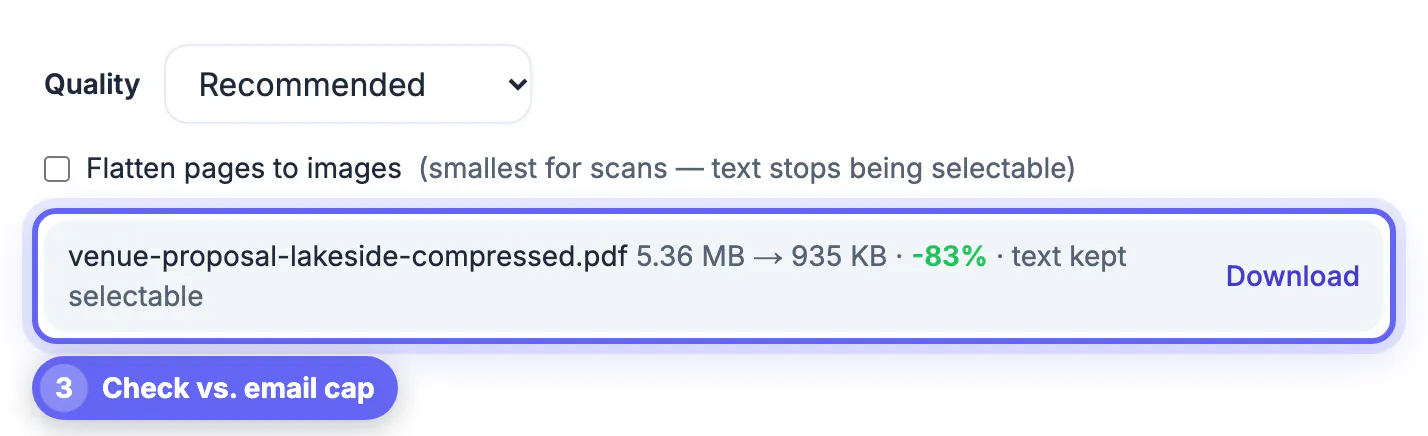
Email was built for text. To carry binary files, clients convert them to base64, a text encoding that turns every 3 bytes into 4 characters, plus line breaks. The result: a 15 MB contract travels as roughly 20 MB. Providers measure the encoded message, not the file on your disk, which is why people are baffled when a 21 MB brochure fails against a 25 MB ceiling. Two more factors tighten the squeeze. First, the limit that counts is the smallest one along the route; your Gmail account may accept 25 MB, but if your client's firm runs an Exchange server capped at 10 MB, the message is rejected on their side, sometimes hours later. Second, limits apply to the whole message, so three 8 MB attachments together fail just like one 24 MB file. Compressing the document itself is the cleanest fix because the recipient still gets an ordinary attachment that opens offline, prints, and gets saved to their records without chasing a sharing link.
Real email attachment limits by provider
Treat these as ceilings for the encoded message, then aim well under them. When you do not know the recipient’s system, plan for the strictest common value, 10 MB.
- Gmail: 25 MB per message when sending; larger files trigger an automatic Google Drive link instead of an attachment.
- Outlook.com and Microsoft 365 personal accounts: 20 MB for attachments; bigger files are offered as OneDrive links.
- Yahoo Mail: 25 MB per message, with a cloud-link fallback for larger files.
- iCloud Mail: 20 MB, though Mail Drop can send up to 5 GB as a download link.
- Corporate Exchange and Google Workspace domains: admins often lower the cap to 10 MB, and some law firms, hospitals and banks sit at 5 MB.
Pick a target size before you compress a PDF
Work backward from the tightest limit. Divide it by 1.37 to account for encoding, then shave a little more for the email text and signature images. That gives practical targets you can act on.
- Recipient on Gmail or Yahoo: keep the attachment at or below 17 MB.
- Recipient on Outlook or iCloud: keep it at or below 14 MB.
- Unknown corporate recipient: stay at or below 7 MB to clear a 10 MB server.
- Sending several files: add their sizes together and apply the same rule to the total.
A typical example: a 31 MB loan application with twelve photographed pay stubs and bank statements. Recommended mode usually brings a file like that down into the low teens, which clears Gmail comfortably but may still be tight for a corporate lender. That is when the Strong setting, or flattening, earns its place.
How the GrabCast settings behave on real attachments
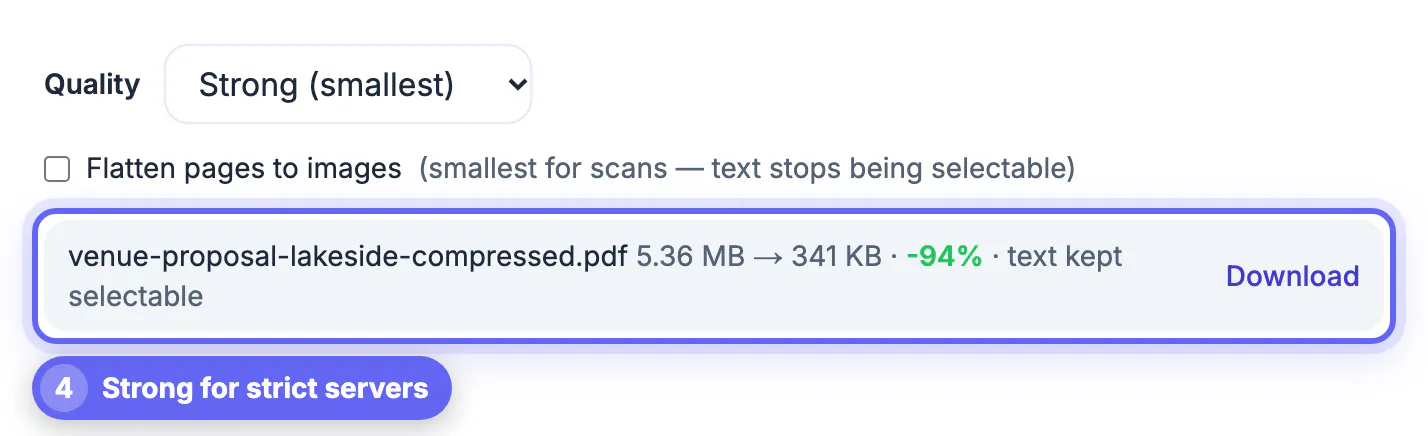
The Compress PDF tool offers three levels. Recommended re-encodes the photos inside the document at a moderate JPEG quality and caps their longest side at 2,000 pixels. Strong drops that to 1,400 pixels with heavier compression, which is still readable on screen for receipts and statements. Light keeps photos up to 2,600 pixels for brochures or portfolios where image quality sells the message.
In the default mode only the embedded photos change. Text, fonts, links and form fields stay exactly as they were, so the recipient can still search the contract, copy an account number or fill in a form. For documents that came from a phone scanner, the optional flatten checkbox renders each page as a single image, which is usually the smallest possible result, but the text is no longer selectable. The tool also tells you honestly when a file is already optimized, for example a text-only report exported from Word that has no photos to shrink.
When compression is not enough for email
Some files will not fit no matter what. A 180-page scanned deposition or a print-ready catalog with CMYK images can stay far above 10 MB. You have three honest options.
- Split the document into parts with a PDF splitter and send them as numbered emails, such as Part 1 of 3.
- Send only the pages the recipient needs; an accountant rarely wants the full 90-page brokerage statement.
- Use the provider’s cloud link, and set it to view-only with an expiry date when the content is sensitive.
Whatever you choose, open the final file before you hit send. Zoom into the smallest print, such as a signature line or a routing number, to confirm it is still legible.
If the file is still too big, you can password protect it and share it through a cloud link instead. Sending only a few pages? The Split PDF tool helps.
▶ Watch: How to compress a PDF (0:38)
Video transcript
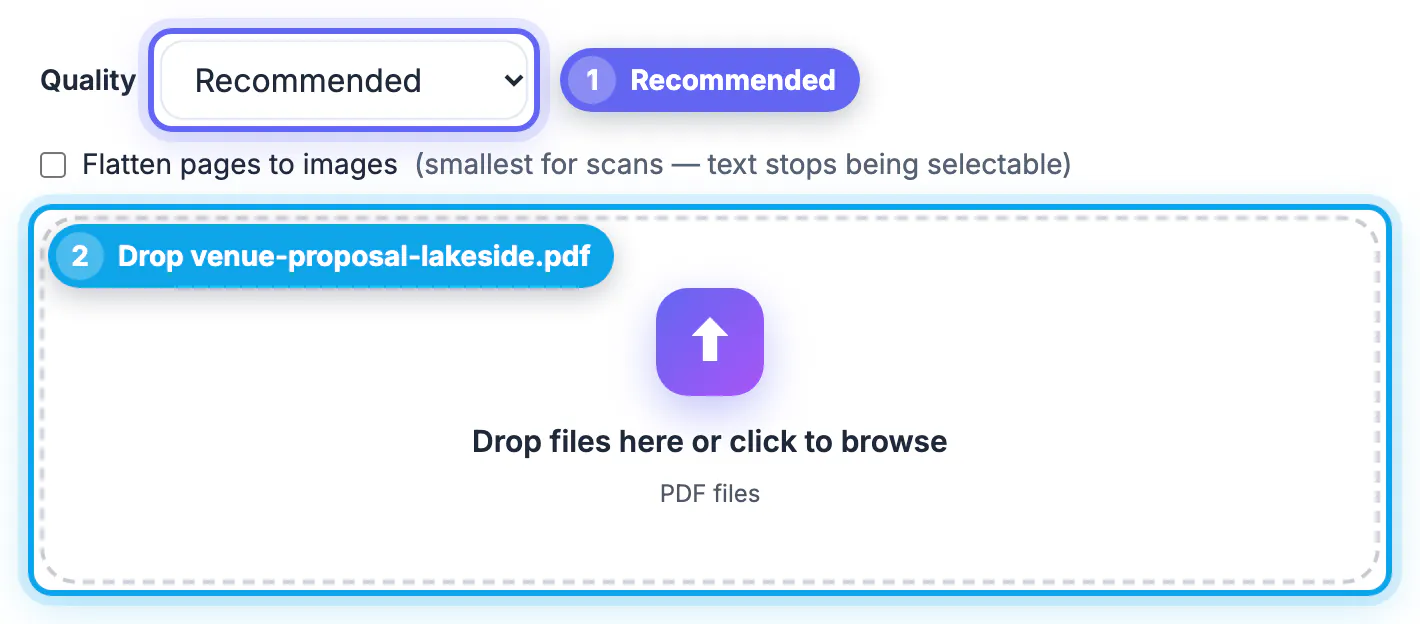
- Pick a quality. Recommended keeps text sharp and still cuts the size a lot.
- Scanned file? Tick Flatten. For scans, flatten the pages to images to get the smallest file.
- Add your PDF. Drop your PDF in the box or click to browse. It never leaves your device.
- Check the new size. The result shows the old size, the new size and how much smaller the file is.
- Download your PDF. Save the smaller copy. Your original file is not changed.
Step-by-step
Common mistakes to avoid
Pro tips
Frequently asked questions
What is the largest PDF I can email through Gmail?
Gmail allows 25 MB per message, but encoding inflates attachments by about a third, so files above roughly 18 MB usually fail. Aim for 17 MB or less.
Does Outlook have a smaller attachment limit than Gmail?
Yes. Outlook.com and personal Microsoft 365 accounts cap attachments at 20 MB, and many company Exchange servers are set to 10 MB, so target 14 MB or less.
Will compressing a PDF for email make the text blurry?
Not in the default mode. GrabCast re-encodes only the photos inside the file, so typed text, fonts and links stay sharp and searchable. Only the optional flatten mode turns pages into images.
Is my document uploaded when I compress it?
No. The compression runs locally in your browser, so the PDF stays on your device until you attach it to the email yourself.
Why did the tool say my PDF is already optimized?
The file has no large photos to shrink, which is typical for text-only documents exported from Word or Google Docs. Those are usually small already; if one is still too big, split it instead.
Email limits are smaller than they look because encoding adds about a third to every attachment and the strictest server on the route wins. Target roughly 70 percent of the cap, start with Recommended, step to Strong or flatten only when needed, and verify the fine print before sending. GrabCast does it free in your browser, so sensitive paperwork travels as a normal attachment without a detour through anyone else's servers.
Related guides
Browse more: all PDF guides · the Compress PDF tool