Compress a Scanned PDF: Why Scans Balloon and How to Fix
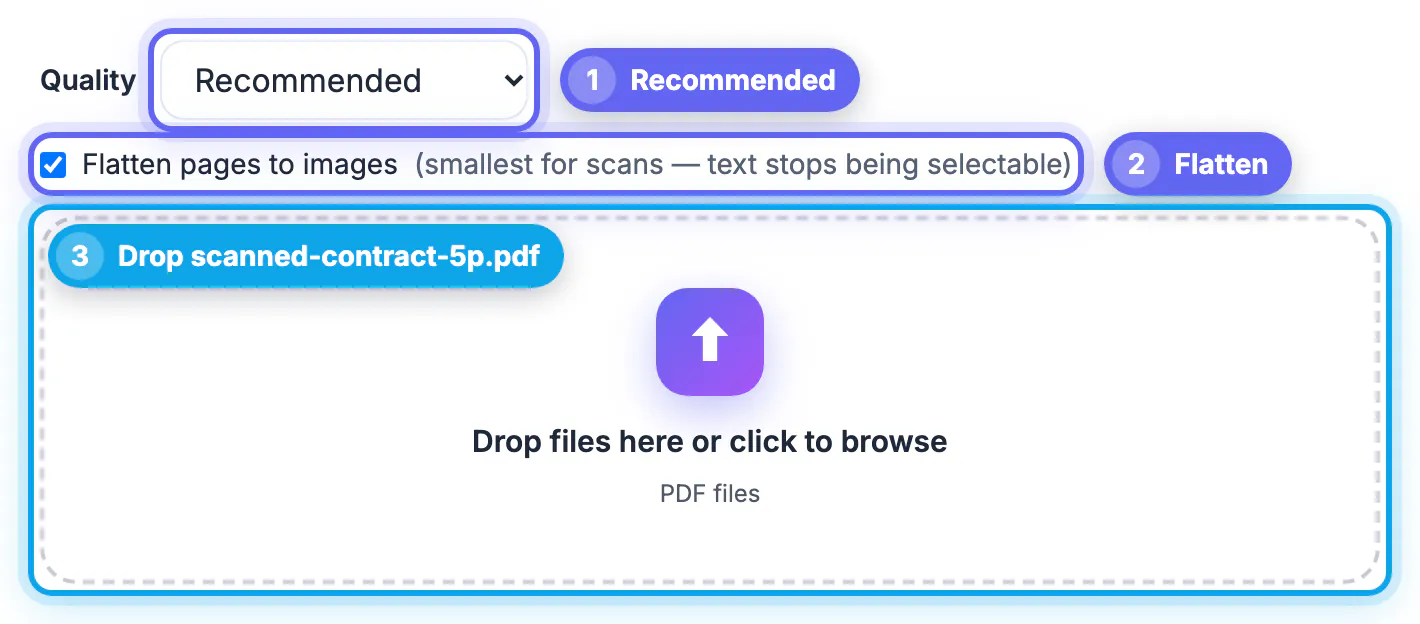
To compress a scanned PDF, open GrabCast's Compress PDF, choose Recommended, and tick Flatten pages to images if the file is a pure scan you only need to read. Nothing is uploaded; the work happens in your browser. The catch is that flattening turns any text layer into pictures, so a searchable scan stops being searchable. This guide explains which route to take, which level to pick, and when rescanning beats compressing.
📉 Try the Compress PDF tool now — freeOpen →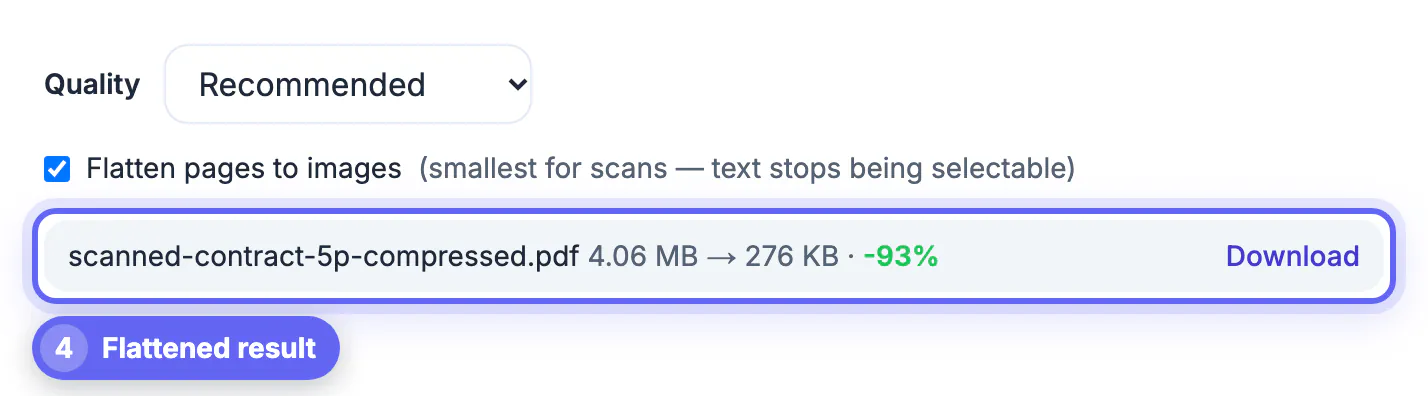
Unlike a PDF exported from Word, a scanned document stores each page as a full-page picture. At 300 dpi in color, a single letter-size page is 2,550 by 3,300 pixels, about 8.4 million pixels, before compression. Twenty of those add up fast, which is why portals with 5 or 10 MB caps reject scans first.
Why scanned PDF files get so big
Three settings drive the size of a scan: resolution, color mode and the compression the scanner chose. Many scanner apps default to 300 or even 600 dpi in full color, and doubling the dpi quadruples the pixel count. Color stores three channels where grayscale stores one, and a slightly off-white page scanned in color keeps every paper texture and shadow.
The format of the embedded pictures matters too. Phone and flatbed scans in color or gray are usually stored as JPEG, which a compressor can re-encode. Office scanners often save black-and-white pages as 1-bit images using fax-style CCITT or JBIG2 compression, which are already extremely compact, so there is little left to squeeze from those.
- Receipts and simple forms: 200 dpi grayscale is plenty.
- Contracts with small print: 300 dpi grayscale.
- Photos or color-coded documents: 300 dpi color, then compress.
Two ways GrabCast shrinks a scan
Default mode, recompress images. The tool looks for large JPEG pictures inside the document, roughly 15 KB and up and not in print-oriented CMYK, scales each one down so its long side fits a limit, and re-encodes it. A picture is only swapped if the new version is at least 8 percent smaller. Text, links, form fields, fonts and any OCR text layer stay exactly as they were, so a searchable scan stays searchable.
Flatten pages to images. This optional checkbox renders every page afresh as a single JPEG and builds a new file from those. It usually gives the smallest result for pure scans and also handles pictures the default mode skips, but text is no longer selectable, the OCR layer is gone, and links, bookmarks and form fields are lost.
If the result is not at least 2 percent smaller than your original, the tool says the file is already well optimized and tells you the original is the best version, suggesting the flatten option if you have not tried it yet.
Choosing Strong, Recommended or Light
The quality menu sets JPEG quality and resolution together:
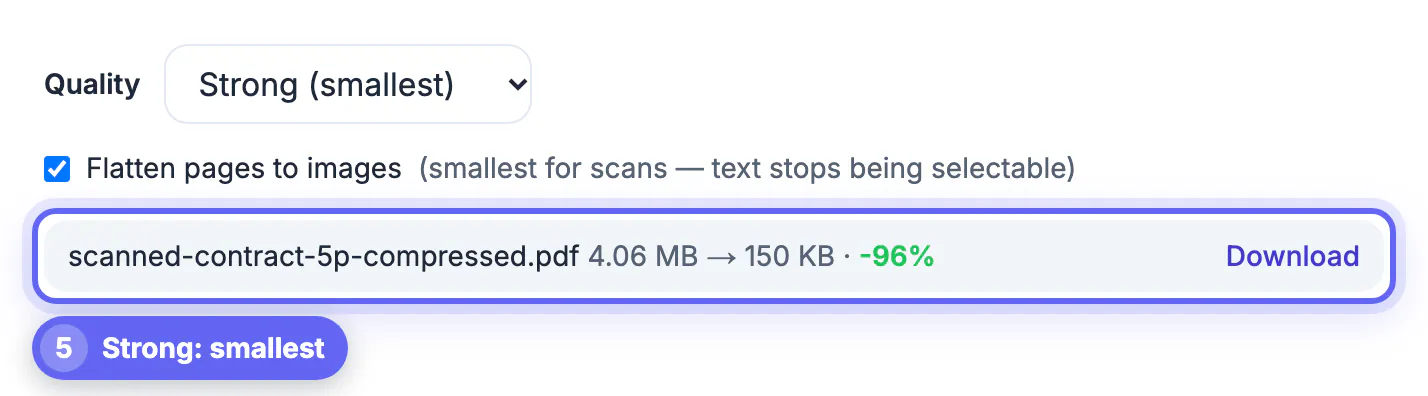
- Strong: quality 55, pictures capped at 1,400 pixels on the long side, and flattened pages rendered at about 79 dpi. Smallest; fine for receipts and on-screen reading, soft on small print.
- Recommended: quality 70, a 2,000-pixel cap, about 101 dpi when flattened. A good default for forms, letters and ID copies headed to portals.
- Light: quality 82, a 2,600-pixel cap, about 137 dpi when flattened. Best for contracts, tables with small figures and anything that may be printed.
For perspective, an 11-inch page edge at 2,000 pixels works out to about 182 pixels per inch, well above what a screen needs. Test before you submit: compress with Recommended, zoom to 200 percent on the smallest text, and step to Light if characters blur, or to Strong if they stay crisp and you need a smaller file.
Limits, privacy and when to rescan instead
Processing happens in your browser with open-source libraries, so confidential scans such as tax forms or medical records never leave your device. The trade-offs:
- Password-protected files may fail to process; remove the password first using the password you already have.
- Flattening a scan that relies on OCR throws away the searchable text; run OCR again afterward if you need it.
- CMYK pictures, common in print-ready files, are skipped by the default mode.
- Very long scans take time and memory on a phone; a laptop handles 100-plus pages more comfortably.
Sometimes the fastest fix is upstream. If you control the scanner, rescan at 200 or 300 dpi in grayscale; that alone often cuts the file to a fraction of a 600 dpi color scan, before any compression. Phone scanner apps usually offer a document or grayscale mode that does the same job.
To make the text selectable afterwards, use the OCR PDF tool. If a page is sideways, the Rotate PDF tool fixes it before you save the final copy.
Step-by-step
Common mistakes to avoid
Pro tips
Frequently asked questions
How do I compress a scanned PDF for free?
Open GrabCast's Compress PDF, pick a quality level, tick Flatten pages to images for pure scans, and drop in the file. It runs in your browser with no sign-up and no upload.
Will my scanned text stay searchable?
It depends on the mode you pick. Yes in the default mode, which only re-encodes pictures and leaves any OCR text layer intact. No if you flatten, because every page becomes a single picture.
Why did my scan barely shrink?
A few causes are common. It may use 1-bit fax-style or JBIG2 images, which the default mode does not touch and which are already small, or it may already be well compressed. Try flattening, or rescan at a lower dpi in grayscale.
Which level should I choose for a government or job portal?
Recommended in most cases. If the file is still over the cap, switch to Strong; if small print becomes hard to read, use Light and split the document instead.
Is it safe to compress tax or medical scans here?
From a privacy standpoint, yes, which is the main advantage over upload-based compressors: the file is processed on your device and never sent to GrabCast's server. Keep the original until you have checked the compressed copy.
To compress a scanned PDF, use GrabCast's default mode when you need searchable text and the Flatten option when you just need the smallest file. Start at Recommended, check small print at 200 percent, and when savings are poor, rescan at 200 to 300 dpi in grayscale.
Related guides
Browse more: all PDF guides · the Compress PDF tool