Best Free PDF Compressor: 6 Options Compared
The best free PDF compressor in 2026 depends on your file and your risk tolerance: a browser-based tool that works locally suits most everyday documents, while desktop and command-line options win for batches and print files. There is no single winner, because compressors differ in how they treat text, how much control they give you, where your file goes, and what the free tier quietly limits. This roundup compares six realistic choices, including GrabCast, popular upload services, Preview, PDF24 and Ghostscript, against the criteria that actually change your result. It is honest about where GrabCast falls short, too, such as batch jobs and CMYK print files, so you can pick the right tool rather than the loudest one.
📉 Try the Compress PDF tool now — freeOpen →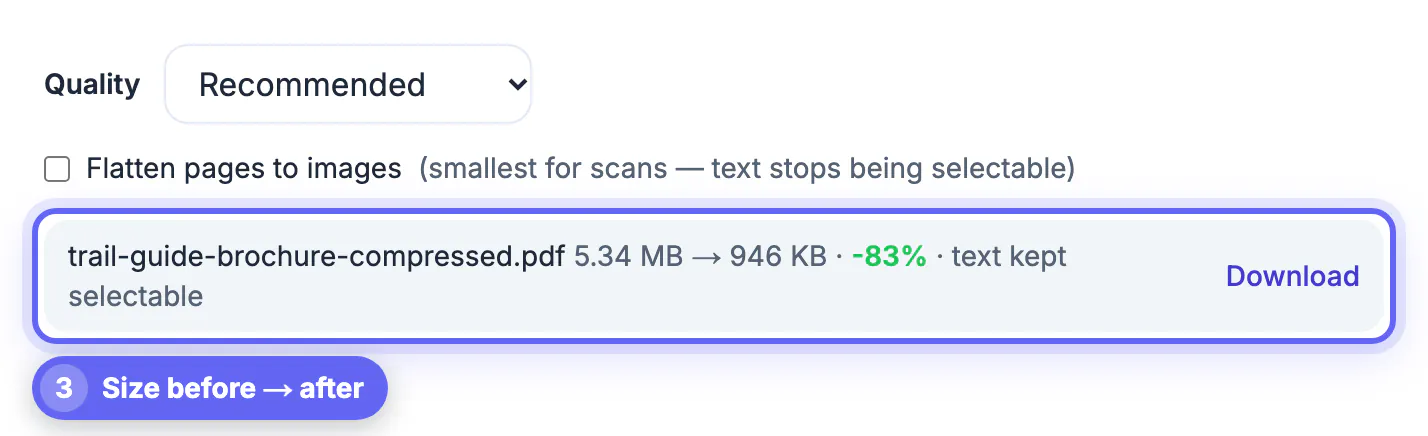
Almost every PDF gets big for one reason: photos or scans stored at far higher resolution than a screen needs. A good compressor finds those images, downsamples them to a sensible size, and re-encodes them, while leaving vector text, fonts and form fields untouched. A bad one rasterizes everything, turning crisp text into a fuzzy picture, or applies one aggressive setting to every document. The other differences are practical. Upload services send your file to their servers, which matters for medical, legal and financial paperwork. Free tiers may cap file size, limit tasks per day, or add a watermark. Desktop tools avoid uploads but require installation, which is not possible on a locked work laptop. Judging tools on these points, rather than on a single percentage claim in an ad, predicts which one will serve you well. The comparison below uses exactly those criteria, so you can apply the same test to any new tool that shows up in search results next year.
Six free PDF compressor options, compared
Each option below is free to use in some form. The notes reflect how they behave, not sponsorships.
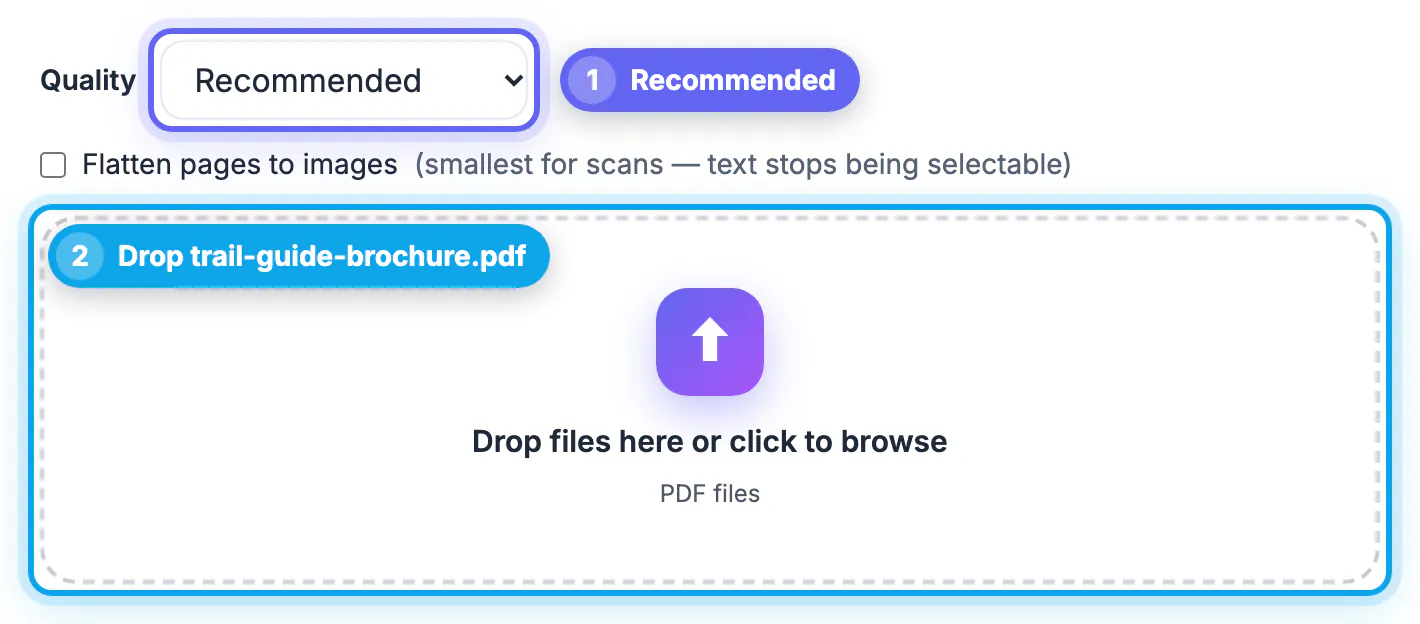
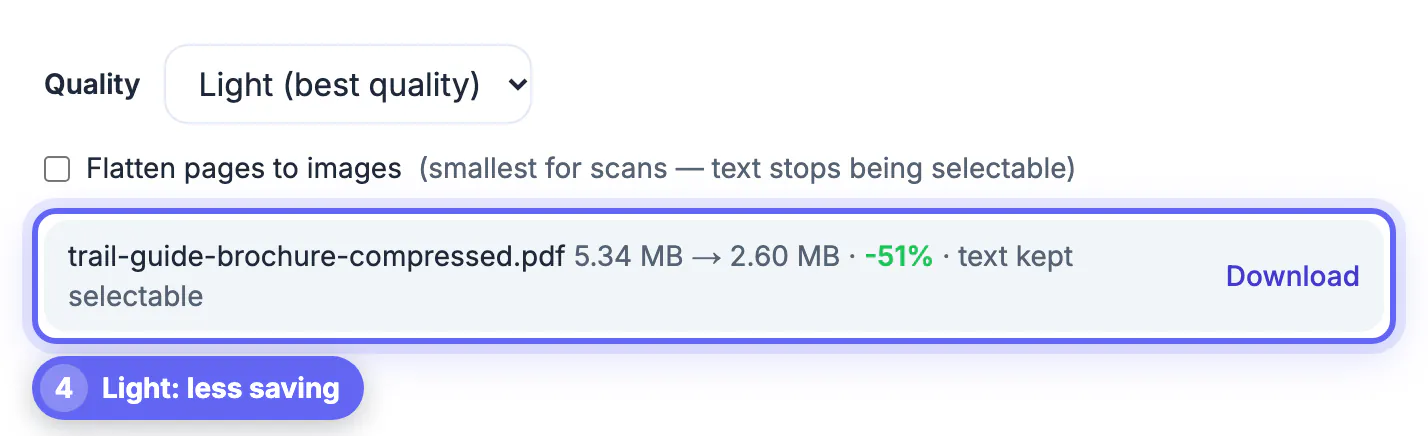
- GrabCast Compress PDF (browser, local): three levels, keeps text selectable by default, optional flatten for scans, no account; one file at a time and skips CMYK images.
- Popular upload services such as iLovePDF, Smallpdf and Adobe’s online compressor: polished and strong on scans, but files go to their servers and free tiers often limit daily tasks or file size.
- macOS Preview: built in and instant, but its Reduce File Size filter over-compresses images and offers no quality control.
- PDF24 Creator (Windows): free desktop app with good presets and batch support; requires installation.
- Ghostscript: free command-line engine behind many tools, excellent results and batching, but technical to set up.
- Adobe Acrobat Pro: the gold standard for control, but it is a paid subscription, so only its trial is free.
Criteria that change the result
When you test a compressor, judge it on these points rather than the headline percentage.
- Text stays vector: copy a sentence from the output to confirm it was not turned into an image.
- Level control: at least two or three settings so a brochure and a receipt are treated differently.
- Privacy: where the file is processed, how long it is kept, and whether an account is required.
- Limits: maximum file size, daily task caps, and any watermark on free output.
- Honesty: does it tell you when a file cannot shrink, instead of returning a bigger copy?
Size savings vary wildly by document. A photographed 40-page lease can drop by 80 percent or more, while a text-only report exported from Word may not shrink at all with any tool, because there is nothing heavy inside to remove.
A fair test takes ten minutes: run the same three files through each candidate at its middle setting, note the output sizes, then open the results side by side at 200 percent zoom and compare photos, fine print and signatures.
Privacy matters too, and this checklist on free tool safety shows what to look for. If a scan is the problem, the OCR PDF tool is worth knowing about.
Where GrabCast wins and where it does not
GrabCast is a strong default for sensitive single documents on any device, including locked work computers and phones, because nothing is installed and the file stays in the browser. Its default mode re-encodes only JPEG photos and keeps fonts, links and fields intact, and the result shows the exact before and after size.
It is not the best choice for every job. If you need to process 200 invoices at once, PDF24 or Ghostscript will save hours. If your file is a print-ready catalog with CMYK images, the tool leaves those images alone to avoid color shifts, so savings are limited; a desktop preflight tool is better there. Very large scans, several hundred pages, can also be slow on older phones because your own device does the work.
A quick decision guide
Match the tool to the situation and you will rarely be disappointed.
- One sensitive file, any device: a local browser compressor.
- Dozens of files on a personal Windows PC: PDF24 Creator.
- Automated batches or a server workflow: Ghostscript.
- Heavily scanned documents where text does not matter: any tool’s flatten or scan mode.
- Print production with strict color: Acrobat Pro or a professional preflight tool.
Step-by-step
Common mistakes to avoid
Pro tips
Frequently asked questions
What is the best free PDF compressor in 2026?
For single, sensitive files on any device, a local browser compressor such as GrabCast is a strong choice. For batches, PDF24 on Windows or Ghostscript on any system is better. Mac users who want something built in can tune a ColorSync filter, though it takes more effort to set up.
Do free PDF compressors add watermarks?
Some free tiers do, and others limit daily tasks or file size. GrabCast adds no watermark and needs no account.
Why does my PDF not get smaller with any compressor?
It likely contains mostly text and vector graphics, which are already compact. Compression mainly shrinks photos and scans. Fonts embedded in full can add weight too, and only desktop engines such as Ghostscript subset them.
Is it safe to use an online PDF compressor?
Upload services send your file to their servers, so read their retention policy. Browser-based tools that work locally keep the file on your device.
Which compressor keeps text sharp?
Tools that re-encode only images, such as GrabCast default mode, leave text as vector and fully sharp. Avoid rasterizing modes for contracts and forms.
There is no universal best free PDF compressor, only the best fit for your file. Use a local browser tool for everyday sensitive documents, a desktop app or Ghostscript for batches, and a pro suite for print color. Whatever you choose, test with your own file and confirm the text stays selectable.
Related guides
Browse more: all PDF guides · the Compress PDF tool