Bank Statement PDF to Excel for a Monthly Budget
If your bank only offers statements as PDF files, you can still build a monthly budget from them: convert the bank statement PDF to Excel, keep only the transaction table, and let the spreadsheet do the adding up. Using a fictional one-page checking statement with 19 transactions as the example, this walkthrough shows how GrabCast's PDF to Excel keeps dates, descriptions, debits, credits and the running balance in separate columns, turns a withdrawal total printed as ($3,602.47) into a negative number, and hands you either an .xlsx for your own budget or a CSV for a budgeting app. It all runs in your browser, which matters for a document that shows your account activity.
📊 Try the PDF to Excel converter now — freeOpen →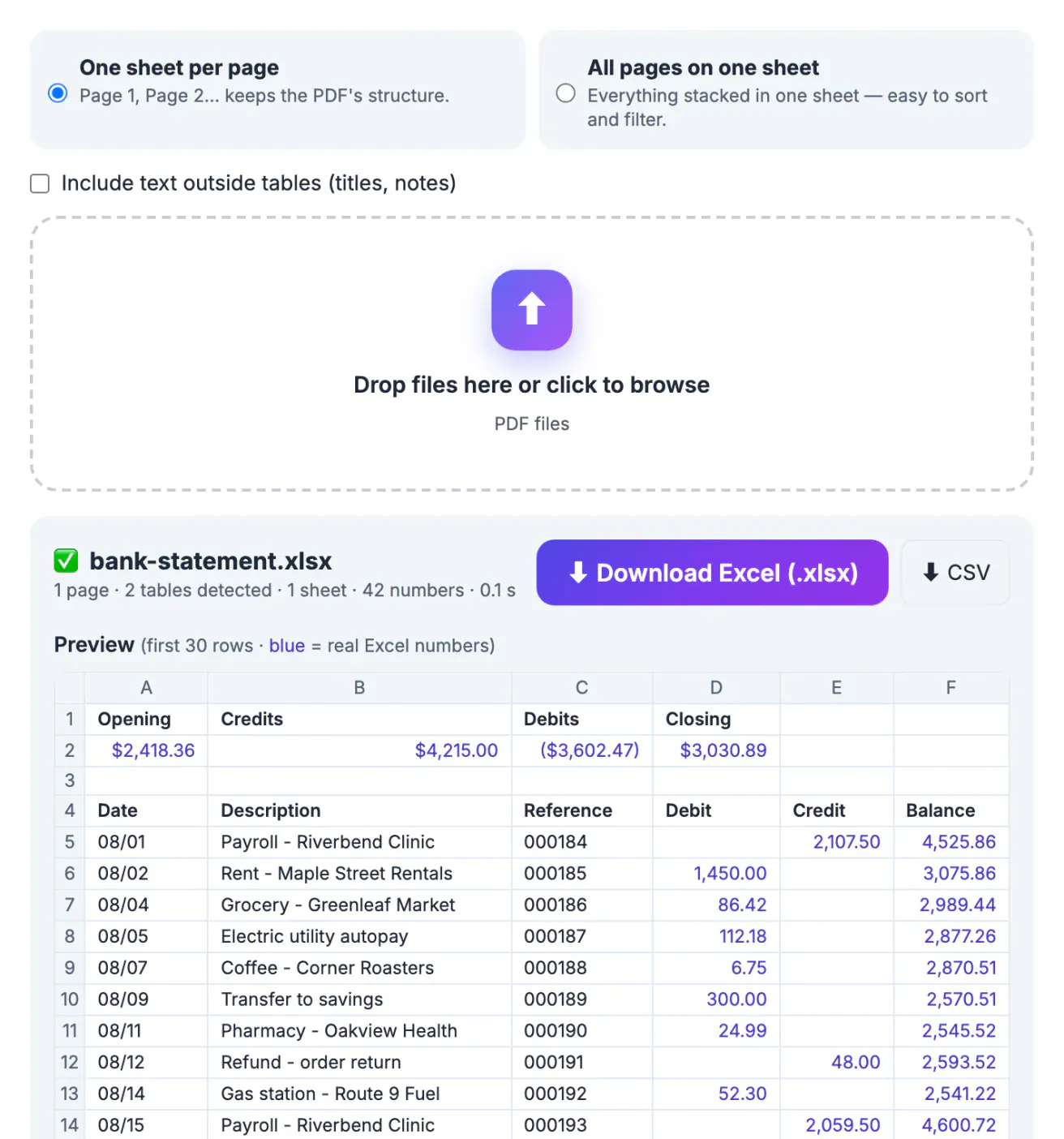
A month of card payments, groceries and autopays easily runs to 40 or 60 lines, and retyping them invites mistakes in exactly the numbers you want to trust. Many banks provide a CSV download, but it often covers only recent months, and older statements, closed accounts and credit union archives may exist only as PDF. Converting the PDF gives you the same rows the bank printed. Because a statement lists your employer, landlord and spending habits, GrabCast does the conversion locally: the file is read on your device and the spreadsheet is built there, so no copy of the statement is sent to a server.
What the bank statement looks like after conversion
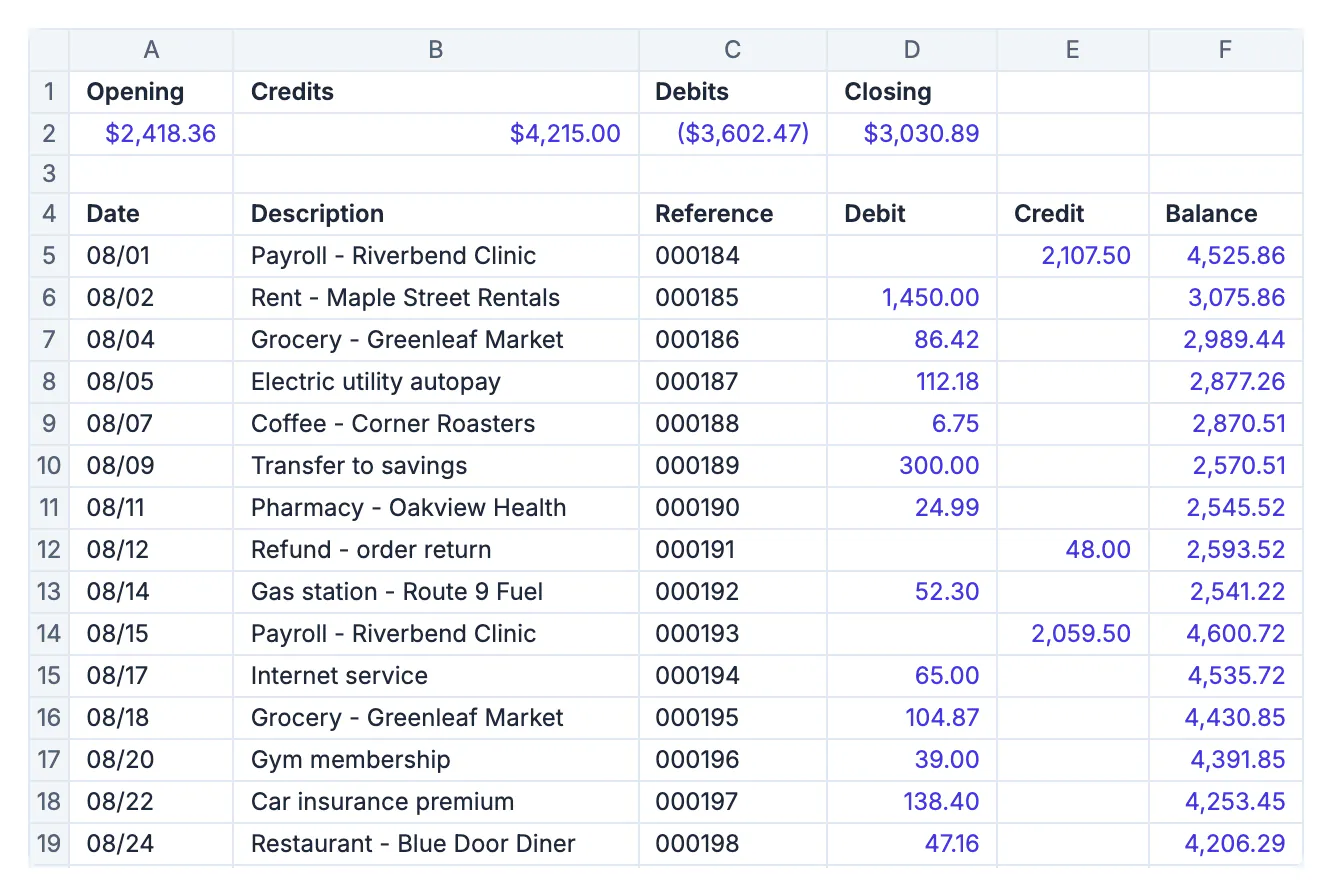
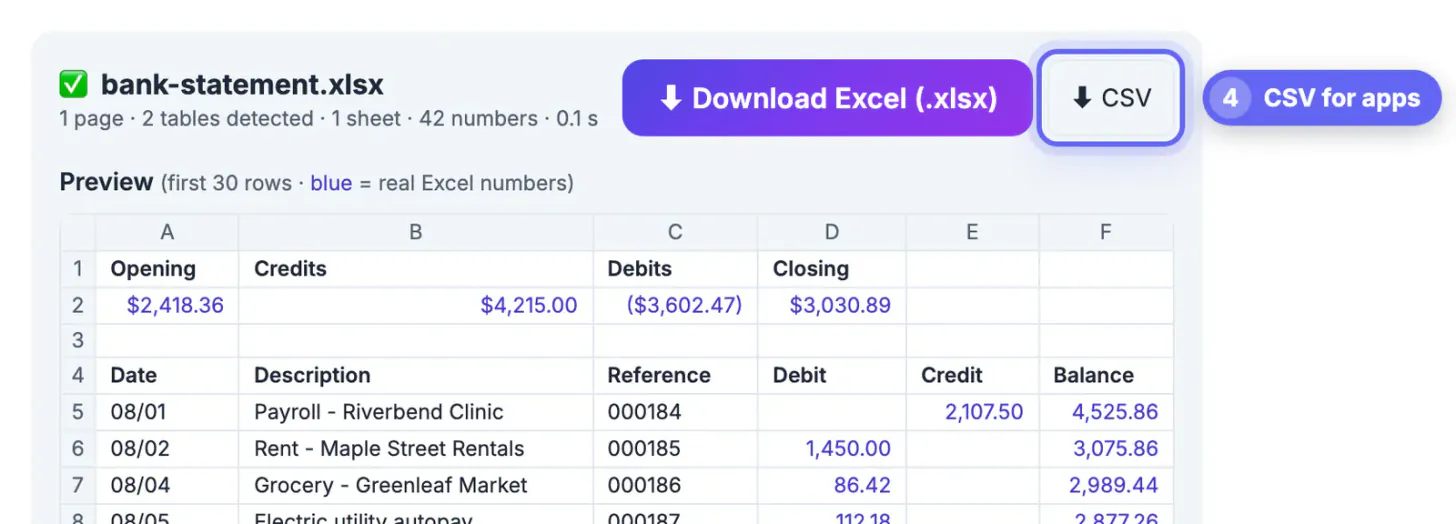
In the sample statement, the converter found two tables: a four-column summary with the opening balance, total credits, total debits and closing balance, and the transaction list with Date, Description, Reference, Debit, Credit and Balance. Each transaction landed on its own row with the amount in the correct column, and empty cells stayed empty, so a payroll deposit shows a blank Debit and 2,107.50 under Credit.
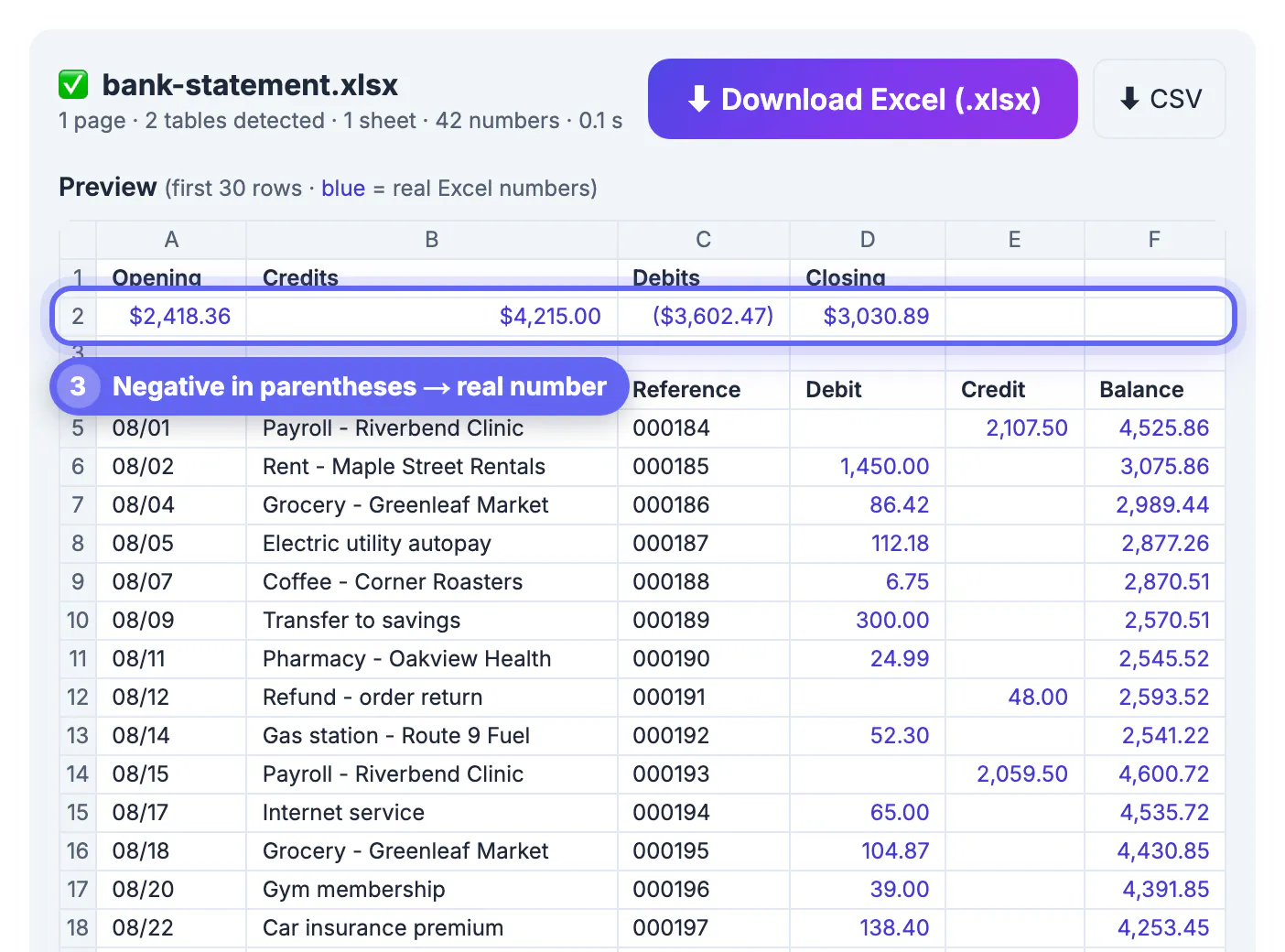
Amounts such as 1,450.00 and 86.42 became real numbers, shown in blue in the preview. The summary figure ($3,602.47) was recognized as an accounting-style negative and stored as -3602.47, so it subtracts correctly in a formula. Reference numbers like 000184 kept their leading zeros as text, which is what you want for an ID.
Dates such as 08/01 stay as text. That is deliberate: a converter cannot know whether 08/01 means August 1 or January 8, and guessing wrong would scramble a whole month. Convert them in Excel once you know the format, as shown below.
Settings that suit a bank statement
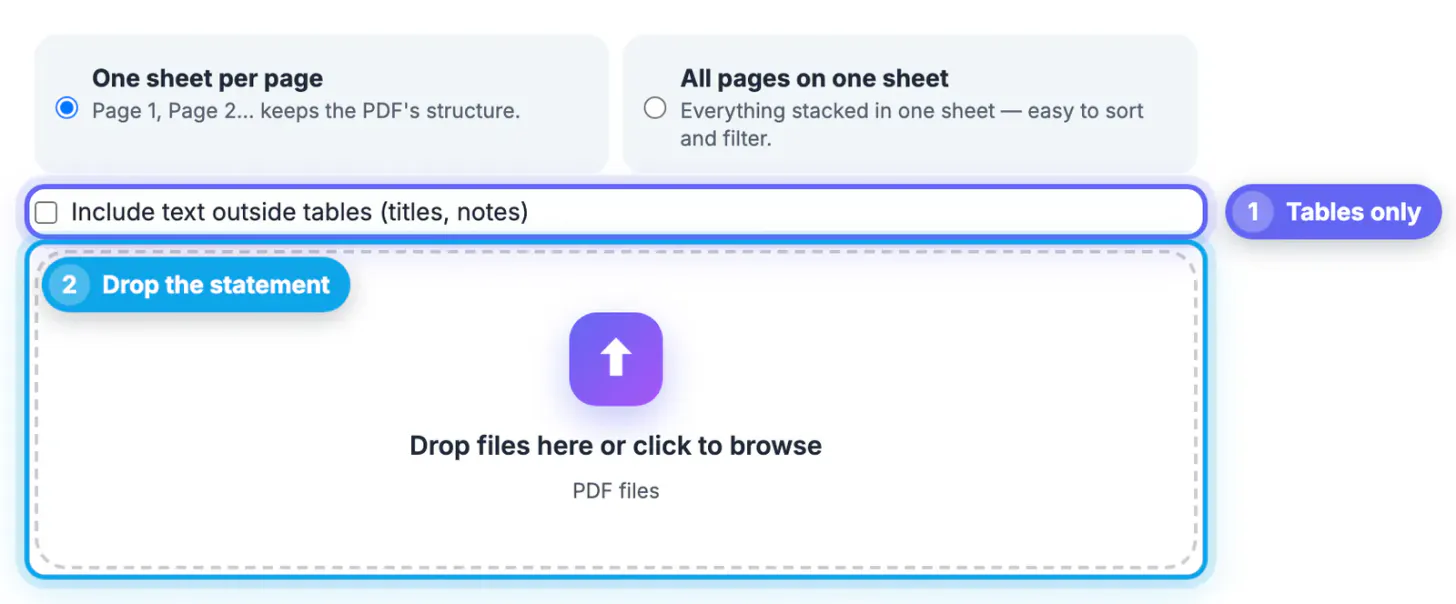
- Untick Include text outside tables before dropping the file. The bank's name, address block and legal footnotes then stay out of the sheet, leaving just the tables.
- Keep One sheet per page for a single statement. For a statement that runs across three or four pages, switch to All pages on one sheet so every transaction sits in one list you can filter.
- Check the counts line. The sample reads 1 page, 2 tables detected, 42 numbers. If a multi-page statement shows fewer tables than pages, look at the page that is missing; it may be a scanned insert or a page of disclosures.
Very long account numbers are protected too. Any digit string longer than 15 characters stays as text, because Excel cannot store more than 15 significant digits and would silently round a card or account number.
Turn the rows into a monthly budget
Once the transactions are in Excel, a few simple steps turn them into a spending picture:
- Add a Category column next to Description and label each line: rent, groceries, transport, utilities, fun. With 19 lines this takes a couple of minutes; sort by Description first so repeated merchants sit together.
- Build a small summary with SUMIF, for example =SUMIF(G:G,'Groceries',D:D) style formulas, or insert a pivot table on the Category and Debit columns.
- Convert the dates if you need them: select the Date column and use Text to Columns with the MDY format, then add the statement year.
- Check the math: the sum of the Credit column should match the credits total in the summary row, and the last Balance should match the closing balance, 3,030.89 in the sample.
In the sample, rent of 1,450.00 and a credit card payment of 1,100.00 account for more than two thirds of the month's debits, which is the kind of pattern that is hard to see on paper.
When to download CSV instead
Many budgeting apps and spreadsheets for household finances import transactions from a CSV file. The CSV button writes each value as plain text: 1,450.00 becomes 1450 and ($3,602.47) becomes -3602.47, with no currency symbols. The file is UTF-8 with a byte-order mark and uses a leading apostrophe to neutralize any text cell that starts with an equals sign, which protects you if a merchant name was crafted to look like a formula.
Before importing, delete the summary rows so only the header and the transactions remain, and check which column order your app expects. Most want a date, a description and either a single signed amount or separate debit and credit columns.
If a statement page is a scan, the converter reports that the page has no selectable text. For those pages, use PDF to JPG and then Image to Text (OCR), and check every amount against the paper copy.
Step-by-step
Common mistakes to avoid
Pro tips
Frequently asked questions
Is it safe to convert a bank statement PDF online?
It depends on where the conversion happens. GrabCast's PDF to Excel reads the file and builds the spreadsheet in your browser, so the statement is not uploaded. Avoid services that ask you to upload financial documents to their servers.
Will negative amounts in parentheses work in Excel formulas?
Yes. Values like (987.00) or ($3,602.47) are recognized as negatives and stored as real negative numbers, displayed in the same parentheses style, so SUM and subtraction work correctly.
Why do the dates stay as text?
A date like 08/01 could mean August 1 or January 8 depending on the bank. The converter keeps it exactly as printed so nothing is misread. Convert the column in Excel with Text to Columns once you know the format.
Can I convert a credit card statement the same way?
Yes, if the PDF has selectable text. Credit card statements often use a single Amount column with payments shown as negatives or with CR after the number; the minus sign and parentheses forms become numbers, while values with letters attached stay as text for you to fix.
What if my statement is a scanned image?
Scanned pages have no text layer, so the converter tells you it found no selectable text. Convert the pages with PDF to JPG, read them with Image to Text (OCR), and double-check every amount, because OCR can misread digits.
A bank statement PDF becomes a working budget in a few minutes when the transaction table converts cleanly. Untick the text outside tables, confirm the columns and blue numbers in the preview, download .xlsx for your own analysis or CSV for an app, and check the closing balance before you trust the totals. Doing the conversion in the browser keeps a document full of personal financial details on your own device.
Related guides
Browse more: all PDF guides · the PDF to Excel converter