JWT Expired? How to Read exp and Fix Errors
When a JWT expires your app suddenly returns 401s, and the cause is almost always the exp claim inside the token. Checking when a JWT expires means decoding it, reading that timestamp and converting it to a real date. This troubleshooting guide shows how to read exp and fix the common expiry errors that catch developers out. The good news is that expiry follows clear rules, so once you can read the claim the mystery disappears.
🔐 Try JWT Decoder now — freeOpen →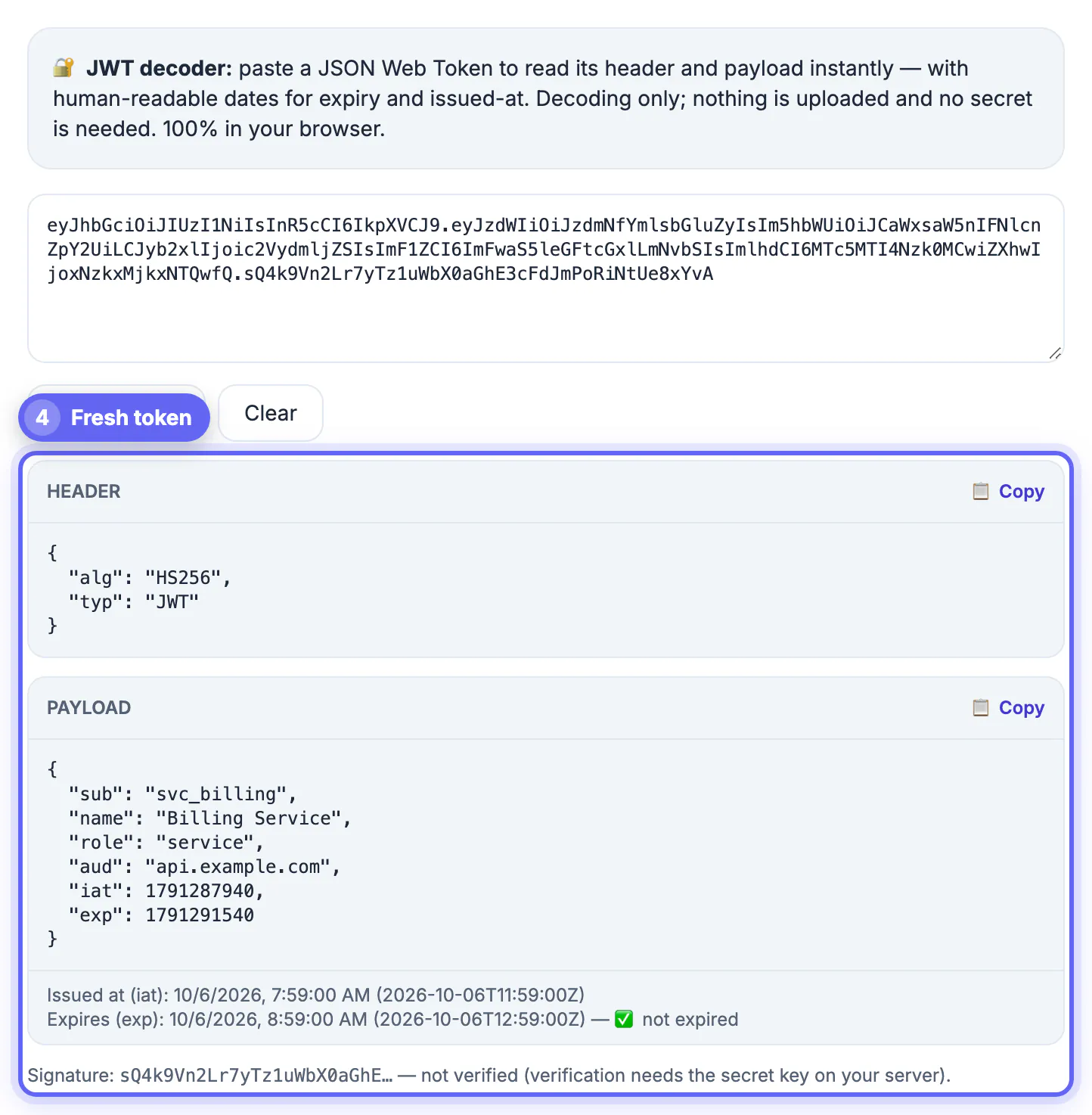
Tokens are deliberately short-lived, so a login that worked an hour ago can fail with no code change at all. The exp claim is a Unix timestamp, seconds since 1970, which is not human-readable at a glance, so it is easy to misjudge whether a token is still valid. On top of that, clock differences between client and server, confusion between seconds and milliseconds, and missing refresh logic all produce the same symptom: a token that should work but does not. Reading exp correctly is the first step to fixing all of them. Because the symptom, a sudden 401, looks identical whether the cause is a real expiry or a comparison bug, reading the exp value directly is the quickest way to tell them apart.
Read the exp claim
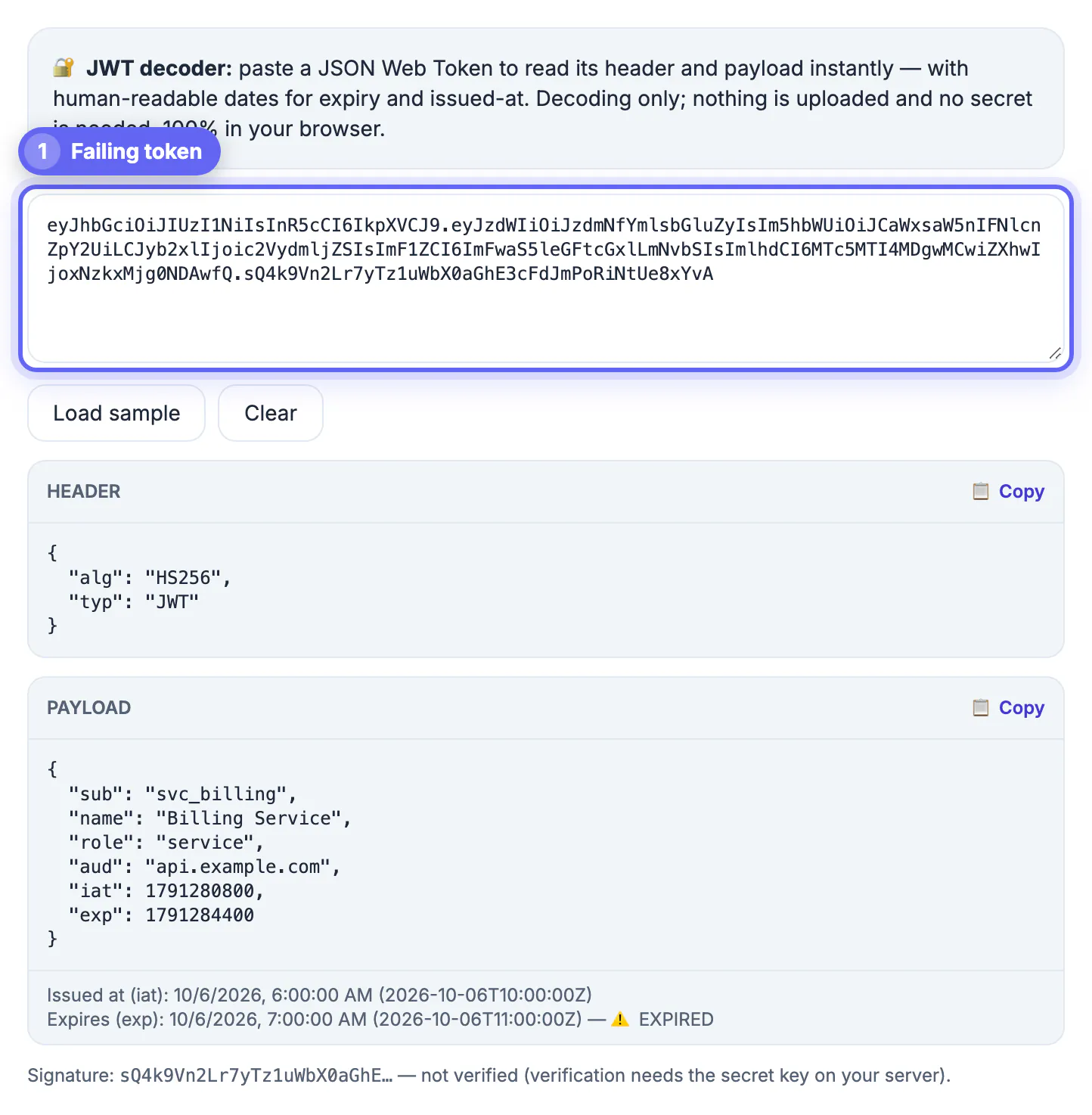
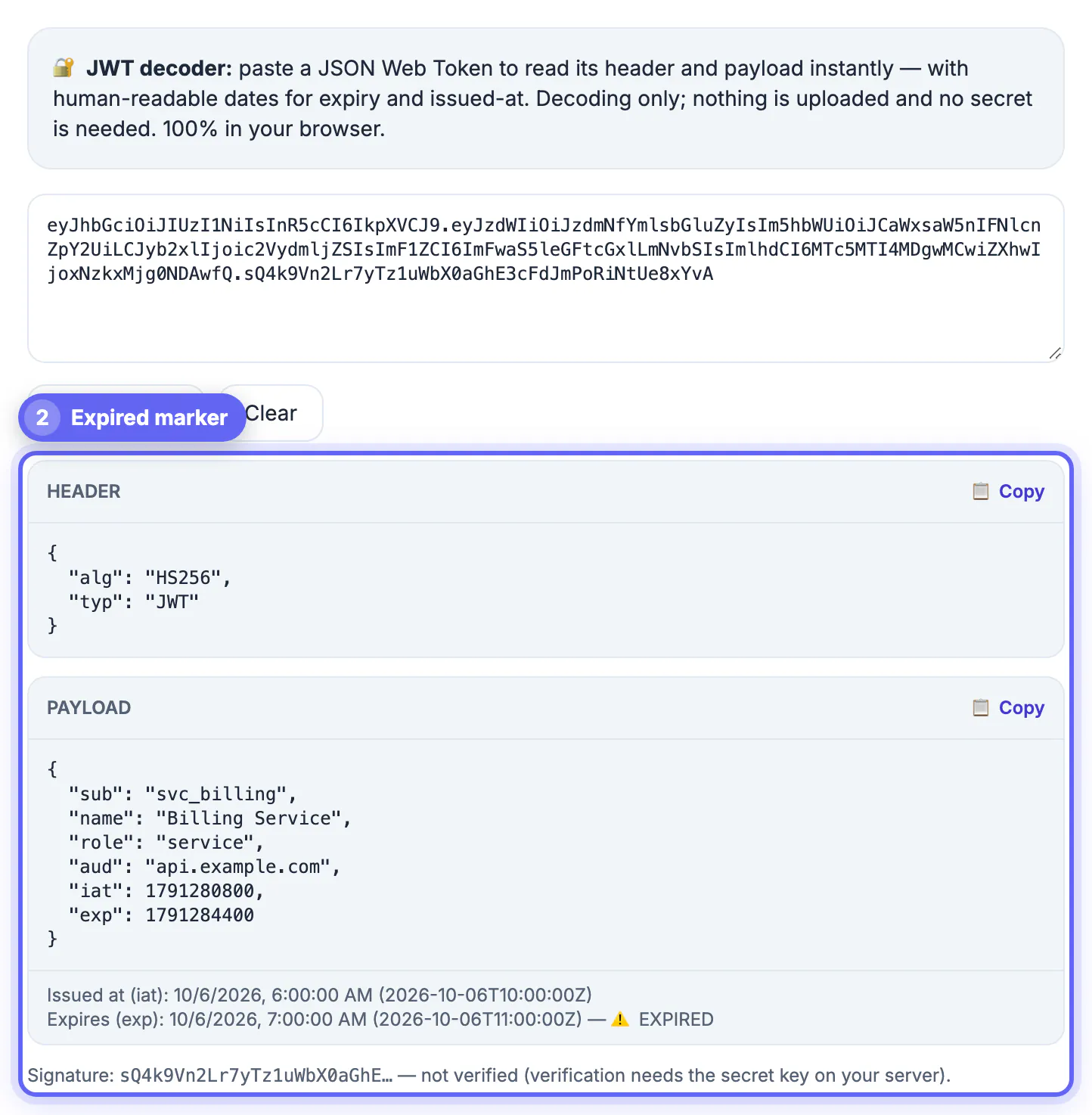
Decode the token and look in the payload for the exp field. It is the moment the token stops being valid, stored as a Unix timestamp.
- exp is seconds since January 1, 1970 UTC
- iat shows when the token was issued
- nbf, if present, is the not-before time
- Compare exp against the current time to see if it is expired
Convert the timestamp to a real date
A raw number like 1735689600 means nothing until you convert it. Turn it into a readable date to know exactly when the token dies.
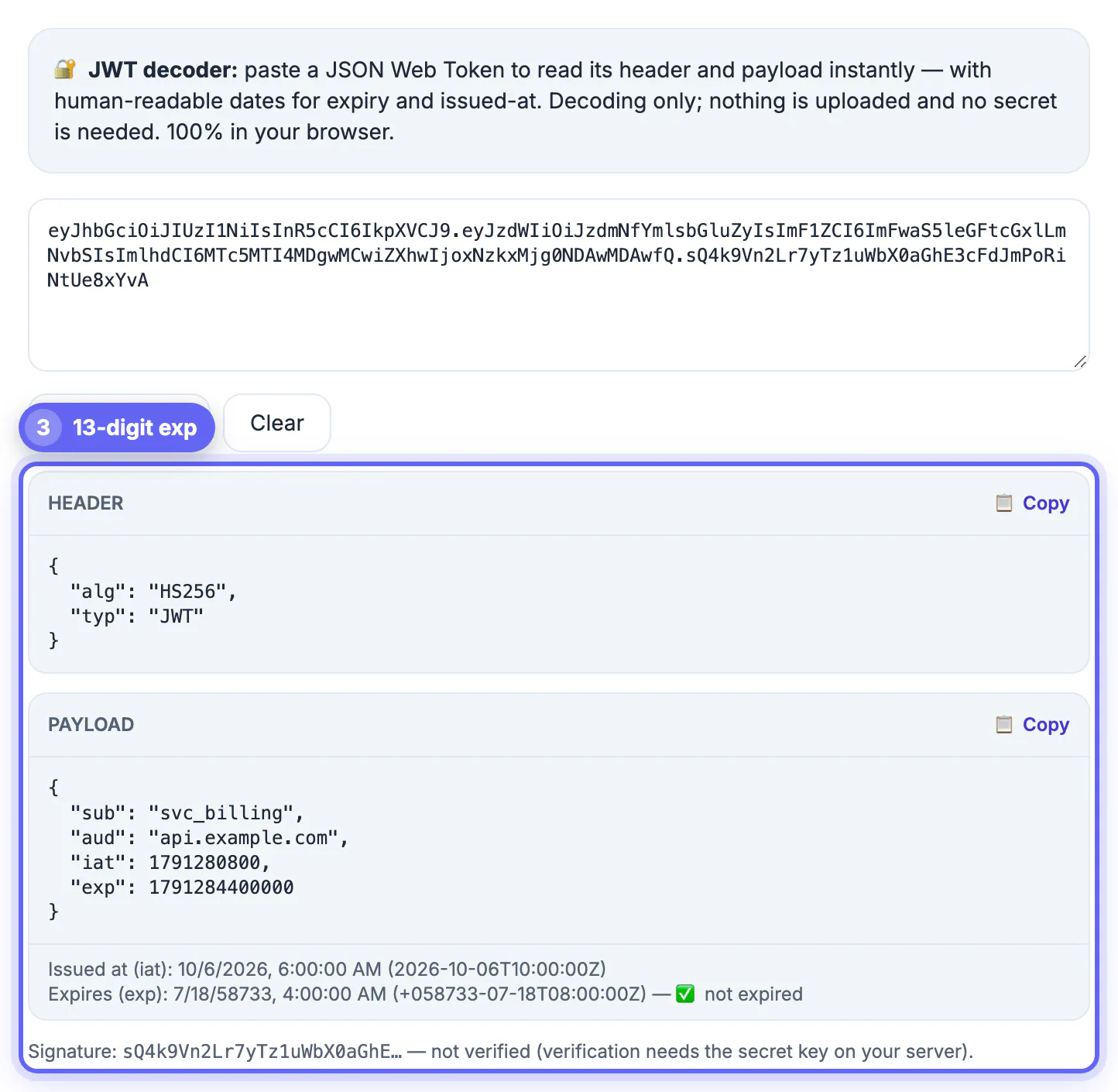
Multiply the exp value by 1000 to get milliseconds and read it as a date, or let a decoder show the converted time for you. Watch for the classic mistake of comparing a seconds value against a milliseconds clock, which is off by a factor of a thousand.
Fix common expiry errors
Most expiry problems come down to a handful of recurring causes. Check these when a token fails unexpectedly.
- Seconds versus milliseconds mismatch when comparing exp
- Client and server clocks drifting out of sync
- Missing refresh logic, so the token is never renewed
- Caching an old token past its expiry
Handle expiry gracefully in your app
Expired tokens are normal, not exceptional, so your app should expect them and refresh smoothly.
Check exp before making a request, use a refresh token to obtain a new access token when it is near expiry, and allow a small clock-skew tolerance on the server so minor time differences do not reject valid tokens.
Read exactly when a JWT expires and why it matters
The exp claim is the single source of truth for a token's lifetime, so learning to read it removes most of the guesswork from expiry bugs.
- exp marks the last instant the token is valid
- A token used after exp is rejected, usually with a 401
- iat plus a lifetime often explains how exp was chosen
- Short lifetimes are a security feature, not a bug
Build refresh and skew handling into the app
Once you understand expiry, design around it so users never hit an abrupt logout. Two mechanisms do most of the work.
Use a refresh token to obtain a new access token shortly before the old one expires, and allow a small clock-skew tolerance on the server so a few seconds of drift do not reject otherwise valid tokens. Together they turn expiry from a failure into a smooth, invisible renewal.
A quick expiry debugging checklist
When a request fails with a 401, run through a short checklist before changing code. Most expiry problems appear within the first three checks.
- Decode the token and read exp and iat.
- Compare exp with the server time in UTC, not the browser local time.
- Confirm the client sends the newest token and not a cached or stored older one.
- Check whether a refresh request is failing silently, leaving the old token in use.
- Look at the lifetime: if exp minus iat is a few minutes, the issuer is short-lived by design.
For the basics of what each part of a token holds, decoding a JWT in your browser walks through the header, payload and signature, and a text diff checker helps compare two tokens' claims side by side.
Typical token lifetimes
Knowing common lifetimes helps you judge whether an expiry is a bug or a design choice. Access tokens are usually valid for five to sixty minutes, ID tokens for about an hour, and refresh tokens for days or weeks. Some mobile apps keep refresh tokens for months and rotate them on each use. If a token expires after one minute, check the issuer configuration for a unit mistake where seconds were supplied instead of minutes. A lifetime that is much longer than expected, such as a year, is a security risk worth reviewing because a leaked token stays usable for that entire period.
Step-by-step
Common mistakes to avoid
Pro tips
Frequently asked questions
How do I check when a JWT expires?
Decode the token, read the exp claim, and convert that Unix timestamp to a date to see exactly when it becomes invalid.
Why does my valid token suddenly return 401?
It likely passed its exp time, or your code compared seconds against milliseconds, or the client and server clocks drifted apart.
Is exp in seconds or milliseconds?
The exp claim is in seconds since 1970, so multiply by 1000 before comparing it against a JavaScript millisecond clock.
How should I handle expired tokens?
Check exp before each request and use a refresh token to obtain a new access token before the old one expires.
Is a short JWT expiry a problem?
No, it is a security feature that limits how long a leaked token is useful; handle it with a refresh flow rather than by extending the lifetime.
A JWT expires at its exp claim, and reading that timestamp, converting it correctly and adding refresh logic fixes the sudden 401s that expiry causes.
Related guides
Browse more: all text and developer guides · JWT Decoder