Epoch Columns in Exported Data: A Guide for Analysts
If a column in your CSV is full of numbers like 1790553600 or 1790553600000000, those are epoch values, and they need a unit check and a time zone decision before they become dates in a chart. Paste a sample into GrabCast's timestamp converter to learn the unit, batch-convert up to 5,000 values to a CSV when the sample is small, and use a formula for anything bigger. This guide is written for analysts who work with exported data from product analytics, billing systems and warehouses, and who need daily and weekly numbers that match everyone else's dashboard.
⏱️ Try Unix Timestamp Converter now — freeOpen →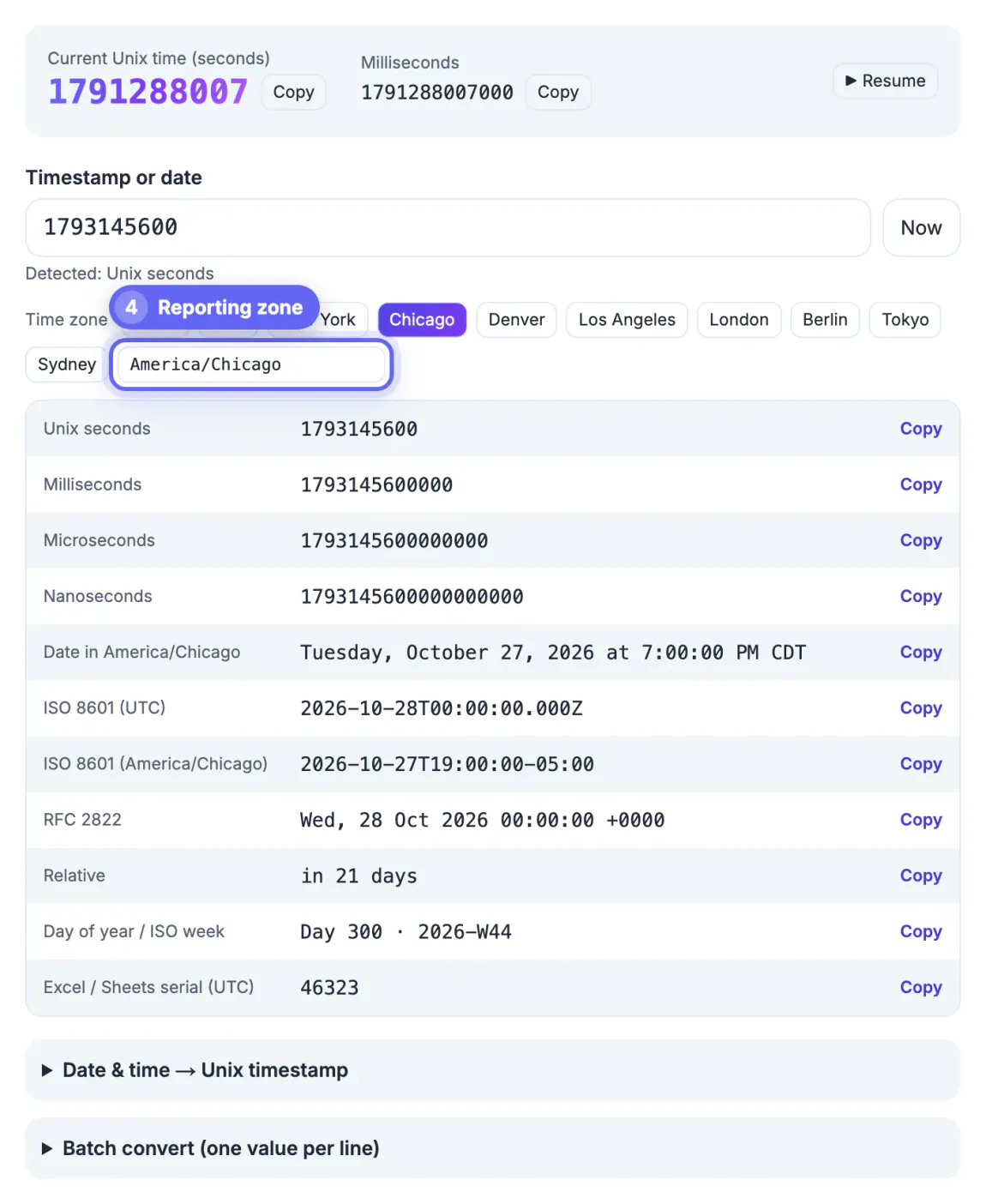
A date column that is off by a unit or a time zone does not throw an error. It quietly produces a plausible chart. Treat microseconds as milliseconds and every event lands in the year 58,000; treat milliseconds as seconds and the whole dataset piles up on one day in January 1970. The subtler failure is the time zone: a purchase at 9:30 PM in California is already the next day in UTC, so a daily revenue report bucketed in UTC shifts part of every evening into tomorrow. Two teams using the same export then publish numbers that differ by a few percent, and hours go into reconciling them. Checking the unit, the range and the bucketing zone once, at the start, is the cheapest quality control an analyst can do.
Identify the unit before you write a formula
Paste one value from the column into the converter and read the detected label under the input box. It counts digits: up to 11 is seconds, 12 to 14 milliseconds, 15 to 17 microseconds, and 18 or more nanoseconds.
- Google Analytics 4 exports to BigQuery store event_timestamp in microseconds, 16 digits today.
- Billing APIs such as Stripe return created and similar fields in seconds, 10 digits.
- Browser-side trackers and many JavaScript pipelines write milliseconds, 13 digits.
- A 0 in the column usually means a missing value that was written as the default, not an event on January 1, 1970.
Then convert the smallest and largest values in the column. Both should fall inside the period you exported. If the maximum lands in 1970 or thousands of years ahead, the column mixes units, which is a pipeline bug worth reporting before you publish anything.
Batch-convert the exported data or use a formula
For a sample, a pivot or a quick ad hoc export, open Batch mode, paste up to 5,000 values one per line, and download the CSV. Each row keeps your original input next to an ISO 8601 UTC value, a readable date in the zone you selected and Unix seconds, so you can paste the columns back beside your data in the same order. Unreadable lines are marked rather than dropped, so row counts still match.
- Google Sheets: EPOCHTODATE(A2, 1) for seconds, 2 for milliseconds and 3 for microseconds, returning UTC.
- Excel: =A2/86400+DATE(1970,1,1) for seconds, or divide by 86,400,000 for milliseconds, then format as date and time.
- BigQuery: TIMESTAMP_MICROS(event_timestamp), or TIMESTAMP_SECONDS and TIMESTAMP_MILLIS for other units.
- pandas: pd.to_datetime(df.ts, unit='ms', utc=True), then .dt.tz_convert('America/New_York').
Before filling a formula down 200,000 rows, convert one row in the tool and compare. The Excel or Sheets serial output shows the exact number your formula should produce for that row in UTC.
Bucket days and weeks in your business time zone
Decide whose midnight defines a day. A US retailer usually reports in Eastern or Pacific time, while a global SaaS product may standardize on UTC. Write the choice at the top of the report, then apply it consistently.
- Pick the zone in the converter and check a late-evening event; 9:30 PM Pacific on March 31 becomes 04:30 UTC on April 1, which moves it across a month boundary.
- Convert with a named zone such as America/Los_Angeles, not a fixed -08:00, or every summer row shifts by an hour.
- Expect one 23-hour day in March and one 25-hour day in November in US zones; hourly charts will show a gap and a doubled hour.
- For weekly reports, the Day of year and ISO week output tells you where a date falls; ISO weeks start on Monday, and December 29, 2025 already belongs to 2026-W01.
Spreadsheets default to different week rules: Google Sheets WEEKNUM starts weeks on Sunday, while ISOWEEKNUM follows the Monday-based ISO standard. Mixing the two in one deck is a common reason two weekly charts disagree.
Final checks before you share numbers
- Spot-check three rows: the earliest, the latest and one near midnight in your reporting zone.
- Confirm totals by day are identical when rerun, which proves the bucketing formula is deterministic.
- Note in the report whether dates are UTC or local, and which zone was used for days and weeks.
- Keep the raw epoch column in the final sheet so anyone can audit the conversion later.
The converter runs entirely in your browser, so customer IDs, order values or anything else in the lines you paste stay on your computer. Only the values you paste are processed; the tool does not need or see the rest of the file.
Before you share a chart, the JSON Formatter helps inspect exported JSON, and the Standard Deviation Calculator checks spread on a series.
Step-by-step
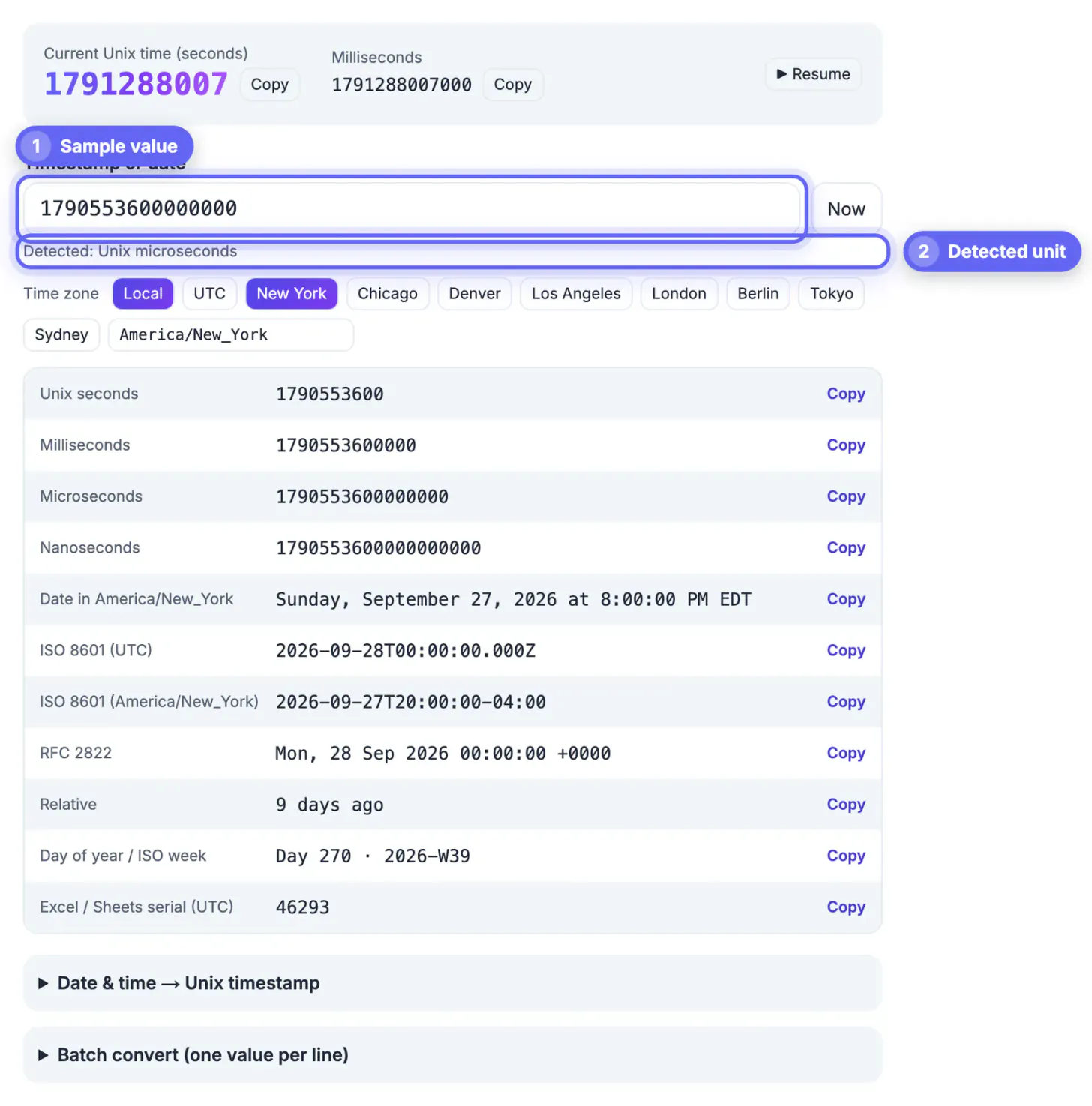
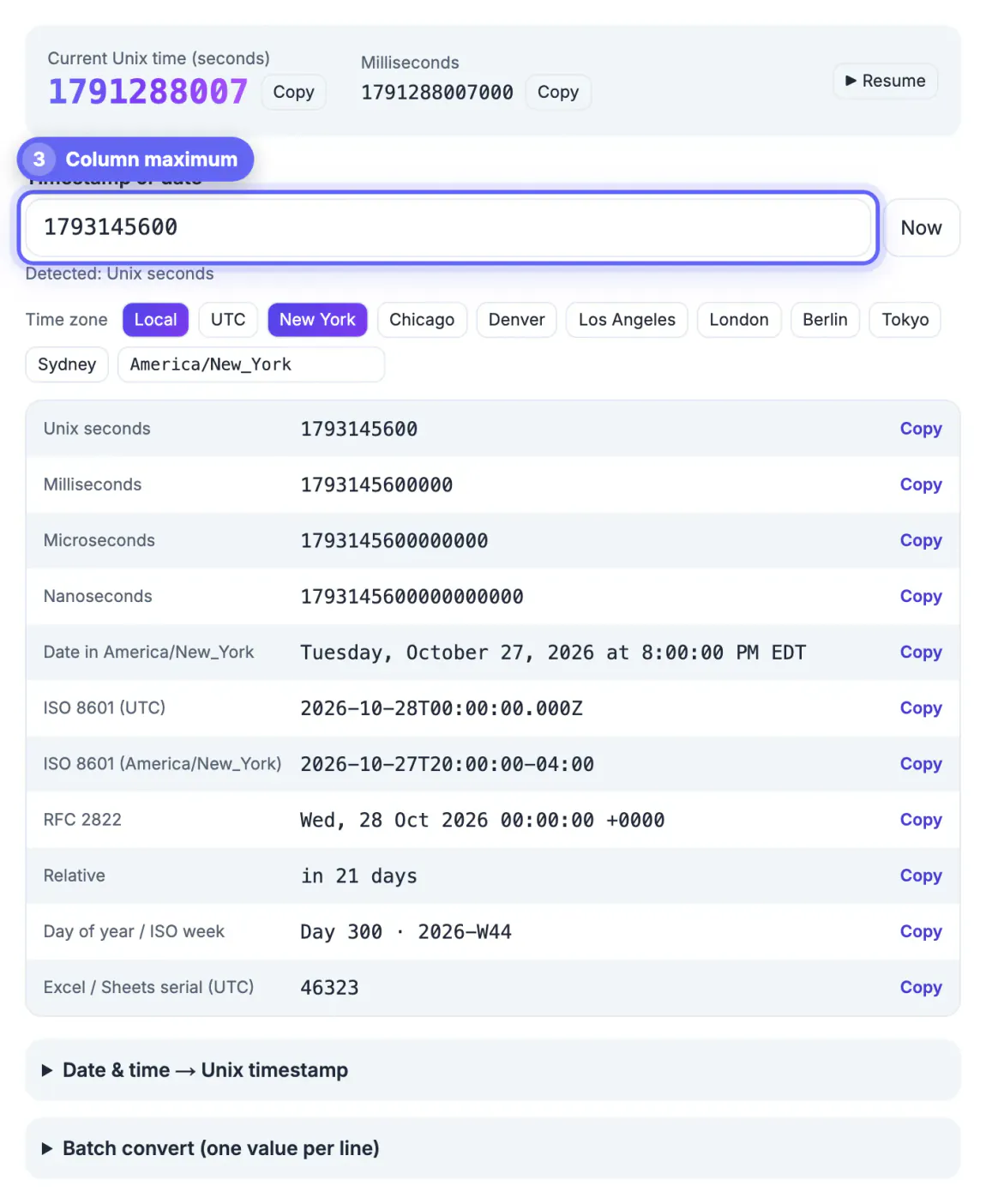
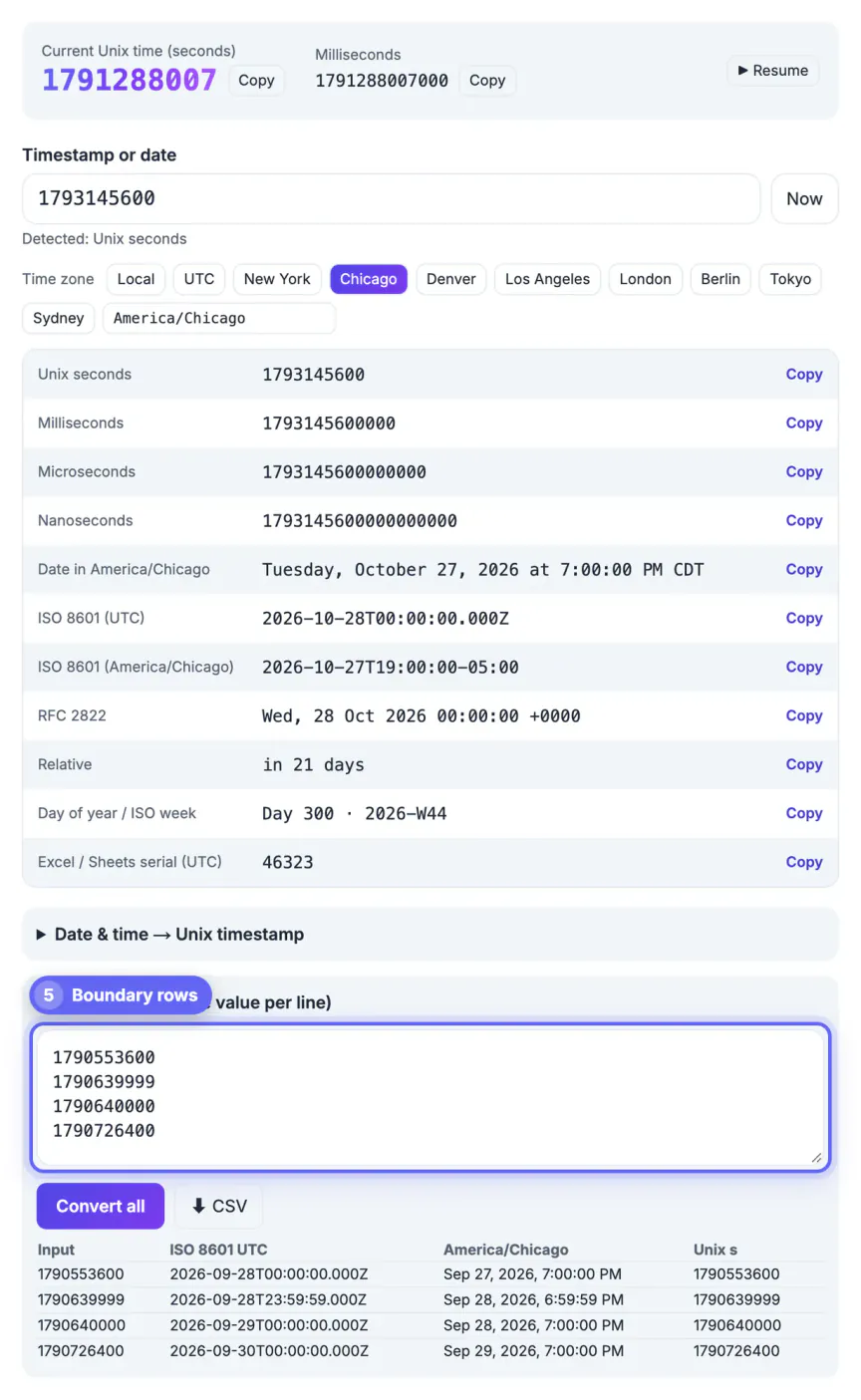
Common mistakes to avoid
Pro tips
Frequently asked questions
How do I know if my export uses seconds, milliseconds or microseconds?
Count the digits or paste one value into the converter. Today, seconds have 10 digits, milliseconds 13, microseconds 16 and nanoseconds 19.
Can the tool convert a whole column?
Batch mode handles up to 5,000 values per run and exports a CSV. For larger files, use EPOCHTODATE in Google Sheets, a formula in Excel or a SQL function.
Why are some sales on the wrong day?
The dates were probably bucketed in UTC. Convert them in your business zone, such as America/New_York, so evening orders stay on the day they happened.
What does 0 mean in a date column?
Usually a missing value written as the default. It converts to January 1, 1970, so filter it out rather than treating it as a real event.
Is it safe to paste customer data?
Yes, in the sense that nothing is uploaded: the converter uses your browser's built-in date functions. Paste only the date values, not whole rows.
Before an epoch column becomes a chart, confirm its unit from one value, check the minimum and maximum, choose and document a business time zone, and convert in bulk with Batch mode or a formula. Those four checks take minutes and prevent the silent off-by-a-day and off-by-a-unit errors that make reports disagree.
Related guides
Browse more: all text and developer guides · Unix Timestamp Converter