Amazon Product Image Requirements and a White-Background Fix
Amazon product image requirements are strict about one picture: the main image, the one shoppers see in search results. At the time of writing it must show the real product on a pure white background, filling most of the frame, with no added text, logos or props, and be large enough for zoom. The other images in a listing have more freedom. This guide sums up the rules that trip sellers up, then shows how to turn ordinary photos taken on a kitchen table into compliant white-background main images in one batch, using three products from fictional small brands: a beard oil bottle, a speckled planter and an enamel camp mug. The tool is GrabCast's free Product Photo Studio, which runs in your browser.
🛍️ Try Product Photo Studio now — freeOpen →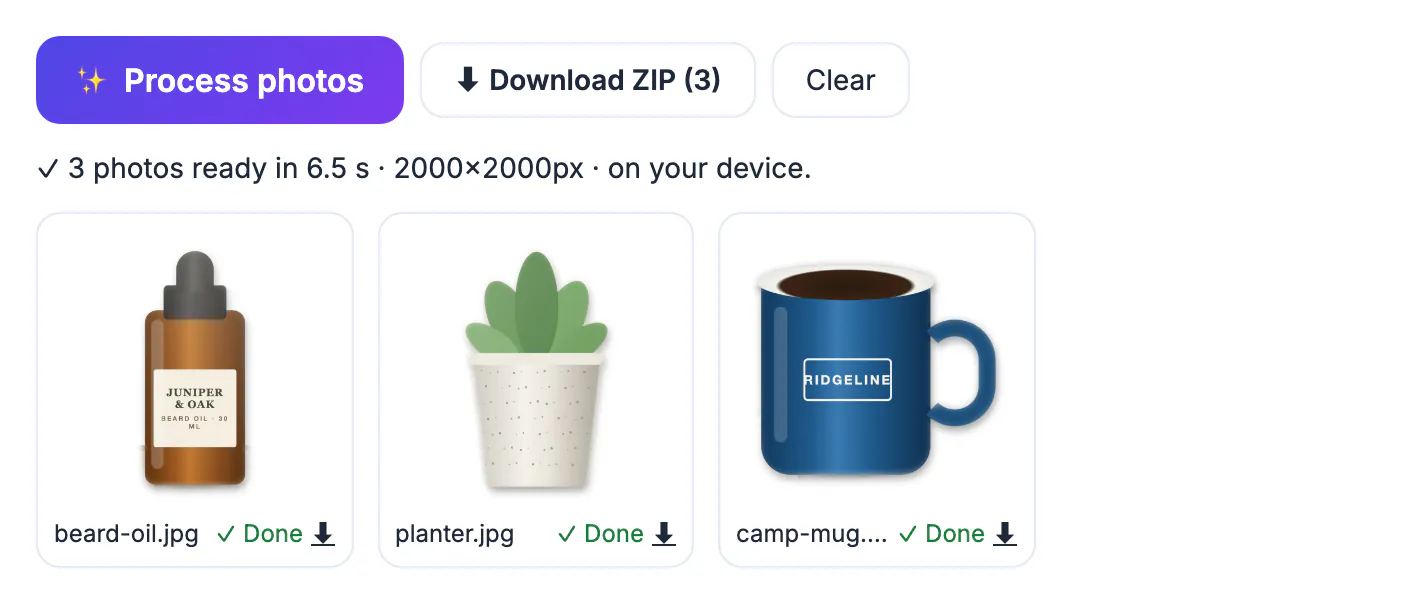
The main image is your listing's first impression and, in search, often the only one. Amazon keeps it uniform so shoppers can compare products at a glance, and images that break the rules can be suppressed, which means the listing stops showing in search until it is fixed. Beyond compliance, a clean white background and a product that fills the frame simply read better on a phone screen, where most browsing happens. The good news is that the rules are mechanical: a background colour, a fill percentage and a pixel size. Those are exactly the parts a batch tool can do for you, leaving the photography itself to you.
Amazon product image requirements at a glance
These points come from Amazon's image guidance for sellers as summarised at the time of writing. Amazon updates its rules and some categories add their own, so check the current Product image requirements page in Seller Central before a big shoot.
- Pure white background for the main image: RGB 255, 255, 255, not an off-white or a light grey.
- The product fills about 85% of the frame or more, so it doesn't look lost in white space.
- Size: images between 500 and 10,000 pixels on the longest side are accepted; 1,000 pixels or more lets shoppers zoom.
- Formats: JPEG is preferred; TIFF, PNG and non-animated GIF are also accepted.
- Only what is sold: no extra props, no added text, logos, badges, borders or watermarks on the main image, and a real photo rather than an illustration.
Secondary images can show the product in use, lifestyle scenes, size charts and close-ups. That is where your kitchen-table shots and infographics belong.
Shoot for a clean cut-out, even at home
You don't need a lightbox to end up with a white background, but you do need a photo the background remover can read clearly.
- Put the product on a plain surface with space around it; a busy background is fine as long as nothing overlaps the product.
- Use soft daylight from one side and avoid hard shadows falling across the product itself.
- Shoot straight on, at the product's height, with the whole product in the frame and a margin on every side.
- Clean the product first: dust and fingerprints show up clearly on white.
- Take a few angles, because a listing can carry several images and the extra ones can be lifestyle shots.
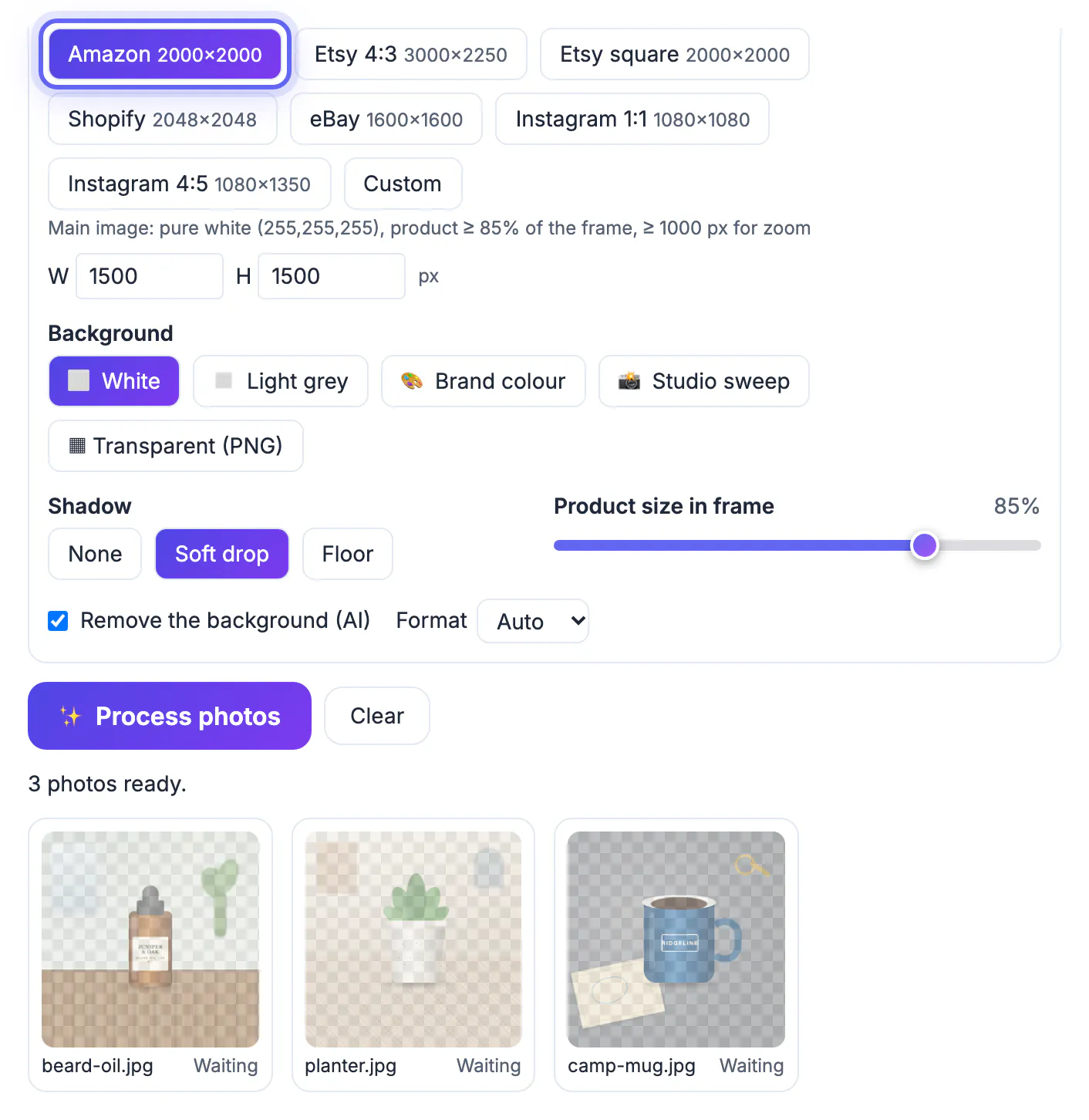
The example photos were deliberately messy: a wooden table and a plant behind the bottle, a patterned floor under the planter, a map and keys next to the mug.
Make white-background photos for Amazon in one batch
In Product Photo Studio, drop the whole shoot, up to 200 photos. Pick the Amazon size, which at the time of writing is set to 2000 × 2000 pixels on pure white with the product filling 85% of the frame, then choose White and a shadow. The note under the sizes repeats the main-image rules as a reminder.
Press Process photos. The first run downloads the U²-Net background remover once (44 MB); after that, every photo is cut out, centred so the product fills the chosen share of the frame, and placed on the white canvas. For the three example photos this took a few seconds on a laptop, and each card showed Done with a download arrow.
- Product size in frame is a slider from 50 to 95%; keep it at 85% or above for Amazon.
- Soft drop or Floor shadows help a product look grounded; choose None if you prefer a flat look.
- Changing the size, background or shadow re-composes the finished photos without running the cut-out again.
- If one photo fails, retry just that one; Cancel keeps everything already finished.
The same batch can be re-exported for Etsy (3000 × 2250 or 2000 × 2000), Shopify, eBay or Instagram. Sizes for those stores are also written at the time of writing; re-check each store's own help pages.
Check each image before you upload
Automatic cut-outs are good, not perfect. Open each file at full size and look at the edges: thin parts such as a dropper tip, a mug handle or plant leaves are where a background remover most often leaves a halo or bites into the product. In the example, the white rim of the enamel mug was the part to check, because white edges are the hardest to see against a white background.
- Zoom to 100% and check the outline all the way round.
- Make sure no part of the old background survived in a corner or under the product.
- Confirm the file is 2000 × 2000 pixels and the background reads 255, 255, 255 in an image editor if you want to be sure.
- Name the files after the SKU before uploading, so the main image and variants stay matched.
For listing text, the guide to writing product descriptions with AI pairs well with the new photos, and Compress Image helps when a marketplace or your own shop sets a smaller file-size limit.
Step-by-step

Common mistakes to avoid
Pro tips
Frequently asked questions
What background does Amazon require for the main image?
At the time of writing, pure white: RGB 255, 255, 255. Off-white, light grey and coloured backdrops belong in the secondary images, not the main one.
How big should Amazon product images be?
Amazon accepts 500 to 10,000 pixels on the longest side, and 1,000 pixels or more enables zoom. Product Photo Studio's Amazon preset exports 2000 × 2000 pixels.
Can I keep a shadow under the product?
A soft natural shadow is common on main images, but if you are unsure for your category, choose None. The tool lets you switch shadows and re-export without redoing the cut-out.
Are my product photos uploaded to remove the background?
No. The background remover runs in your browser; the model downloads once and the photos never leave your device.
Is there a limit or watermark?
No credits and no watermark. A batch holds up to 200 photos, and the only practical limit is your device's memory.
Amazon's main image rules come down to pure white, a product that fills the frame, and enough pixels for zoom. Shoot clean photos at home, batch them to the Amazon size on white, check every edge, and keep your lifestyle shots for the other image slots. Re-check the official rules before each big upload.
Related guides
Browse more: all image guides · Product Photo Studio