How to Write Alt Text for Social Media Posts
To write alt text for social media, describe what the image shows and why it is in the post, in one or two plain sentences, and add it in the network's alt text field rather than the caption. Screen readers read it aloud to blind and low-vision followers, and it is shown when an image fails to load. Most people skip it because the field is tucked away. This guide covers what to write, how long to make it, where each network takes it, and how the Post Preflight check in GrabCast's free Scheduler flags images without alt text before a post is scheduled. The example is a two-photo shop update for Instagram, Bluesky and Mastodon.
📅 Try the Social Media Scheduler now — freeOpen →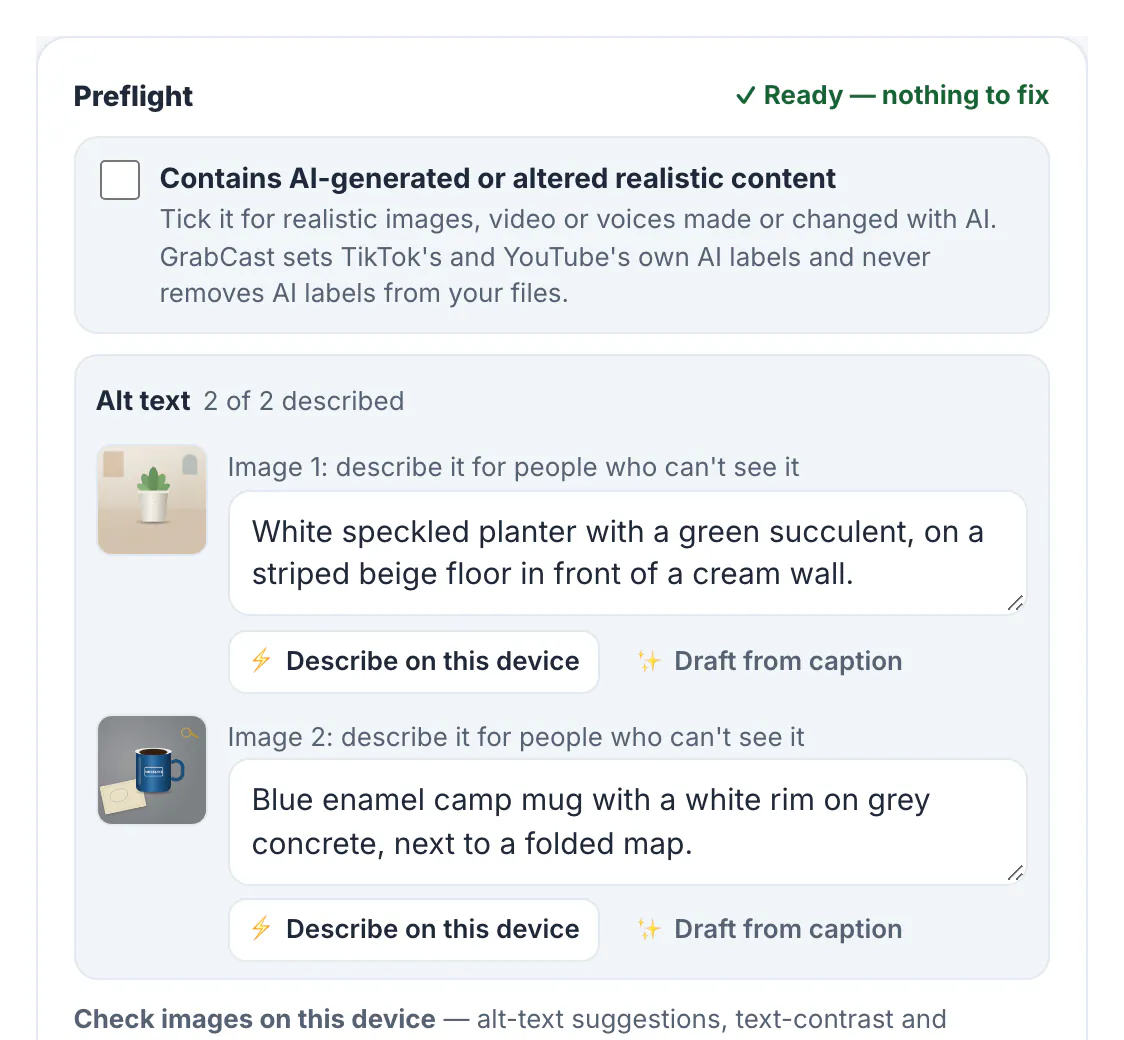
Social feeds are visual, and without alt text a screen reader can only say image, or read out a file name. A product launch, an event poster with the date on it or a chart with your results is simply missing for those followers. Some communities care about it openly: on Mastodon many people boost only posts that have image descriptions. Alt text also helps anyone on a slow connection and gives search features on some networks more to go on. It costs a minute per image, and once it is part of your posting routine, nobody on your team has to remember it separately.
What good alt text says
Describe the image for someone who can't see it, focusing on what matters in this post:
- Lead with the subject: White speckled planter with a green succulent, not Image of a product.
- Add what the post needs: colour for a colour launch, the setting for an event, the facial expression for a reaction photo.
- Include every word printed in the image, such as a date, a price or a quote on a poster.
- Keep it short: one or two sentences for a photo. For a chart or an infographic, give the key numbers and put the full data in the caption or a link.
- Skip image of and photo of; screen readers already announce that it's an image.
For a deeper general guide to alt text on websites and documents, the Alt Text Generator page links the basics; this guide focuses on posts.
Where each network takes alt text
When you post from each network's own app, most of them have an alt text field, usually under an accessibility or advanced setting for each image. When posts are scheduled through a tool, it depends on what the network's API allows. In GrabCast's Scheduler, at the time of writing:
- Instagram: alt text is sent with photo posts and each carousel image, up to 1,000 characters.
- Bluesky, Mastodon and Threads: alt text is sent with every image.
- Facebook, TikTok and YouTube: their APIs don't take image alt text, so the Preflight suggests a short description in the caption instead.
Reels and Stories on Instagram have no alt text field through the API; describe what matters in the caption or in words on screen. Videos need captions rather than alt text; the captions for accessibility checklist covers that side.
How to write alt text for social media in the Scheduler
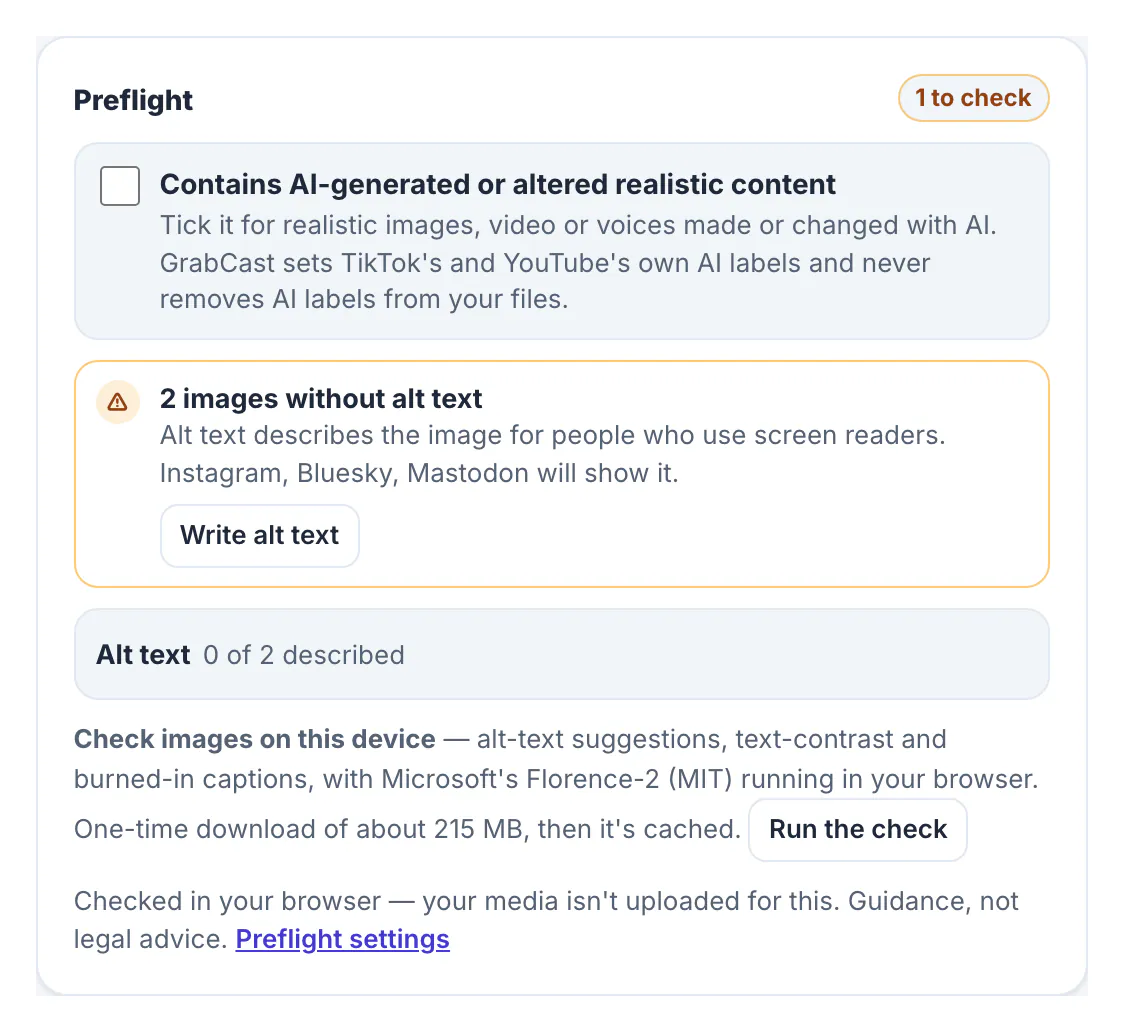
Tick the networks, add the images and write the caption. The Preflight card under the platform checks recalculates on every edit. For the shop update going to Instagram, Bluesky and Mastodon, it showed 2 images without alt text and named the three networks that will show it, with a Write alt text button.
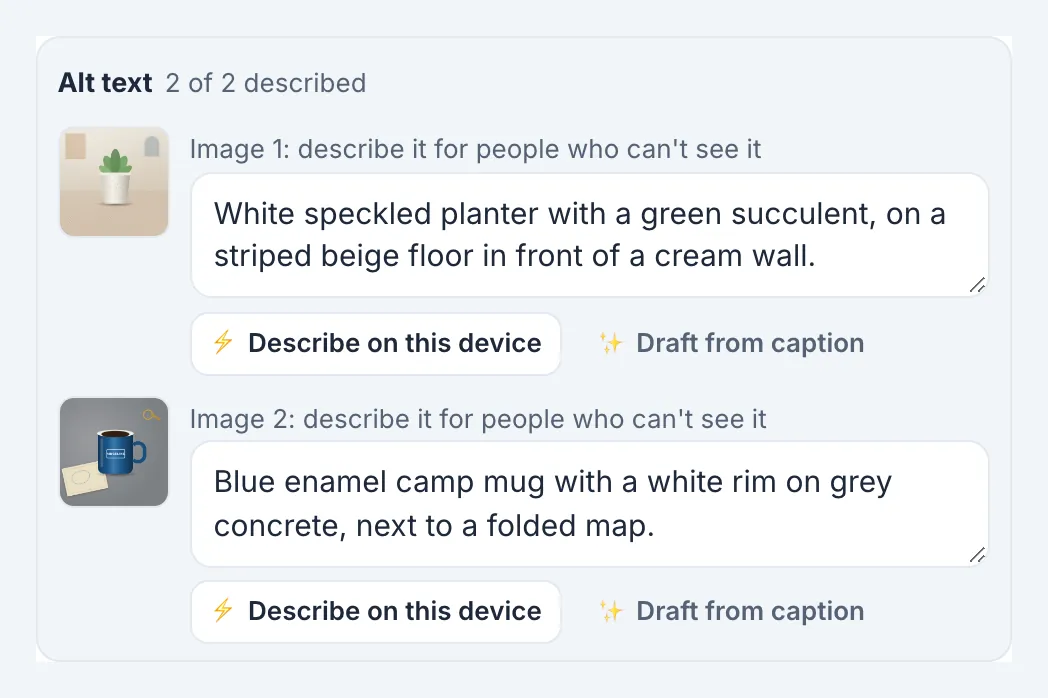
The alt text editor has one box per image, next to its thumbnail:
- Describe it yourself: White speckled planter with a green succulent, on a striped beige floor in front of a cream wall. and Blue enamel camp mug with a white rim on grey concrete, next to a folded map.
- ⚡ Describe on this device suggests a description with Microsoft's Florence-2 model in your browser, after a one-time download of about 215 MB. Check and edit it.
- ✨ Draft from caption creates a draft with AI from your caption. The AI can't see the image, so treat it as a starting point only.
As soon as both boxes were filled, the warning disappeared and the card read Ready, nothing to fix. The same alt text goes to every network that supports it, so you write it once.
Make alt text a habit, not a chore
Preflight settings live in Settings → Workspace → Post preflight. The missing alt text check can be set to Off, Tip, Warn or Block scheduling; choose the block if your team agreed that no image goes out undescribed. Saving a draft always works, so nobody loses work.
- Add alt text when you draft the caption, while you still remember why you chose the image.
- Keep a few patterns for recurring posts, such as product photos or event posters.
- Describe charts with their headline number and trend.
- Ask a follower who uses a screen reader for feedback on a few posts.
Checking images for readable lettering helps too: Preflight's optional on-device check can flag low contrast between lettering and background, and Color Contrast Checker tests your brand colours before you design.
Step-by-step
Common mistakes to avoid
Pro tips
Frequently asked questions
How long should alt text be on social media?
One or two sentences for a photo is usually right. Instagram accepts up to 1,000 characters through its API, but shorter alt text is easier to listen to.
Can I add alt text to scheduled Instagram posts?
Yes, for photo and carousel posts. GrabCast sends the alt text with each image. Reels and Stories have no alt text field through the API.
Does Facebook get the alt text I write in GrabCast?
Not at the time of writing, because Facebook's publishing API doesn't take it. Preflight suggests describing the image in the caption instead.
Can AI write my alt text?
It can draft it. The on-device model looks at the image; the caption-based draft can't see it at all. Always check and edit before posting.
Is my image uploaded to check or describe it?
No. Preflight checks run in your browser, and the optional image description model runs on your device after a one-time download.
Alt text for social media is one or two plain sentences about what the image shows and why it matters, written in the network's alt field. Let a check flag the images you forgot, use AI only as a draft, and describe images in the caption where a network has no field. It takes a minute, and it makes every post work for every follower.
Related guides
Browse more: all business guides · the Social Media Scheduler