Instagram Photo Errors: Fix JPEG and 4:5 Before Posting
Most Instagram photo errors when publishing a feed image come down to three rules: the file must be a JPEG, it must be 8 MB or smaller, and its shape must fall between 4:5 portrait and 1.91:1 landscape. A tall 9:16 poster exported as PNG breaks two of those at once. GrabCast's Social Media Scheduler checks a photo against these rules the moment you add it and offers one-click fixes, Convert to JPEG and Crop to 4:5, that rebuild the file in your browser. This guide uses a hiking club poster, 1080 by 1920 pixels as PNG, to show what each error means, which fix to use, and what the checks cannot see, so you catch the problem while planning rather than at posting time.
📅 Try the Social Media Scheduler now — freeOpen →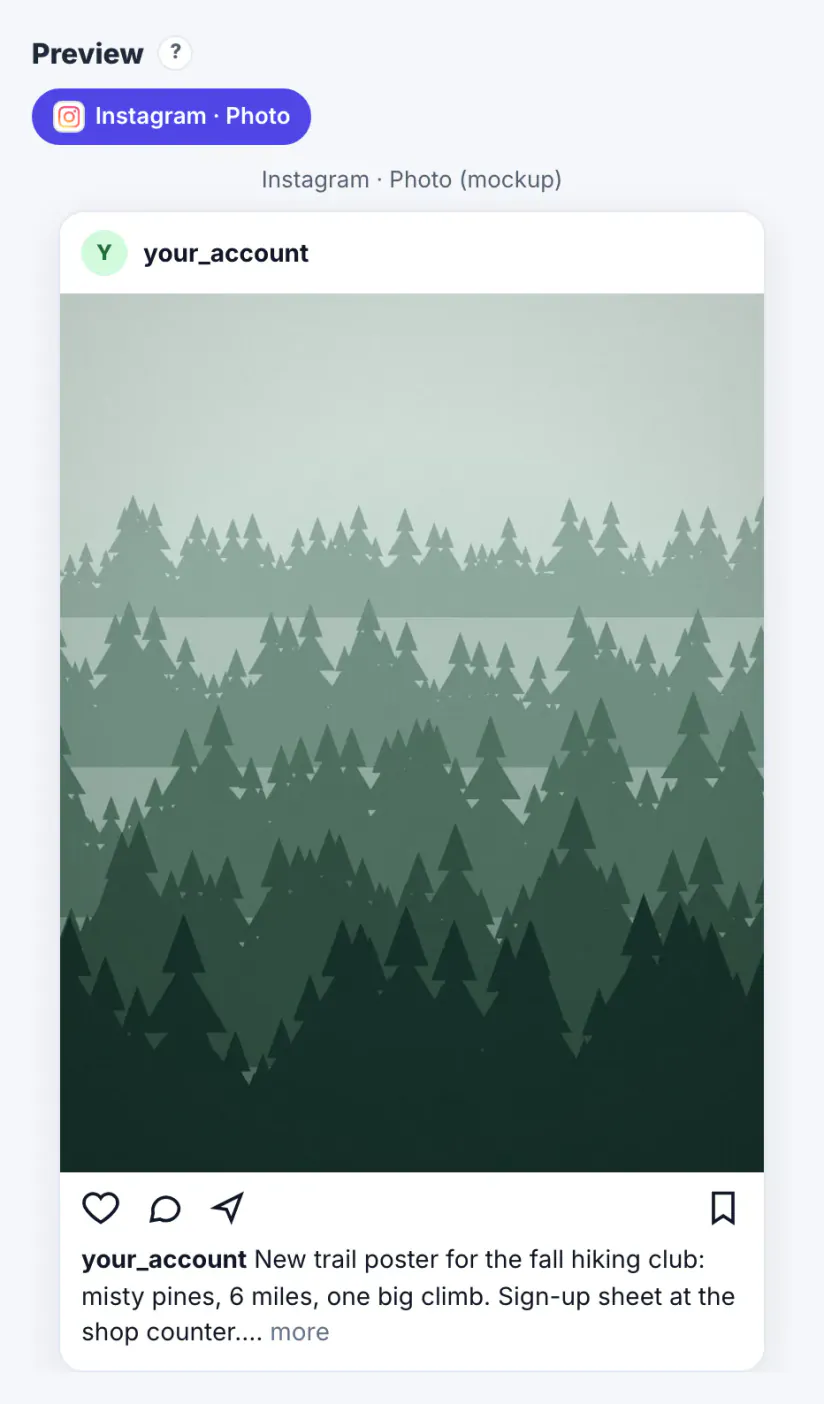
Instagram accepts different things in different places. The phone app quietly converts and crops many images for you, which is why people are surprised when a scheduling tool, a publishing API or a desktop workflow rejects the same file. Feed photos published through Instagram's official publishing interface must be JPEG and must sit inside the 4:5 to 1.91:1 range, while Stories accept a tall image because they fill the screen. Designers often export posters as PNG for crisp text and at 9:16 for Stories, then reuse the file for a feed post. Nothing is wrong with the design; the container is wrong. Checking before the day you post means you choose the crop yourself instead of letting an app pick which part of the poster disappears.
The Instagram photo rules the checker applies
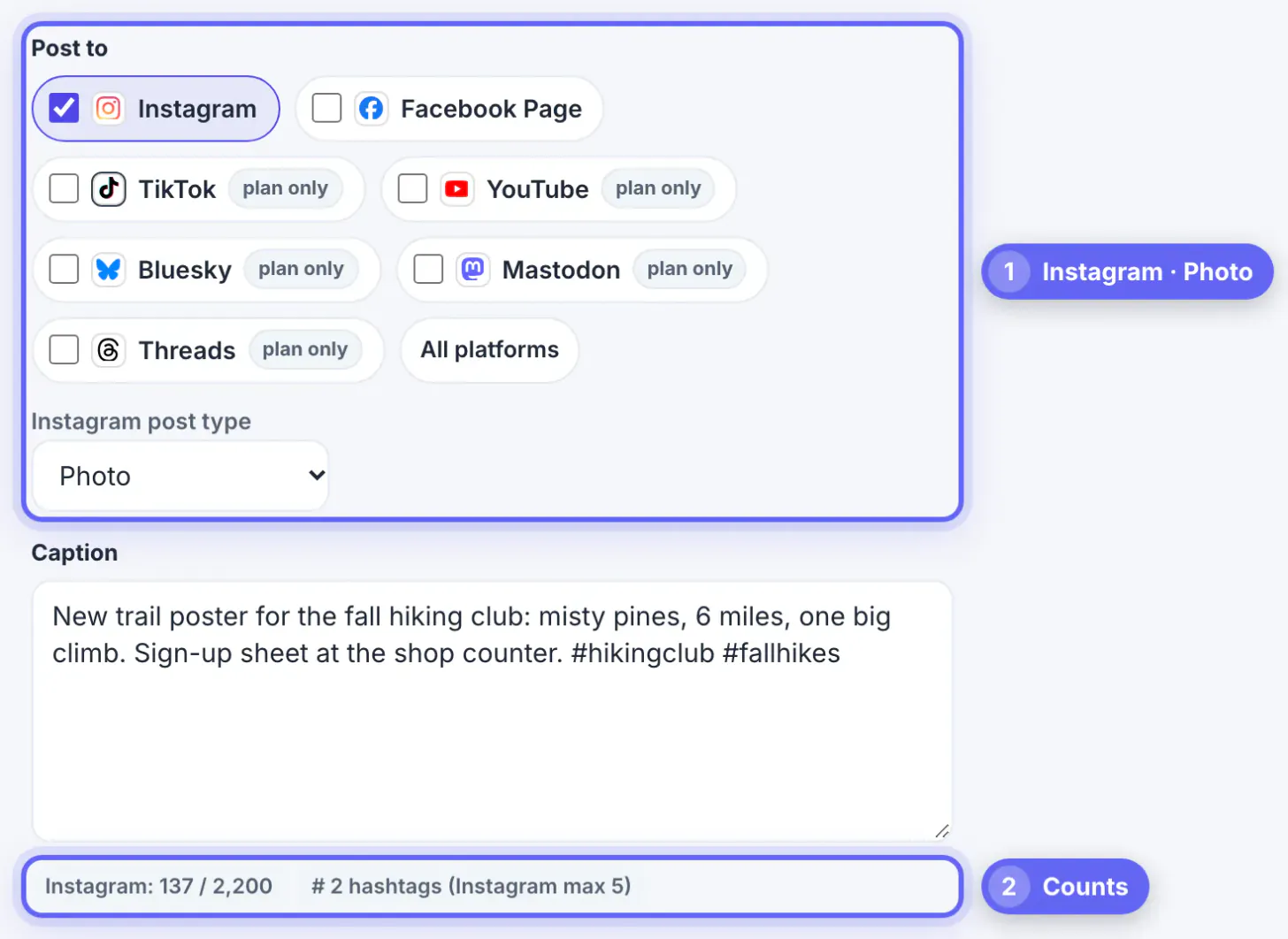
When Instagram is ticked with the Photo post type, the Scheduler reads the file's type, size and pixel dimensions in the browser and compares them with these rules. Errors are shown in red with a cross, warnings in amber.
- Format: feed and carousel images must be JPEG; PNG and WebP trigger an error
- File size: 8 MB or smaller
- Shape: width divided by height between 0.8 (4:5) and 1.91 (1.91:1); square 1:1 and 3:2 landscape both pass
- Width: 320 to 1440 pixels is expected; outside that range you get a warning that Instagram will rescale, not an error
- Caption: up to 2,200 characters, counted live under the caption box
- Carousel: 2 to 10 items; a Story takes exactly one image or video
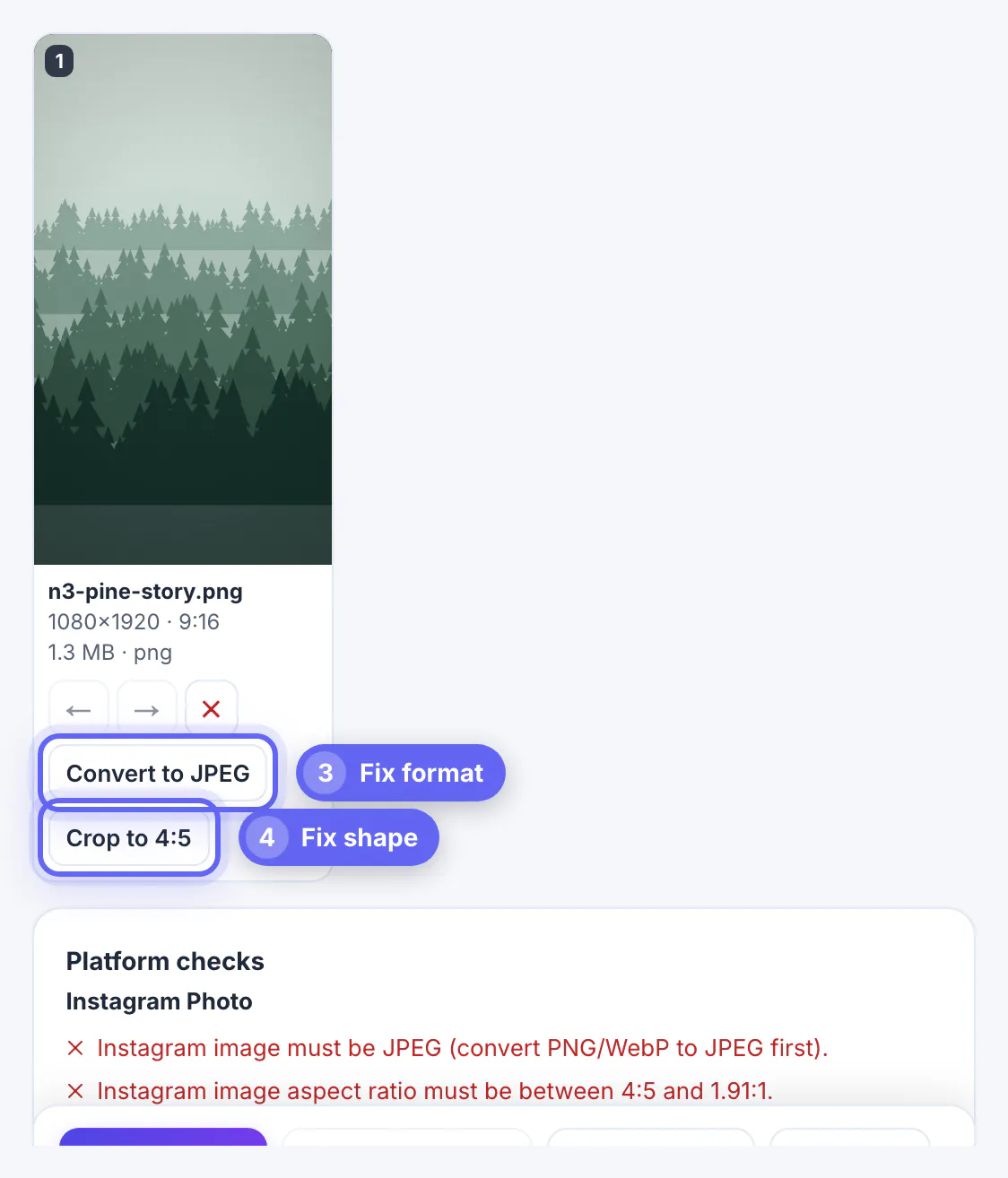
For the hiking poster the checks listed two errors: the image must be JPEG, and the aspect ratio must be between 4:5 and 1.91:1. The file size of 1.3 MB was fine.
Fixing format and shape in one pass
Under the thumbnail, the media card offers only the fixes that apply. Convert to JPEG re-encodes the image. Crop to 4:5 trims a tall image to the tallest shape Instagram allows in the feed; a very wide panorama gets Crop to 1.91:1 instead. Both run on your device, and the thumbnail updates with the new name, size and ratio.
- Convert first, then crop, so the final file is a JPEG at the new size
- The crop keeps the center; if your headline sits at the very top of a 9:16 poster, it may be cut, so check the preview
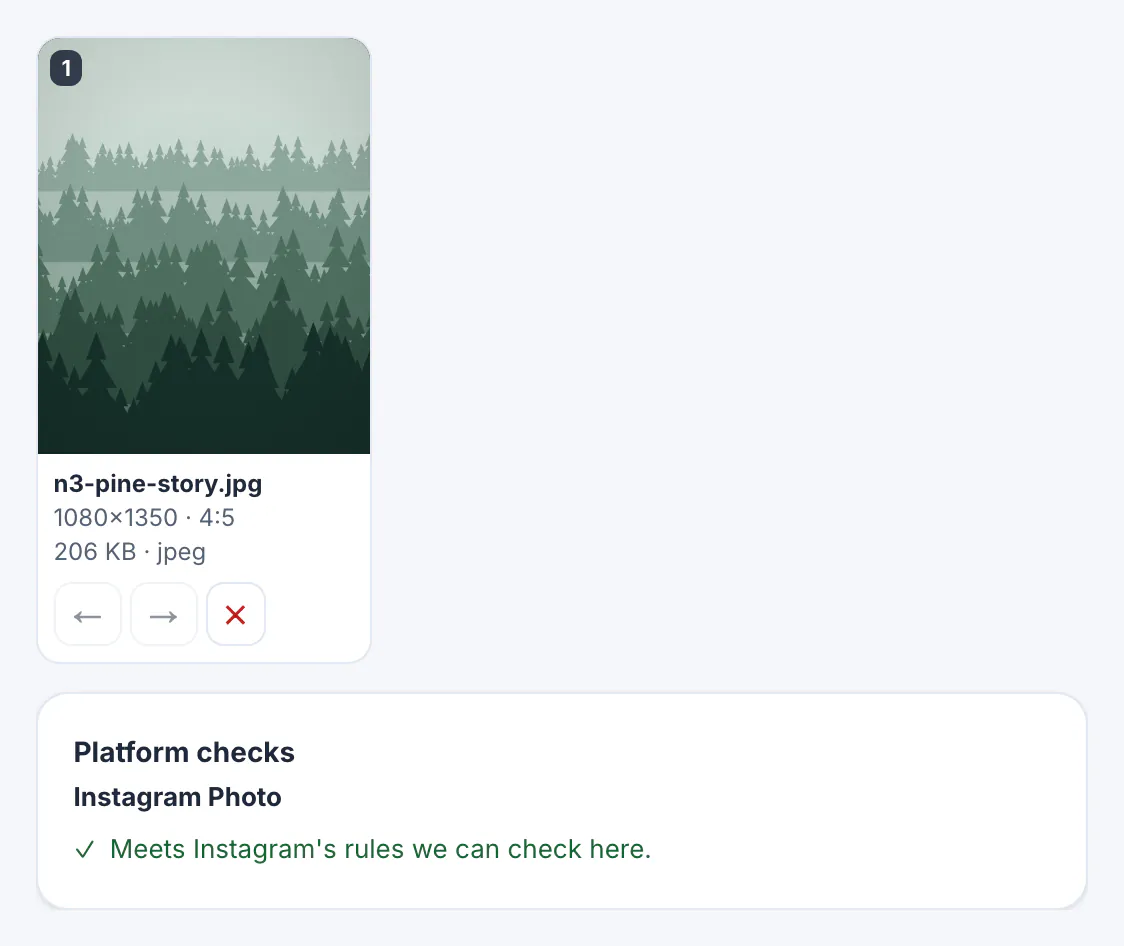
- After both fixes the poster read n3-pine-story.jpg, 1080 by 1350 pixels, 4:5, 206 KB, and the check turned green
- If the center crop loses something important, redesign at 1080 by 1350 instead of fighting the crop
A 4:5 portrait is usually the best feed choice for posters and product shots because it takes up the most screen height Instagram allows in the feed.
iPhone photos in HEIC need converting to JPG first, and this 1080x1080 guide covers square posts.
What the checks cannot catch
A browser can read a file's type, size, dimensions and video length, but not everything a platform evaluates. The checks say Meets Instagram's rules we can check here for a reason.
- Video frame rate and codec are not measured; an unusual export can still fail at upload
- Color profile and text legibility are up to you; small text on a busy photo stays hard to read at phone size
- Hashtag and caption policies change; the counter shows how many hashtags you used, but Instagram's own rules decide what is allowed
- The preview is a mockup; the real app picks fonts and may trim the caption after the first lines
Treat a green check as a pass on the technical basics, then look at the mockup at arm's length the way a follower will see it. If a line of text on the poster is hard to read there, it will be harder still on a small phone in daylight, so enlarge it in the design file before posting.
Instagram photo errors in Stories, Reels and carousels
Change the post type and the rules change with it, which is often the fastest fix. The same 9:16 poster that failed as a feed Photo is a natural fit for a Story, where the tall shape fills the screen and there is no feed ratio check.
- Story: exactly one image or video; video Stories run up to 60 seconds; captions are not shown, so put the text in the image
- Reel: one video from 3 seconds to 15 minutes, MP4 or MOV, up to 300 MB
- Carousel: 2 to 10 images or videos, each image checked as JPEG within 4:5 to 1.91:1, each video 3 to 60 seconds
- Facebook Page photos are more relaxed: JPEG, PNG, GIF, BMP or TIFF up to 10 MB
A practical routine for event posters is to plan two posts from one design: the original 9:16 file as a Story on the day, and a 4:5 JPEG crop as a feed post a few days earlier.
Step-by-step
Common mistakes to avoid
Pro tips
Frequently asked questions
Why does Instagram reject my PNG?
Feed photos published through Instagram's publishing interface must be JPEG. The Scheduler flags PNG and WebP files and offers Convert to JPEG, which re-encodes the image in your browser.
What aspect ratio does an Instagram feed photo need?
Between 4:5 portrait and 1.91:1 landscape. Square and 3:2 photos pass; tall 9:16 images need a crop to 4:5 or should be posted as a Story.
Is there a file size limit?
Yes, 8 MB for Instagram images in the checker. Facebook Page photos allow up to 10 MB.
Are my photos uploaded when I use the fixes?
No. The conversion and crop run in your browser and the file stays in this browser's storage with your draft. Only the caption is sent to an AI service, and only if you click an AI assist button.
Does the preview show exactly what followers will see?
No. It is a mockup that shows crop, caption length and layout. Instagram decides the final fonts and trimming, which can differ by phone.
Instagram photo errors are almost always format, size or shape. Check the image while you plan, convert PNG or WebP to JPEG, crop tall designs to 4:5 or post them as a Story, and look at the preview before saving. The browser can confirm the technical basics; legibility, crop placement and current platform policies still need your eyes.
Related guides
Browse more: all business guides · the Social Media Scheduler